EasyManua.ls Logo

Foscam FI9821W - Page 82

Foscam FI9821W
104 pages
Print Icon
To Next Page IconTo Next Page
To Previous Page IconTo Previous Page
Loading...
81
w
w
w
w
w
w
w
w
www
www
www
www
www
www
www
www
.foscam.com
.foscam.com
.foscam.com
.foscam.com
.foscam.com
.foscam.com
.foscam.com
.foscam.com
Shenzhen
Shenzhen
Shenzhen
Shenzhen
Shenzhen
Shenzhen
Shenzhen
Shenzhen
Foscam
Foscam
Foscam
Foscam
Foscam
Foscam
Foscam
Foscam
Intelligent
Intelligent
Intelligent
Intelligent
Intelligent
Intelligent
Intelligent
Intelligent
Technology
Technology
Technology
Technology
Technology
Technology
Technology
Technology
Co.,
Co.,
Co.,
Co.,
Co.,
Co.,
Co.,
Co.,
Limited
Limited
Limited
Limited
Limited
Limited
Limited
Limited
Tel:
Tel:
Tel:
Tel:
Tel:
Tel:
Tel:
Tel:
86
86
86
86
86
86
86
86
755
755
755
755
755
755
755
755
2674
2674
2674
2674
2674
2674
2674
2674
5668
5668
5668
5668
5668
5668
5668
5668
Fax:
Fax:
Fax:
Fax:
Fax:
Fax:
Fax:
Fax:
86
86
86
86
86
86
86
86
755
755
755
755
755
755
755
755
2674
2674
2674
2674
2674
2674
2674
2674
5168
5168
5168
5168
5168
5168
5168
5168
81
81
81
81
Section3
Section3
Section3
Section3 Add
Add
Add
Add device
device
device
device buttons
buttons
buttons
buttons
Add
Add
Add
Add device
device
device
device in
in
in
in LAN
LAN
LAN
LAN
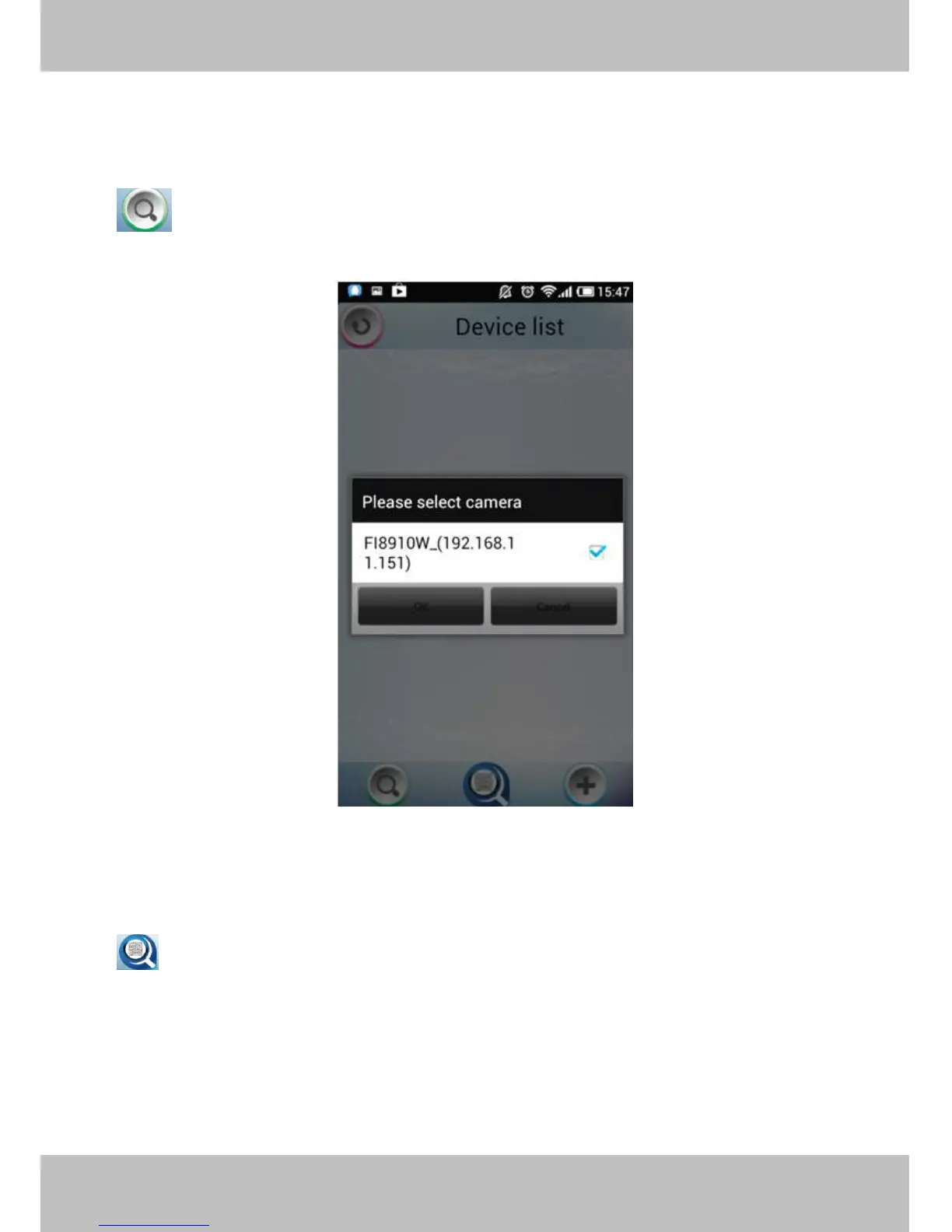
: Click this icon and the APP will search all cameras in LAN automatically. Such as the following
screen:
Figure 6 .5
Select the camera IP and click OK to add cameras in LAN, then you can see the camera in the Device List.
Add
Add
Add
Add device
device
device
device through
through
through
through scanning
scanning
scanning
scanning UID
UID
UID
UID (User
(User
(User
(User Identification
Identification
Identification
Identification )
)
)
) number
number
number
number
: UID
UID
UID
UID Scan.
Scan.
Scan.
Scan. Click this icon and scan the UID no. in the camera body, then the camera can be added to
the App.

Other manuals for Foscam FI9821W

Related product manuals