NVR User Manual
www.foscam.com
Display the plug-in version of your NVR.
Click Save button to take effect.
Hard Disk Information
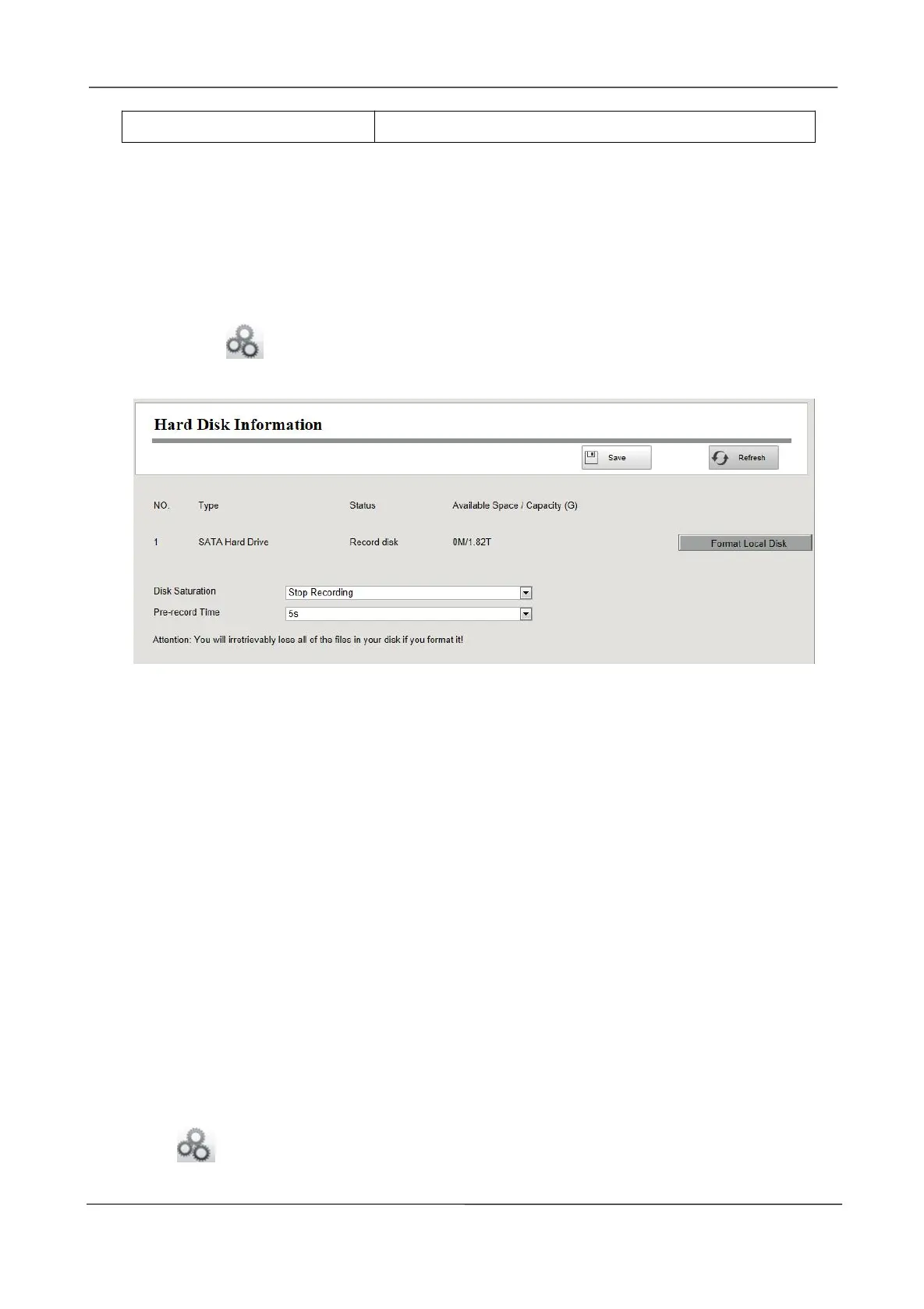
You can configure the Disk Saturation, Pre-recorded Time for HDD information.
Step1 Choose (Parameter Configuration) > Device Information > Hard Disk Information.
The Hard Disk Information page is displayed.
Step2 You can configure the following settings.
Format Hard Disk: Click the Format Hard Disk button to initialize the SATA disk for recording.
Note: Initializing the HDD will erase all the data saved on it, please backup the data before
formatting hard disk if necessary.
Disk Saturation:When the disk is saturated, you can choose to stop recording or cycle coverage.
Pre-record Time:The time you set to record before the event.
For example, when an alarm triggered the recording at 11:00, if you set the pre-record time as 5
seconds, the camera records it at 10:59:55.
Step3 Click Save button to take effect.
-------End
System Log
Choose (Parameter Configuration) > Device Information > System Log. The System Log
page is displayed.



 To Next Page