2.3 Internet Connection Setup
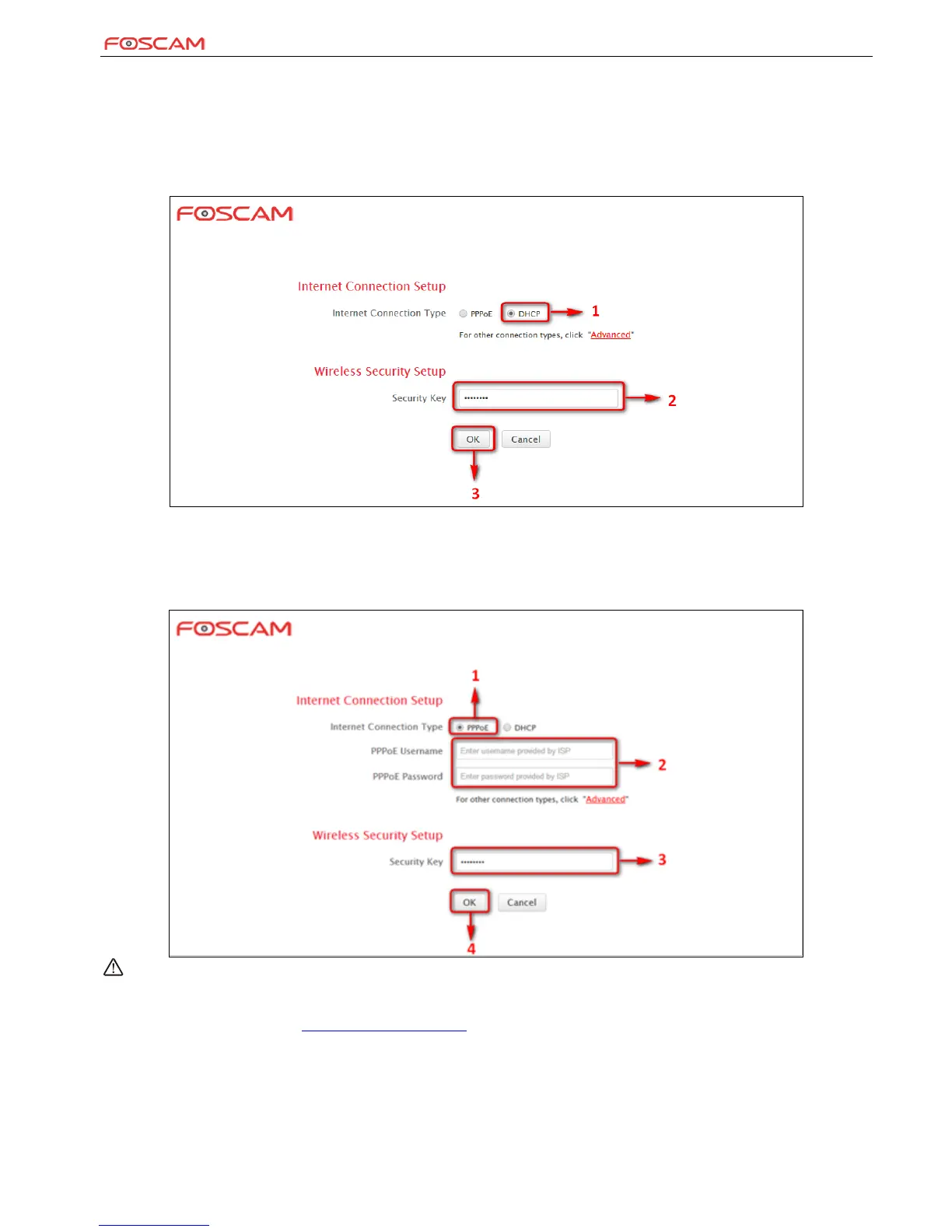
Common Internet connection types are available on the home page: PPPoE and DHCP.
DHCP
Select DHCP (Dynamic IP) if you can access the Internet as soon as your computer directly connects to an Internet-enabled ADSL/Cable modem;
configure a security key (8-63 characters) to secure your wireless network and then click OK.
PPPoE
Select PPPoE (Point to Point Protocol over Ethernet) if you used to connect to the Internet using a broadband connection that requires a
username and a password. Enter the user name and password provided by your ISP; configure a security key to secure your wireless network and
then click OK.
Note:
1. DHCP is the default Internet connection type;
2. If you are not sure about your PPPoE username and password, contact your Internet service provider (ISP) for help. For other Internet
connection types, please go to section 1.2: Internet Connection Setup.


 To Next Page