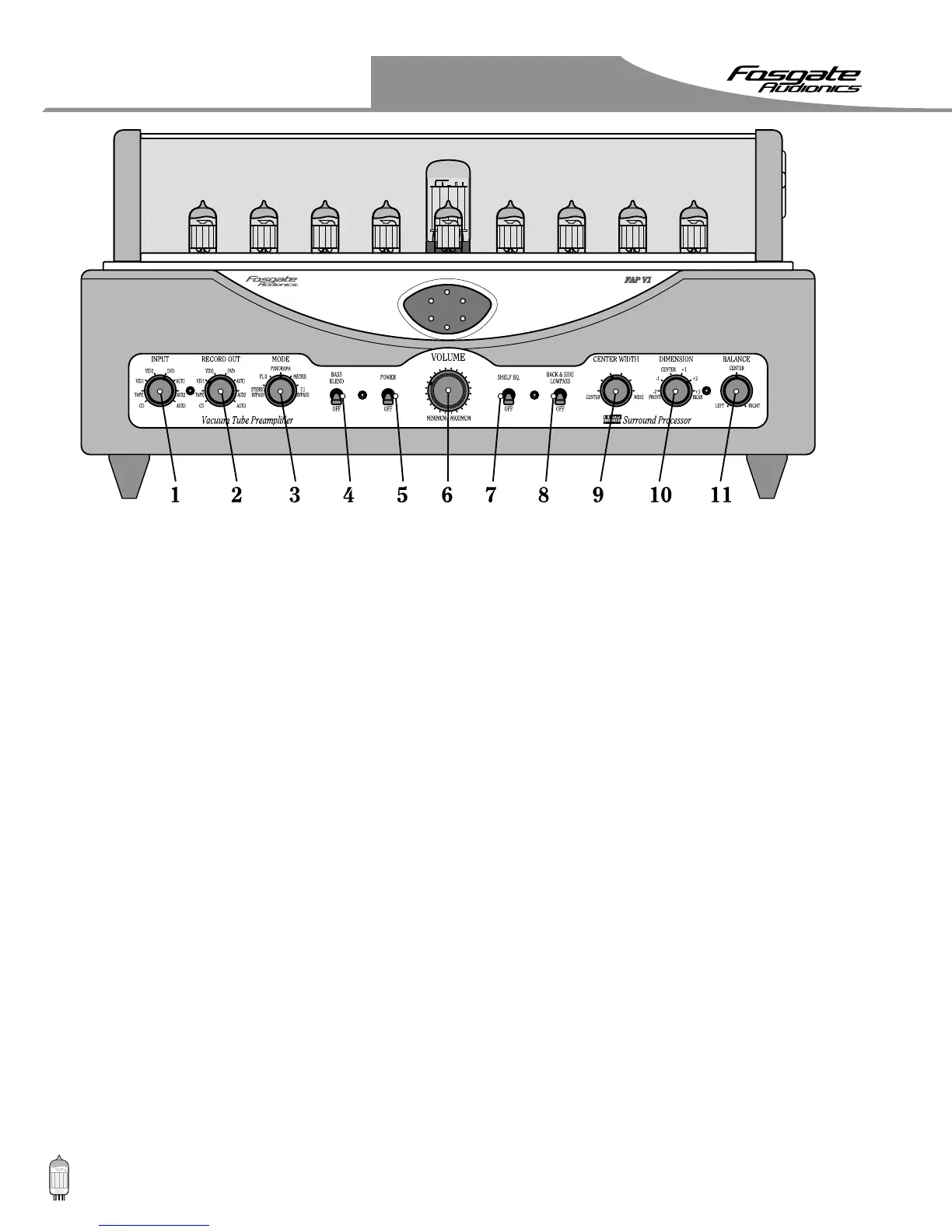
Controls
1122
4. The BASS BLEND switch – Directs the bass
recorded in the center to the left and right speakers.
When the bass blend control is switched "ON" the
bass located in the center front channel is also
reproduced in the left and right front speakers. To
hear this work you must have large speakers on the
left and right front channels that have full bass
response. With the switch "on" there will be more
overall bass in the room. If you are using a small
speaker for center front, try leaving this switch on
all the time for fuller bass response.
5. The POWER switch – Turns the unit On or Off.
6. The VOLUME selector – Adjusts the selected output
volume of the unit.
7. The SHELF EQ switch – When "ON" is a high
frequency filter that places a -3dB@5kHz shelf
filter at the two-channel input of the surround
processor.
8. The BACK & SIDE LOWPASS switch – When "ON"
is a -3dB@8kHz shelf filter located in the back and
side channels and is available when listening to any
surround mode except 7.1 BYPASS.
This filter is normally switched on and gives a 3dB
roll off above 8kHz to give a pleasing balance with
the fronts. The filter also attenuates any sibilants
from voices located in the front channels that may
leak into the back channels. If you are sitting closer
to the back channels than the fronts it is best to
leave the filter switched on.
9. The CENTER WIDTH selector – Used to adjust the
"width" of the center front image.
When this selector is in the CENTER position (full
counterclockwise) the center channel speaker carries
the center signal. As the selector is rotated towards
the WIDE position, the center signal also appears at
the left and right speakers. When the selector is set
to the WIDE position (full clockwise) the center
speaker is turned off completely and the center
signal is coming from the left and right front
speakers and is reproduced as a phantom image
as in regular stereo.
* I usually set this selector somewhere around the
middle for music and CENTER (full counterclockwise)
for movies. Listen to the center vocalist or dialogue on
movies and adjust according to your preference.
Set this selector to WIDE (full clockwise) and leave it
there if you are not using a center front speaker.
10. The DIMENSION selector – Changes the balance of
the "front-rear" and "width" of the sound stage.
In the CENTER position it has no effect. As the
selector is rotated towards REAR there is more
sound placed in the back channels and the front
soundstage widens. As the selector is rotated
towards FRONT there is less sound located in the
back channels and the front stage narrows.
11. The BALANCE selector – Useful for balancing any
input source that is out of balance as many of the
older stereo recordings are.
This control is not
operational in Stereo Bypass Mode.
Turn the selector left or right until the center image
is located directly in the middle, the logic display
will show when the balance is centered, adjust the
balance to the point where the center LED is the
brightest.


 To Next Page