FFAAPP VV11
Connection
1199
Connecting an External Amplifier
IMPORTANT: Before attempting to plug any jacks into any power amplifier verify that the power amplifier is turned off and/or
disconnected from the AC mains. Failure to do so can potentially result in severe damage to your amplifier and
loudspeakers.
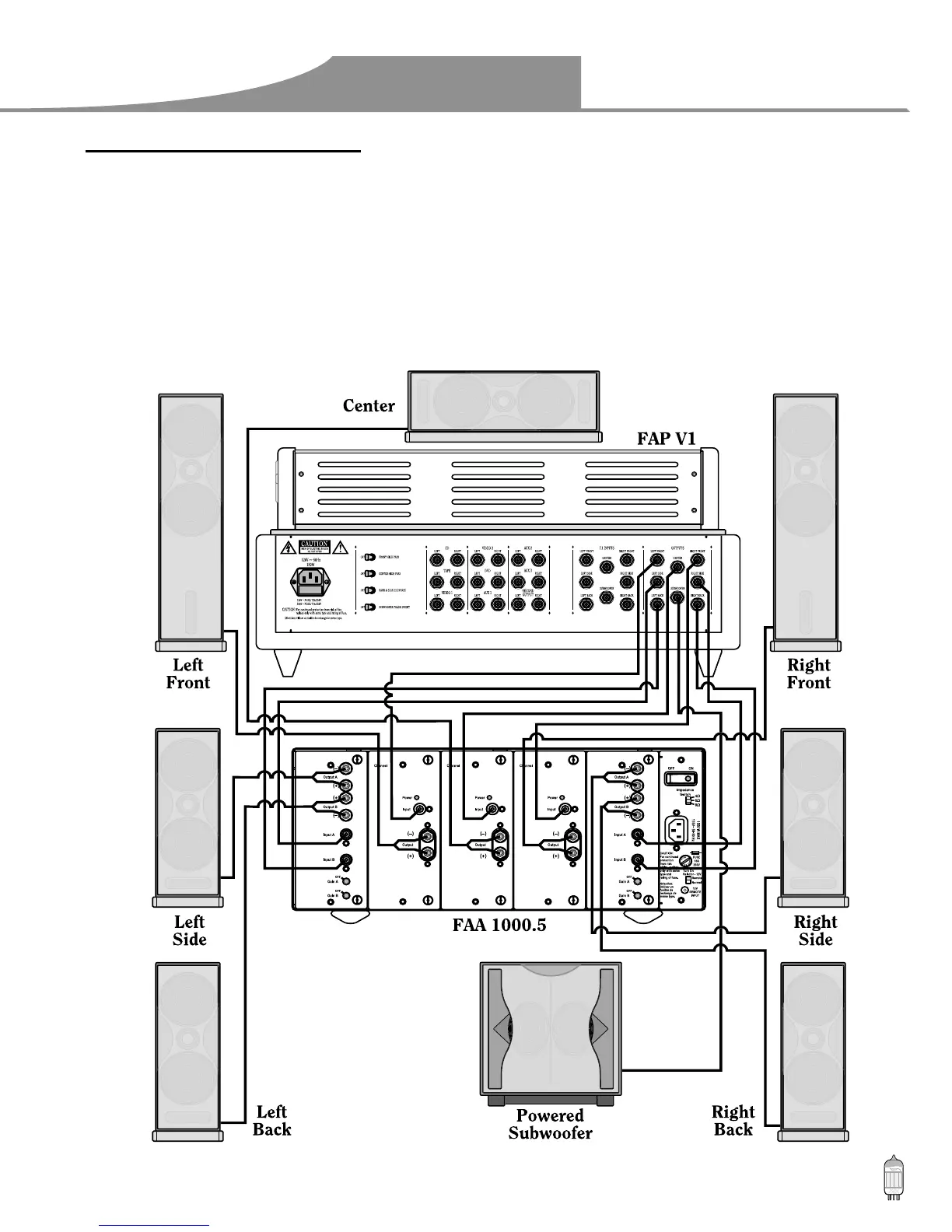
Use the audio jacks labeled OUTPUTS to connect the FAP V1 to an external power amplifier such as the Fosgate Audionics
FAA 1000.5 Power Amplifier. The FAP V1 can output up to 7.1 channels of sound (seven satellite and one subwoofer channel)
depending on source components and material.
The output jacks supplied by the FAP V1 are: Left Front, Center, Right Front, Left Side, Right Side, Left Back, Right Back, and
Subwoofer.
Use the following diagram for connecting your amplifier and speakers.


 To Next Page