10
www.fosterrefrigerator.com
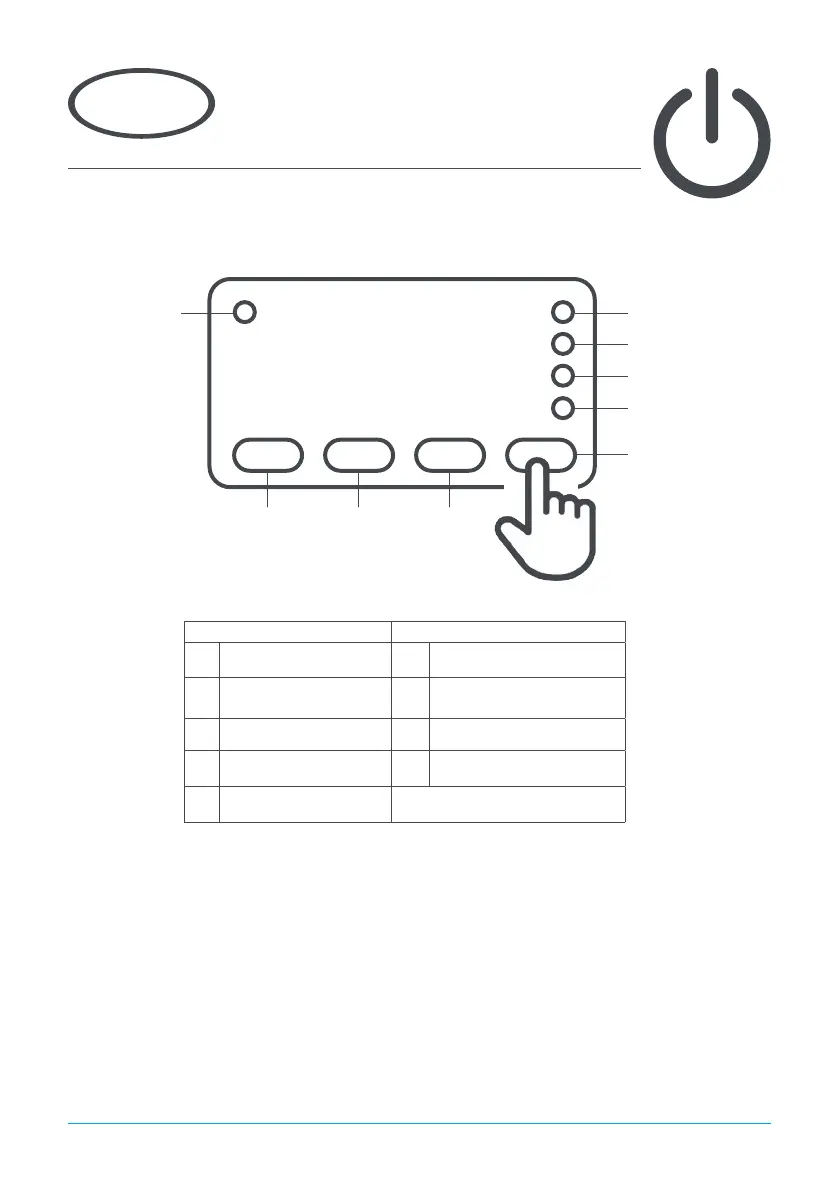
Display Icons and Buttons
Icon Button
1 Alarm Warning 1 Info & Set Point
2
Thermostat Output
Active
2
Manual Defrost & Decrease
Value
3 Fan Output Active 3 Increase Value
4 Defrost Output Active 4 Standby/Exit
5 2nd Parameter Set Active
Using the appliance
3
+1.5°C
Standby
Pressing button 4 for 3 seconds will turn the unit on or into standby. When in standby, the display will
show ‘oFF’. When operating normally, the display will show the internal temperature.
Icon 1 Icon 2
Button 1 Button 2 Button 3
Button 4
Icon 3
Icon 4
Icon 5


 To Next Page