EasyManua.ls Logo

Fostex 1240 - Page 16

Fostex 1240
22 pages
Print Icon
To Next Page IconTo Next Page
To Previous Page IconTo Previous Page
Loading...
pong
rtewieang
OCEHCF
STOIC
15
IG
NPUT
E-lt
ouipgp
Eii-
Latlul
noi
ia
create
a
loop
tjiicli
-:ypnan
iF
set
to
L-R
.tofiirca
timbre
of
pfi^:a:a'ur
returns.
ftdjuEL
!.-M>cre
ol
oa:h
:
r
r
-
pocig
chnmcIS-TFK
1"^7ii
Ta
preuwtf
a
loopi
aands
CoiTusnKWJirtg
Ki
cKcol
re
luma-are
retard
lo
-
os.
Conlrri
amoLft
of
raueft*
ad3eti
lo
eachlrw*.
prfivtifll
loe-pirim
ifilo
the
aFtl^BObtjsa.
•Viiuiil
sl'w;
b;ilance
of
each
channel.
Corclrd
IomcI
baBmue
or
i?tu
i^oeeasoi
icnurns.
STEREO
buss
at
the
level
same
as
with
the
meter
(32)
1
~
4
indications.
The
effect
processing
method
is
almost
the
same
as
with
the
ping-pong
recording
example
but
please
note
that
the
effect
returns
from
AUX
OUT
Jakes
1
-
A
are
also
connected
to
the
channels
17,
IB
TAPE
IN
jack
(36)
and
ihe
STEREO
IN
jack
(44),
Especially,
it
will
be
safer
to
select
an
effect,
to
be
connected
to
the
STEREO
IN
jack
(44),
which
is
of
stereo
oulput
and
adjustable
in
oulput
level
and
perspective.
Also,
do
not
forget
to
set
the
channel
T
7,
1
(1
AUX
2
send
(6)
to
-
«>
(same
reason
as
for
ping-pong
recording).
In
any
case,
if
the
effect
sound
of
SUB
MIX
section
(3),
(4)
is
sent
to
the
STEREO
buss
by
CUE/L-R
selector
(5),
and
the
effect
sound
of
channel
17,
IS
INPUT
fader
{17)
to
the
STEREO
buss
by
the
assign
L-R
switch
(12)
and
PAN
(13),
all
effect
sounds
and
dry
sounds
wiH
be
sent
to
the
master
recorder
via
the
STEREO
master
fader
(22).
For
the
method
of
monitoring,
you
can
listen
lo
either
the
signal
sent
to
the
master
recorder
by
selecting
STEREO
Df
the
MONITOR
selector
(26)
or
you
can
listen
to
the
master
recorder
output
signal
by
pressing
the
2
TRK
IN
SOLO
button
1
(25),
IV.
MIXDQWN
Whai
is
mixdown
After
finishing
all
recording
on
the
muititrack
recorder,
combining
into
stereo
(or
monaural)
the
playback
sound
ot
all
tracks
thru
the
mixer,
then
copying
it
onto
a
master
tape
is
called
''mljidown"
This
is
an
important
operation
in
which
!he
frnai
touches
are
made
to
the
multitrack
recording,
end
is
carried
out
in
parallel,
from
equalization
to
effect
processing,
for
total
sound
creation.
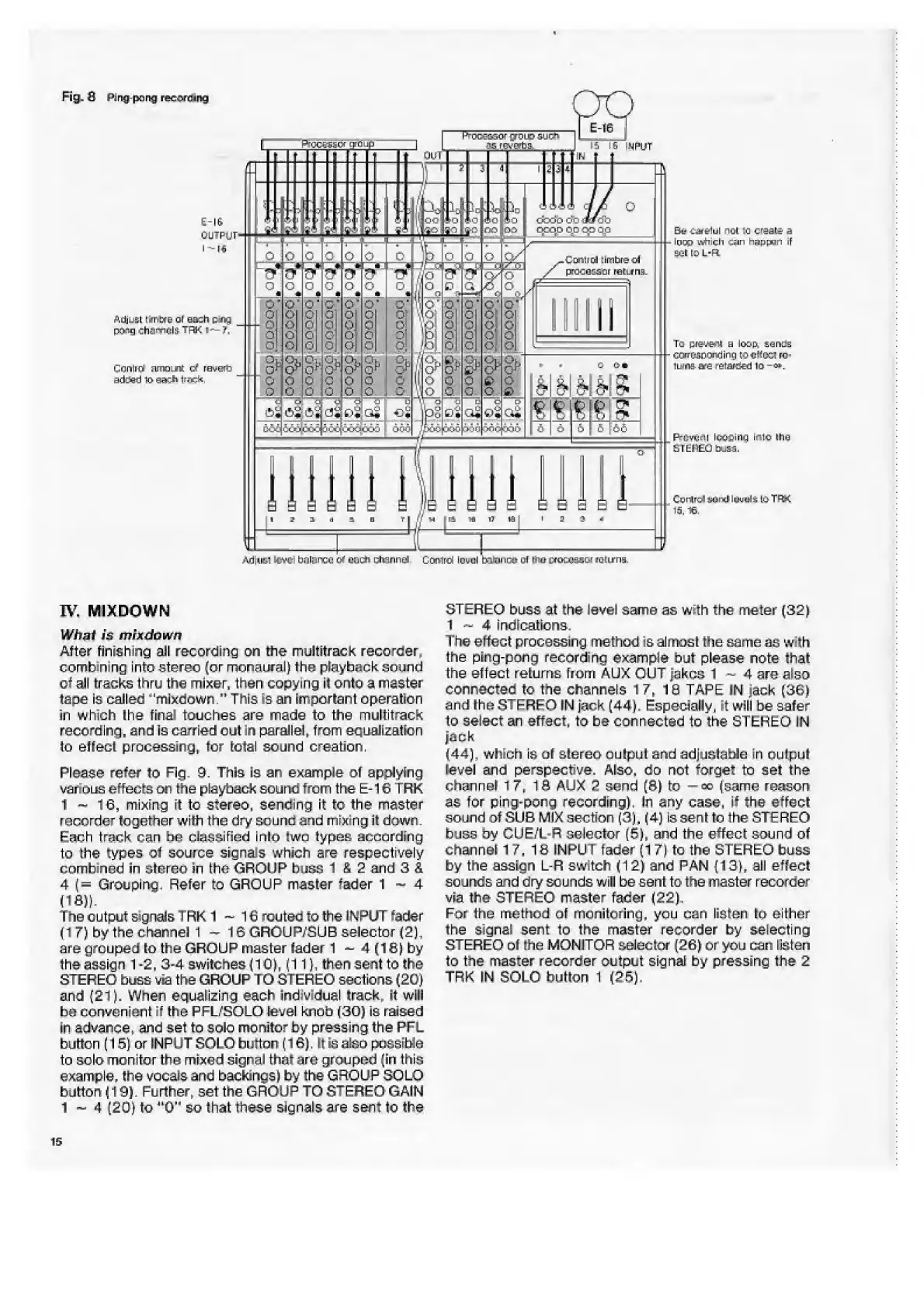
Please
refer
to
Fig.
3.
This
ie
an
example
ol
applying
various
effects
on
the
playback
sound
from
the
E
-16
TRK
1
-
16,
mixing
it
to
stereo,
sending
it
to
the
master
recorder
together
with
trie
dry
sound
end
mixing
it
down.
Each
track
can
bo
classified
into
(wo
types
according
to
the
types
ol
source
signals
which
are
respectively
combined
in
stored
in
the
GROUP
buss
1
£
2
and
3
&
4
(=
Grouping.
Refer
to
GROUP
master
fader
1-4
(IS))
The
output
signals
1RK
1
16
routec
to
the
INPUT
rader
(17)
by
the
channel
1—16
GROUP/SUB
selector
(2),
are
grouped
lo
the
GROUP
master
fader
1
-
4
(16)
by
the
assign
1-2,
3-4
switches
(10).
(11).
then
sent
to
the
STEREO
buss
via
the
GROUP
TO
STEREO
sections
(20)
and
(21).
When
equalising
each
individual
track,
it
will
be
convenient
it
the
PFL/SOLO
level
knob
(30)
is
raised
in
advance,
and
set
to
solo
monitor
by
pressing
the
PFL
button
(15}
or
INPUT
SOLO
button
(16),
It
is
also
possible
to
solo
monitor
the
mixed
signal
that
are
grouped
-iri
Ibis
example,
the
vocals
and
backings)
by
the
GROUP
SOLO
button
(19).
Further,
set
the
GROUP
TO
STEREO
GAIN
1
~
4
(20)
to
"O'
1
So
that
these
signals
are
sent
to
the
i
3
1
<4
p
c
5
i
\o
‘HI
ip
_
L_
0
o
c
P-.V
y
■■
.6
c
r>
c
C
c
o
o
<
0
o
C
c
O'
£
c
of
C
o^c
0
£
£
0
5
c
J
c
€3
-
j-,
G
*
-t*
trii
£
t-H
V
,
0
0
fj*
0
0
m
0
0.
0
0
o
0
0
o
1
n';
oj
o
o
o
/p!

Related product manuals