EasyManua.ls Logo

Fostex 1240 - Page 17

Fostex 1240
22 pages
Print Icon
To Next Page IconTo Next Page
To Previous Page IconTo Previous Page
Loading...
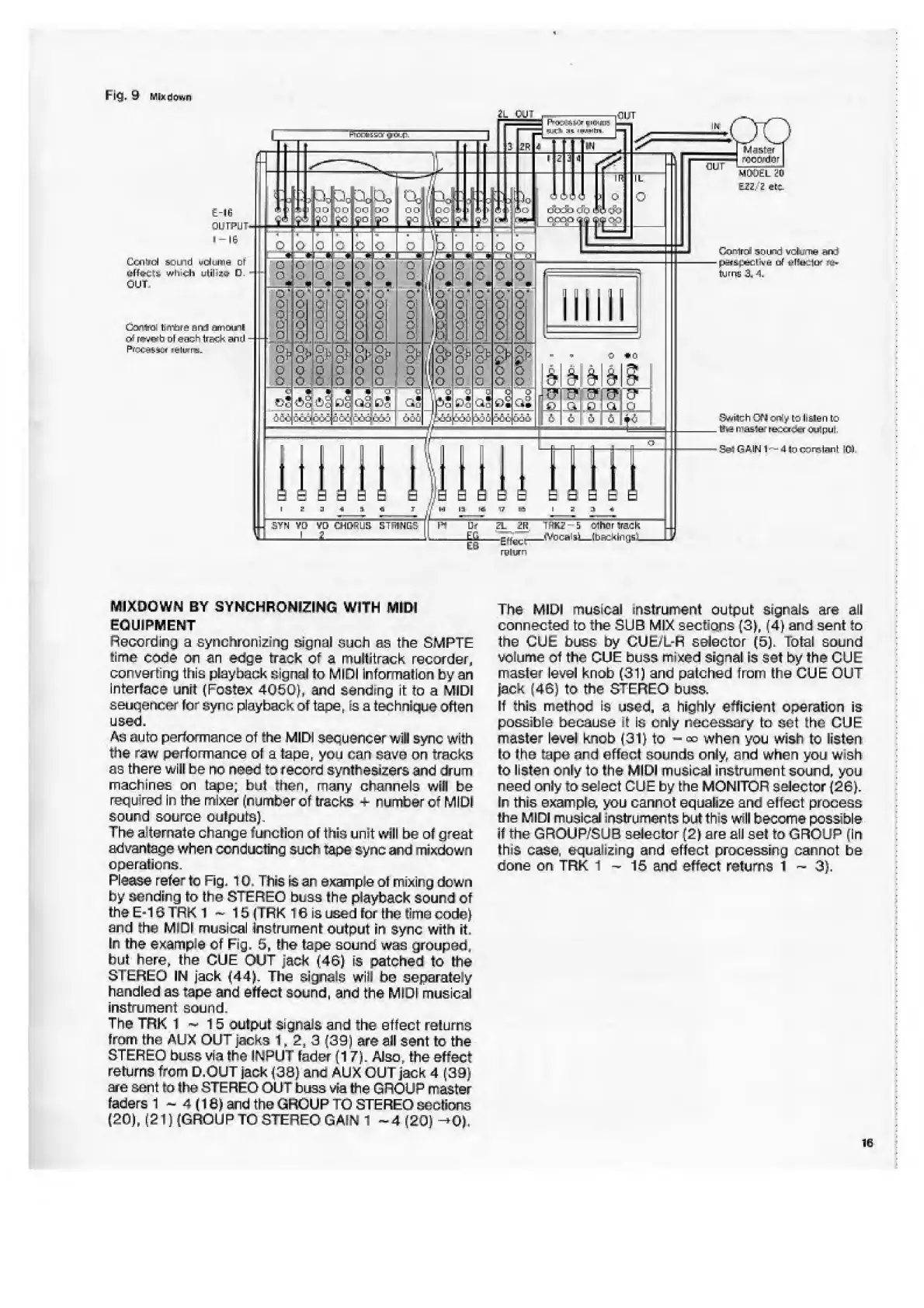
Fig,
9
Ml*
d
o
wn
MIXDOWN
BY
SYNCHRONIZING
WITH
MIDI
EQUIPMENT
Recording
a
synchroni
2
izig
signal
such
as
the
SMPTE
time
code
cm
an
edge
track
of
a
multitrack
recorder,
converting
this
playback
signal
to
MIDI
information
by
an
interface
unit
(Fostex
4050),
and
sanding
it
to
a
MIDI
eeuqencer
for
sync
playback
of
tape,
is
a
technique
often
used,
Ac
auto
performance
of
the
MIDI
sequencer
will
sync
with
the
raw
performance
of
a
tape,
you
can
save
on
tracks
as
there
will
be
no
need
to
record
synthesizers
and
drum
machines
on
tape;
but
then,
many
channels
wilt
be
recfuirec
In
the
mixer
(number
of
tracks
-
r
umber
of
MIDI
sound
source
outputs).
The
alternate
change
funclion
of
this
unit
will
be
ot
great
advantage
when
conducting
such
tape
sync
and
mixdown
operations.
Please
refer
to
Fig.
10.
This
is
an
exanple
of
mixing
down
by
sending
to
the
STEREO
buss
I
he
playback
sound
of
the
E-16
TRK
1
~
15
(TFK
16
is
used
for
the
time
code)
and
the
Mini
musical
Instrument
output
in
sync
with
it.
In
the
example
of
Fig,
5,
the
tape
sound
was
grouped,
but
here,
the
CUE
OUT
jack
(46)
is
patched
to
the
STEREO
IN
jack
(44).
The
signals
will
he
separately
handled
as
tape
and
effect
sound,
and
the
MIDI
musical
instrument
sound.
The
TRK
1
~
15
output
signals
and
the
effect
re!urns
from
the
AUX
OUT
jacks
1.2,
3
(39)
are
all
sent
to
the
STEREO
buss
via
the
INPUT
fader
(17).
Also,
the
effect
returns
from
D,OUT
jack
(30)
ana
AUX
OUT
jack
4
(39)
are
sent
to
the
STEREO
OUT
buss
via
the
GROUP
master
faders
1
~
4
(18)
and
the
GROUP
TO
STEREO
seclions
(20),
(2
T)
(GROUP
TO
STEREO
GAIN
1
~
4
(20)
->0).
The
MIDI
musical
instrument
output
signals
are
all
connected
to
the
SUB
MIX
sections
(3),
(4)
and
sent
to
the
CUE
buss
by
CUE/L-R
selector
(5),
Total
sound
volume
Of
the
GUE
buss
mixed
signal
is
Set
by
the
CUE
master
level
knob
(31)
and
palched
from
the
CUE
OUT
Jack
(46)
to
the
STEREO
buss,
if
this
method
is
used,
a
highly
efficient
operation
is
possible
because
4
Is
only
necessary
In
set
the
GUE
master
level
knob
(31)
to
-
«?
when
you
wish
to
listen
to
the
tape
and
effect
sounds
only,
and
when
you
vwsh
to
listen
only
to
the
MIDI
musical
instrument
sound,
you
need
only
to
select
CUE
by
the
MONITOR
selector
(2GJ.
In
this
example,
you
cannot
equalize
and
eifect
process
!he
MIDI
musical
instruments
but
th»s
will
become
possible
if
the
GROUP/SUB
selector
(2)
are
all
set
to
GROUP
(In
lhi$
case,
equalizing
and
effect
processing
cannot
be
done
on
TRK
1-15
and
effect
returns
i
~
3),
16

Related product manuals