15
CR300
<PRB1291-A>
DISC LOADING/UNLOADING
1
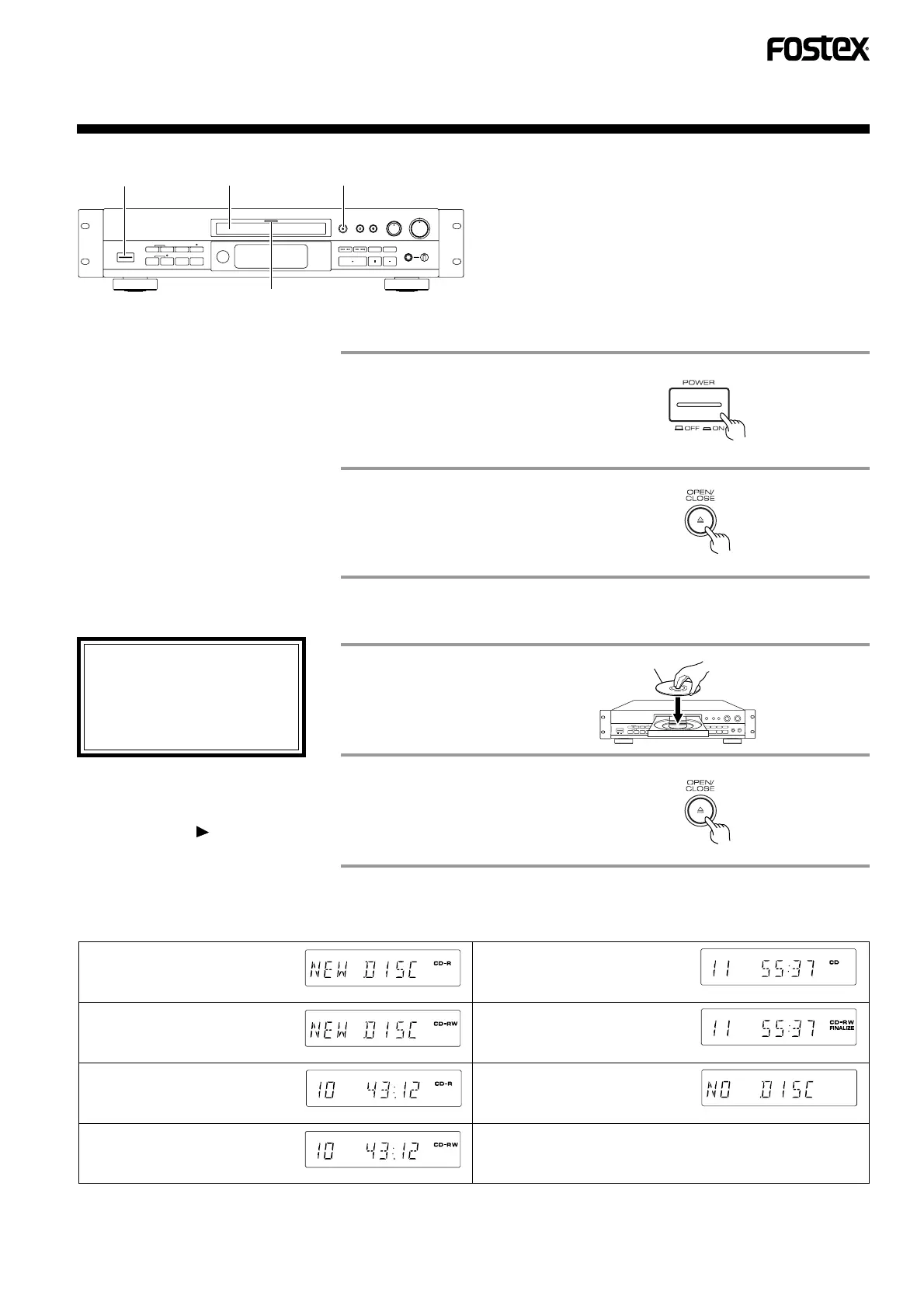
Turn the power on.
• The function indicator will
flash green.
• The display panel is illumi-
nated.
When a disc is loaded, the disc type is identified and the information on the disc is read out. (In this period, "CD", "CD-R" and
"CD-RW" are displayed alternately.)
Display for a non-recorded
CD-R disc:
Display for a partially
recorded CD-R disc:
Display for a prerecorded
CD or finalized CD-R disc:
An attempt is made to start
playback without loading a
disc:
The total playing time is displayed.
The total recording time is displayed.
Display for a non-recorded
CD-RW disc:
Display for a prerecorded
and finalized CD-RW disc:
Display for a partially
recorded CD-RW disc:
The total recording time is displayed.
The total playing time is displayed.
B. CLOSE THE DISC TRAY (LOADING A DISC)
2
"OPEN" is displayed and the
tray comes out.
3
Place a disc.
4
Close the disc tray.
Label side
"CLOSE" is displayed and the
tray is closed.
• After recording or skip information
recording, it takes a few seconds
before the disc can be unloaded
because the recording information is
written on the disc. "OPEN" blinks in
this period.
The disc tray can also be closed by;
• pressing the play ( ) button.
• pushing the disc tray lightly.
• Set a disc in the center of the tray
with the label side up.
• When loading an 8-cm (3-inch)
disc, set the disc in the groove in
the very center of the tray.
• Load only one disc at a time.
1
3 2,4
Function indicator
Open the disc tray.
A. OPEN THE DISC TRAY



 To Next Page