35
CR300
<PRB1291-A>
PLAYBACK
Starting playback
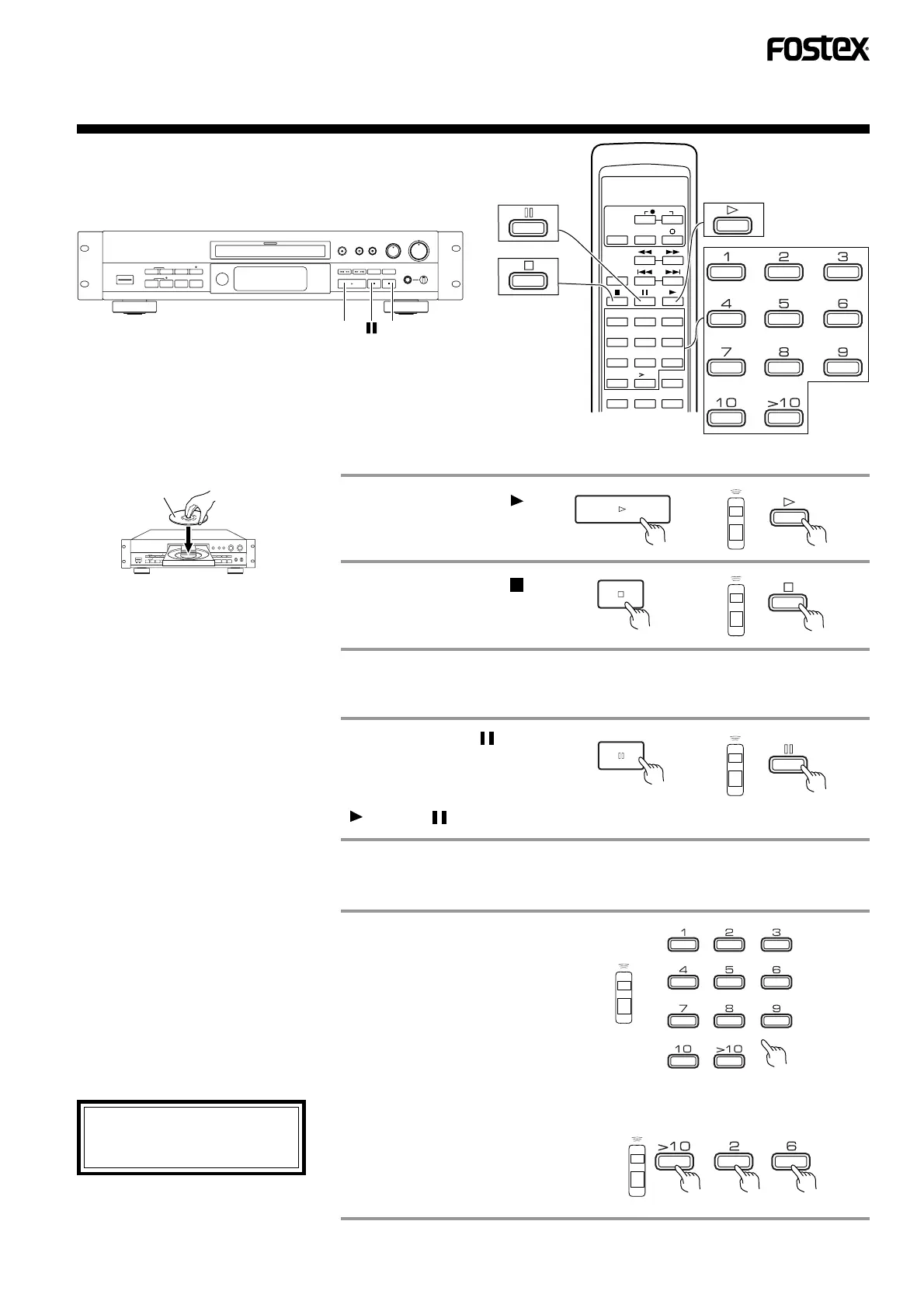
1
Press the play ( )
button.
Place the disc on the disc tray with the
label side facing upward.
2
For a disc loading, refer to page 15.
This unit starts playback.
Press the stop ( )
button to stop play-
back.
Press the pause ( ) but-
ton to pause playback
temporarily.
To restart playback, press the play
( ) or pause ( ) button.
To pause playback
• When the pause mode has continued for
about 10 minutes, the pause mode stops
and unit enters the stop mode.
Select the desired track
with the numeric buttons
of the remote control
unit.
• To select track No. 1 to 10, simply press
the corresponding button.
• To select track No. 11 or higher, press the
>10 button first.
When selecting a track number,
press numeric buttons at
intervals of less than 5 seconds.
Playing from the desired track (Direct track selection)
(Example) To select track No. 26
• Press in order of (>10), (2) and (6).
• A higher track No. than the total number
of tracks on the disc cannot be selected.
Label side
1 2
123
456
789
10
10
TIME
PGM CHECK CLEAR
REPEAT
FADER
TRACK NO.
WREITE
REC



 To Next Page