EasyManua.ls Logo

Fostex G16S - Page 31

Fostex G16S
107 pages
Print Icon
To Next Page IconTo Next Page
To Previous Page IconTo Previous Page
Loading...
3)
Open
the
Controller
Panel
up,
and
take
the
Panel
Extension
out
by
unscrewing
two
screws.
4)
Rotate
the
TRACK
1
R205
(SYNC
CROSSTALK
CANCELLER
POT)
on
the
R/P
AMP
PCB
Assy
to
a
point
slightly
CCW
from
the
center
position.
5)
Turn
the
RECORD
TRACK
SAFE/READY
SELECTOR
of
TRACK
1
to
SAFE
posi
tion.
6)
Rotate
the
TRACK
2
R205
(SYNC
CROSSTALK
CANCELLER
POT)
to
a
point
alightly
CW
from
the
full
CCW
position.
7)
Plug
in
an
audio
oscillator
output
to
the
recorder
rear
panel
INPUT
jack
2
and
apply
a
IKHz,
-lOdBV
(0.3V)
signal.
8)
Plug
in
a
level
meter
to
the
recorder
rear
panel
OUTPUT
jack
1,
and
put
TRACK
2
'
in
the
REC
mode.
9)
Rotate
the
TRACK
2
R205
(SYNC
CROSSTALK
CANCELLER
POT)
CW
slowly
and
fix
it
at
a
point
3
~
5
dB
above
minimum
point
to
obtain
minimum
sync
crosstalk
in
the
high
frequency
region.
10)
Measure
the
OUTPUT
level
of
TRACK
1
while
sweeping
the
test
signal
frequency
20
20KHz.
It
is
considered
as
a
normal
condition
if
the
leaking
level
is
less
than
-35dBV
(18mVr.m.s.)
at
IKHz
and
less
than
-4dBV
(625mV
r.m.s.)
at
worst
peak
point
in
high
frequency
region.
11)
The
remaining
tracks
2
~
24/2
~
16
are
adjusted
in
the
same
way.
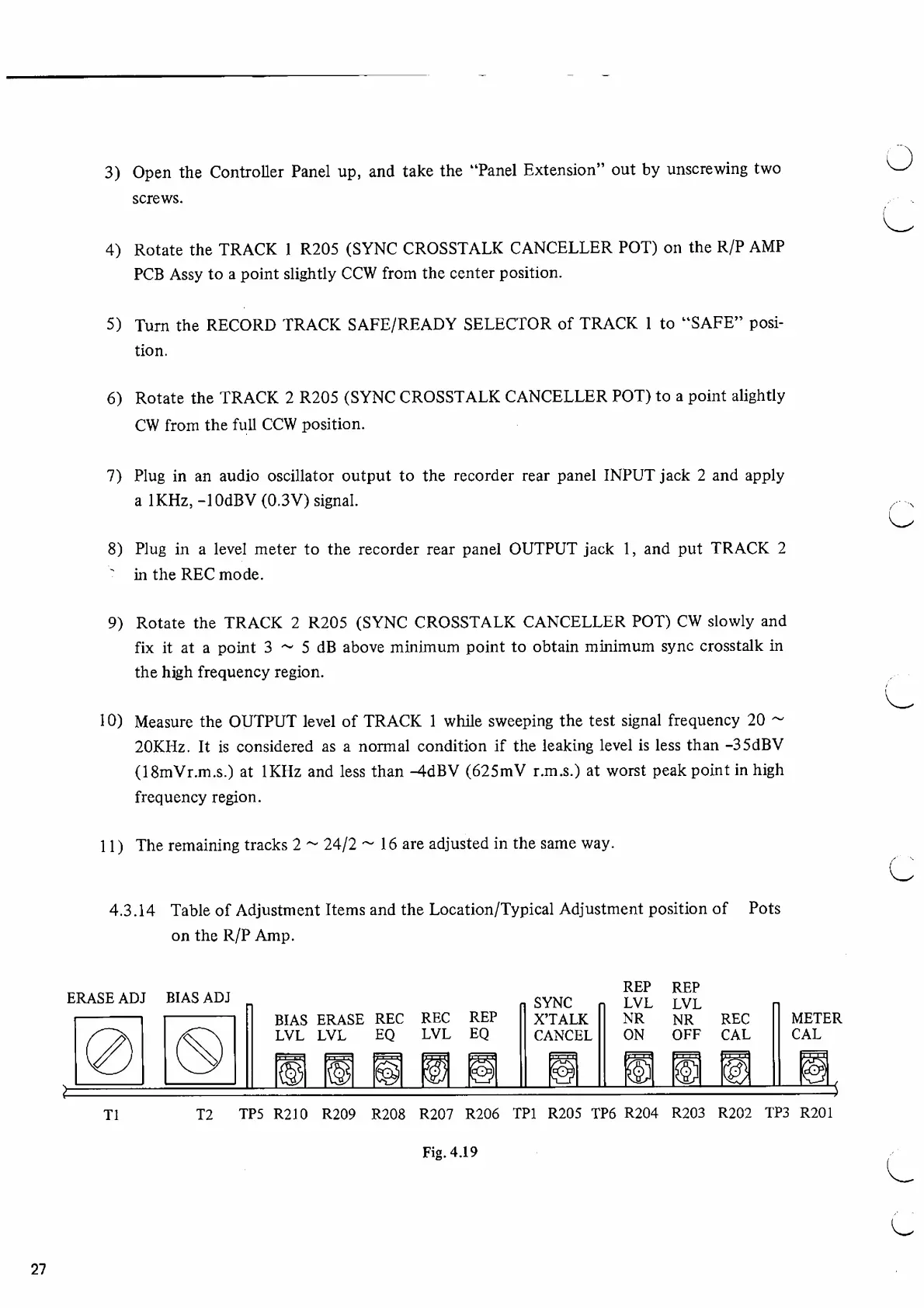
4.3.14
Table
of
Adjustment
Items
and
the
Location/Typical
Adjustment
position
of
Pots
on
the
R/P
Amp.
Fig.
4.19
27

Other manuals for Fostex G16S

Related product manuals