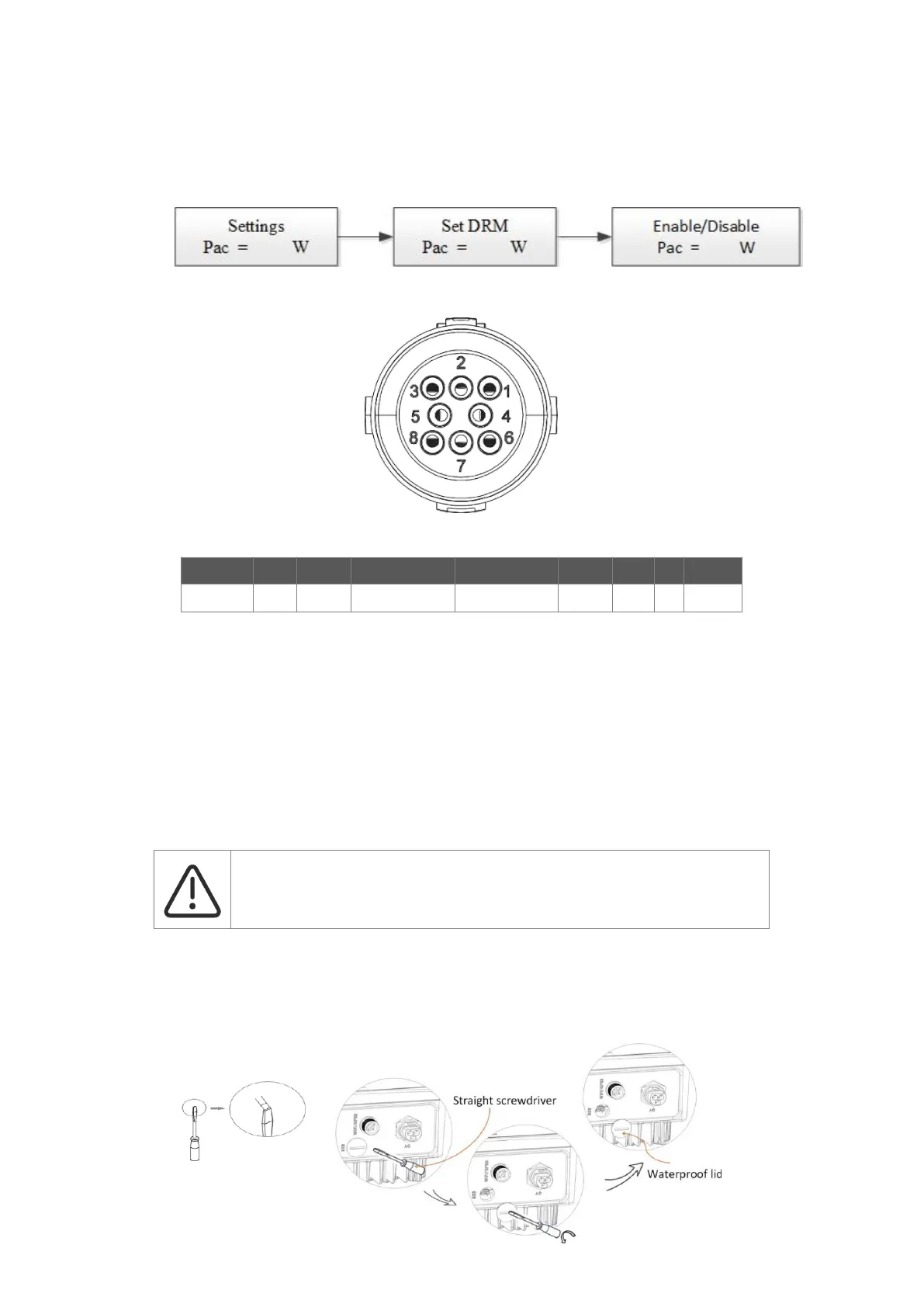
DRM0 setting
Short press the touch key to switch display or make the value+1. Long press the touch key to confirm your setting.
The PIN definitions of CT/RS485/DRM0/ESTOP interface are as below.
• Upgrade
The inverter firmware can be updated locally through a U-disk. Please refer to following steps.
a.
Please contact our service support team to get the latest firmware, and copy the files to U-disk using the
following file path:
Master: “Update\master\xxxxx_Master_Vx.xx.hex”
Slave: “Update\slave\xxxxx_Slave_Vx.xx.hex”
Manager: “Update\manager\xxxxx_manager_Vx.xx.hex”
Note: Vx.xx is version number.
b.
Make sure the DC switch (if no DC switch, please disconnect the PV connector) is off and the AC is
disconnected from the grid. Unscrew the waterproof lid of the USB port using a flat-headed screwdriver as
below.
Warning!
Make sure the directory structure is strictly in accordance with the above. Do not
modify the program file name! It may cause the inverter to cease functioning.



 To Next Page