4
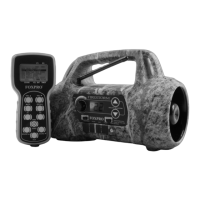
2. The power switch and manual volume control are located on the
front face of the Firestorm, to the left of the screen.
3. The TX9 remote control is featured in the image for reference.
4. The rear speaker slide switch is located below the
power/volume knob to the left.
5. The front speaker slide switch is located to the right of the rear
speaker slide switch.
6. The low battery LED is located below the rear speaker slide
switch.
7. The sound up/down buttons are located to the right of the
screen.
8. The front horn speaker is located on the right side of the
housing.
9. The rear cone speaker is located to the left side of the housing.
10. The front of the Firestorm features a row of four jacks that span
the area below the main face area. Each jack features a rubber
cover. The charge jack is the first jack from the left.
11. The rear external speaker jack is the second jack from the left.
12. The auxiliary device jack is located to the right of the rear
external speaker jack.
13. The front external speaker jack is the last jack to the right.
1-3 Firestorm: Requirements
The Firestorm and TX9 remote control are shipped without batteries.
The Firestorm digital game call requires 8 ‘AA’ batteries. You may use
alkaline batteries to get started, but it is recommended that you use
high-capacity rechargeable NiMH (nickel metal hydride) batteries or
one of FOXPRO’s optional rechargeable battery packs. Visit our website
to view the entire line of recharging options for the Firestorm.
Installing Batteries in the Firestorm
1. Access the battery compartment by removing the door on the
back of the Firestorm. Once the door is removed, locate the


 To Next Page