11
8-1 Primary Display Area
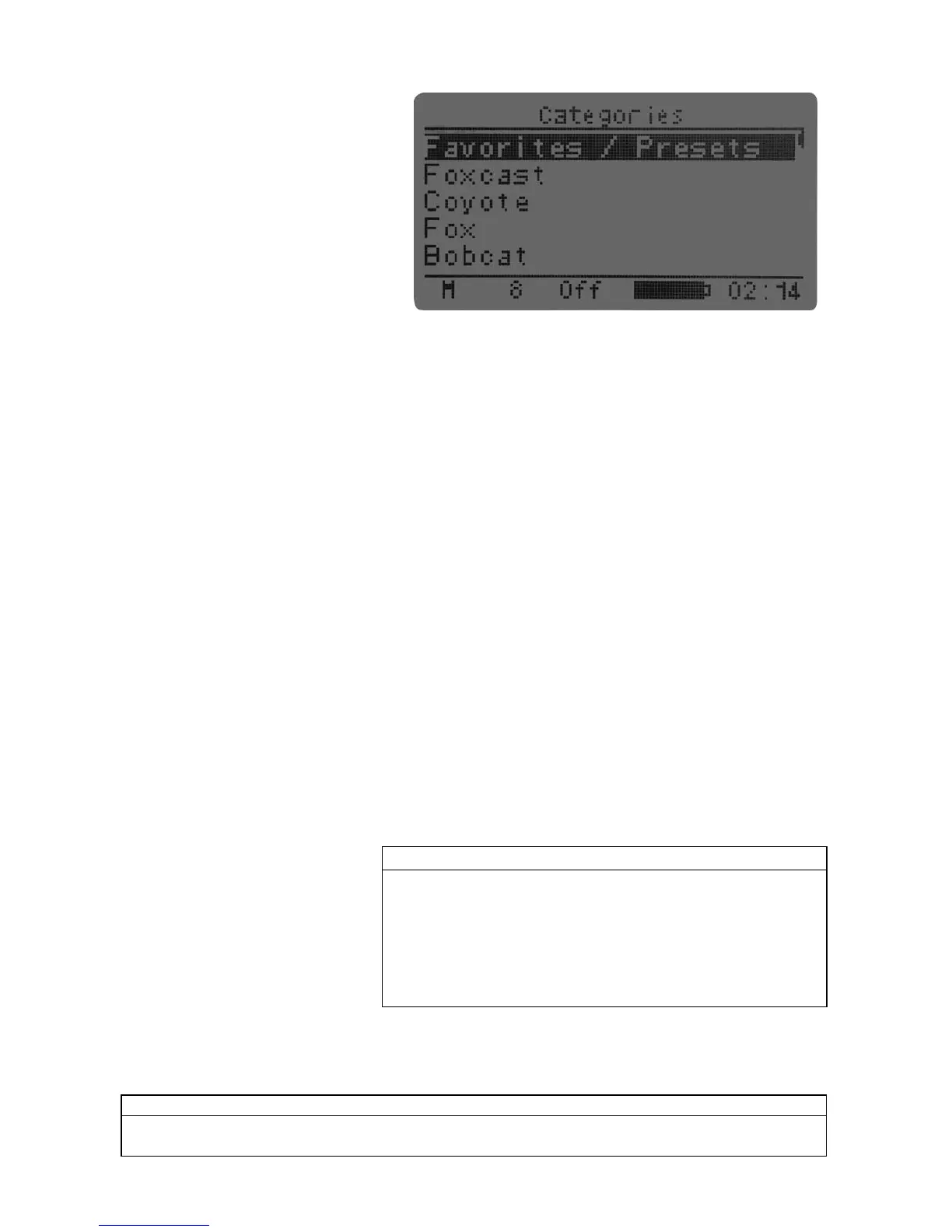
When the TX915 is powered on, it will
briefly display a startup screen showing
the firmware version information and
then switch to the primary screen (shown
to the right). The top line of the
transmitter displays “Categories.” The
first line down displays
“Favorites/Presets.” “Favorites/Presets”
provides a mechanism for both creating
new presets as well as initiating playback
of existing presets. The transmitter can handle up to 10 presets in total. Beneath “Favorites/Presets” is
“Foxcast” (see section 9 of the manual for more information), beneath that is list of sound categories or
“Sound List” depending upon the transmitter configuration. The bottom line of the transmitter display is a
static status line displaying (in order): mute status, volume level, FOXBANG status, battery level, and
elapsed timer. To navigate through the primary display area and menu options, use the “Scroll Up” or
“Scroll Down” buttons. The resulting action of pushing the “Scroll Up” or “Scroll Down” button is the black
highlight bar moving up or down, respectively. To select a menu item, push the Select button. To move
back through the menu, or exit a category or menu option, use the “Back/Menu” button.
8-2 Main Menu
The main menu provides access to a variety of transmitter configurations. To access the main menu from
the primary screen, push the “Back/Menu” button a single time. The following sections cover each of the
menu options and their associated sub-menus.
8-3 FOXFEATURES: FOXBANG
When activated, FOXBANG reacts to the muzzle blast of a firearm by automatically switching to an assigned
function. The available functions for FOXBANG activation include: mute (toggles mute on/off), auxiliary
(toggles auxiliary device on/off), and presets 1-5. To activate FOXBANG and assign a function, highlight the
“FOXBANG” menu item, push the “Select” button, and then use the “Sound Up” or “Sound Down” button to
cycle through the available functions. When the desired function is selected, push “Select” to lock it in.
As the transmitter has an internal sensor that senses when your firearm has been discharged, it is important
to make sure that you have the correct sensitivity level set for your particular firearm. There are three
sensitivity levels that you can choose
from: Low, Medium, and High. The
lower sensitivity setting should be
used with higher caliber firearms
such as a .30 and higher. High
sensitivity should be used for smaller
calibers such as .17 to .22.
Everything else should work fine
with the medium setting. To adjust the sensitivity, select the “FOXBANG SENS” option, push the “Select”
button, and then use the “Sound Up” or “Sound Down” button to cycle through the options. When the
desired sensitivity level is set, push “Select” to lock it in.



 To Next Page