Home
Framery
Office Equipment
Four
Page 13 (Install the Vertical Frames)
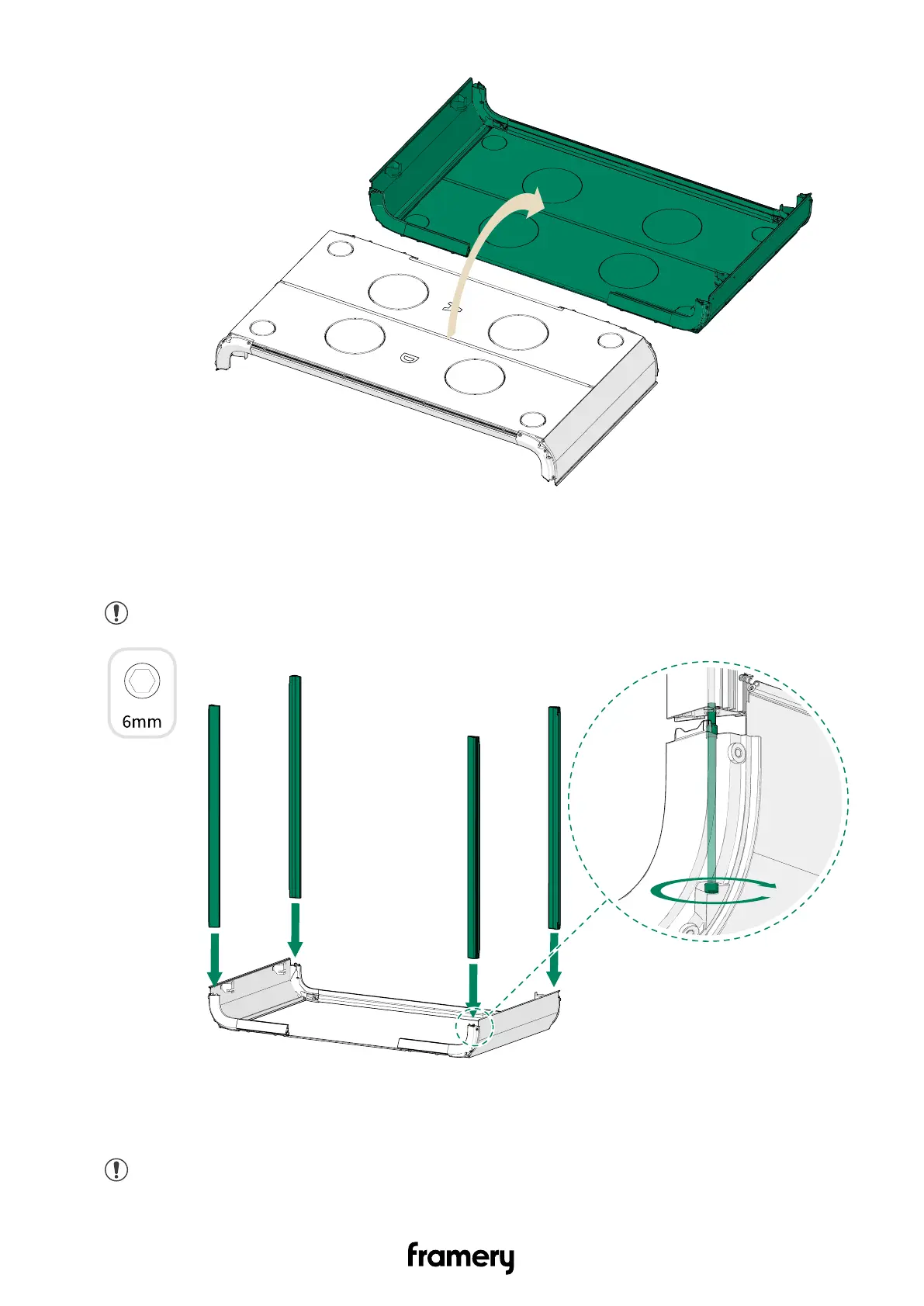
Framery Four - Install the Vertical Frames; Install the Horizontal Frames
70 pages
Manual
Save Page as PDF
To Next Page
To Next Page
To Previous Page
To Previous Page
Loading...
Framery Four
4.
1.5 Install the vertical frames
Note:
Make sure that the bolts are properly tightened.
1.6 Install the horizontal frames
Note:
Make sure that the bolts are properly tightened.
Installation instructions
info@frameryacoustics.com
13
12
14
Table of Contents
Main Page
Table of Contents
3
Important Safety and Product Instructions
5
Preface
5
Product Information
5
Copyright
5
Manual Contents
5
Installation Requirements
6
Components and Accessories
6
Tools and Accessories
6
Main Dimensions
7
Required Operating Space
7
Seismic Anchoring Requirements
8
Chassis
9
Assemble the Front Frame
9
Assemble the Back Frame
10
Install the Bottom Corners
10
Install the Floor Boards
11
Install the Vertical Frames
13
Install the Horizontal Frames
13
Install the Horizontal Supports
15
Install the Back Glasses
15
Tighten the Screws of the Back Glass Wall
16
Install the Front Glasses
18
Install the Ceiling Threshold and Plugs to the Doorway
20
Install the Inlet Module
21
Install the Outlet Modules
22
Install the Wall Exterior Panels
22
Install the Coat Hook(S) (Optional)
24
Electrics
25
Install the Power Unit
25
Install the Core Unit
26
Install the Wiring Harness
26
Make the Electrical Connections
29
Exterior
35
Install the Roof Exterior Panels (Corners)
35
Install the Roof Exterior Panels (Front & Back) and Bottom Exterior Panels
35
Install the Fan Cover
37
Install the Floor Exterior Panels
38
Install the Floor Covers
38
Install the AC Power Cord
39
Route the AC Power Cord through the Floor
40
Route the AC Power Cord through the Roof
41
Install the LAN Cord (Optional)
42
Install the Add-On Rails
42
Install the Occupancy Lights
43
Door
44
Install the Door
44
Install the Door Handle
45
Inspect the Door
45
Adjust the Closing Speed of the Door
46
Change the Door Handedness (Optional)
47
Interior
51
Install the Wall Acoustic Panels
51
Install the Roof Acoustic Panels
51
Install the Ceiling Interior Panels
52
Install the Wall Interior Panels
53
Install the Lights
53
Install the Carpet and Table Leg
54
Install the Cable Channels
57
Install the Kickboards
58
Install the Gaskets
58
Check the Interior Panel Alignment
60
Install the Threshold
60
Install the Table Top
61
Install the Monitor Arm (Optional)
62
Install the Touch Screen Holder and Touch Screen
62
Assemble the Sofas
65
Finalize the Installation
66
Prepare the Pod for Use
66
Fill out the Installation Report in the Service Tool App
66
Related product manuals
Framery Q
148 pages
Framery One
51 pages


 To Next Page