12Chapter 2 Life with your Franke Oven
OPERATING YOUR OVEN
To select a cooking function and choose your desired temperature:
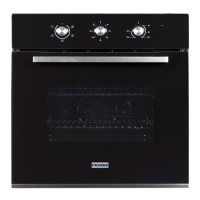
1. Rotate the ‘left knob’ to choose the cooking function.
The various symbols represent different cooking functions.
2. Rotate the ‘right knob’ to adjust the temperature to your desired pre-set.
3. Rotate the ‘middle knob’ to select the amount of time required for cooking.
4. Alternatively, if no specific time is required, rotate the ‘middle knob’ to the left to switch
on the oven.
5. To turn off the oven, switch the ‘middle knob’ to the ‘0’ position.
TIMER FUNCTION
The timer allows you to keep and eye over the amount of cooking time that has elapsed. To set a timer:
1. Rotate the ‘middle knob’ to select the amount of time required for cooking.
2. Once the selected amount of time has elapsed, the oven will switch off and the buzzer will sound.




 To Next Page