EasyManua.ls Logo

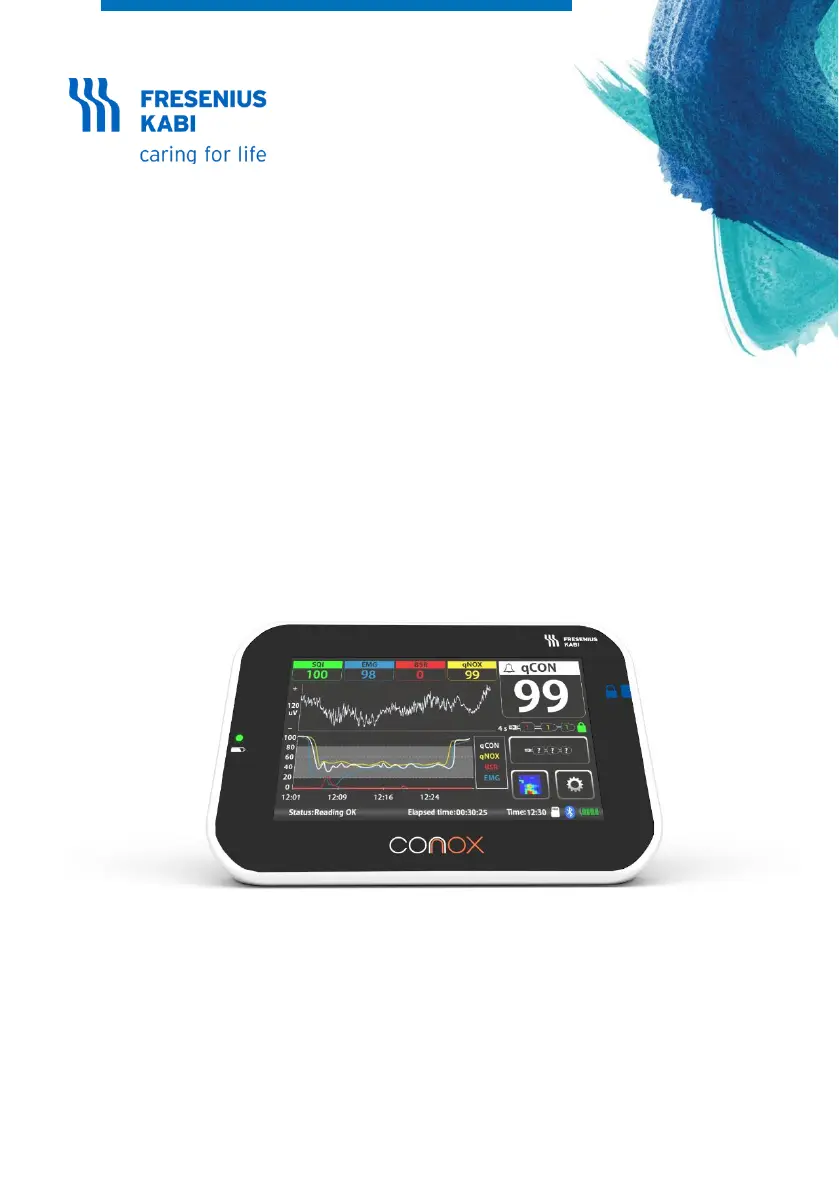
Fresenius Kabi Conox 2D - User Manual

Fresenius Kabi Conox 2D
76 pages
Print Icon
To Next Page IconTo Next Page
Loading...
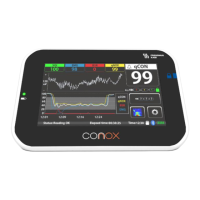
Conox® 2D
Depth of Anesthesia Monitor
Instructions for Use

Table of Contents

Questions and Answers

  • M
    Marilyn BrownAug 15, 2025
    What to do if Fresenius Kabi Medical Equipment shows 'Lead off Status: Lead off'?
    • J
      Jennifer SalinasAug 16, 2025
      If the Fresenius Kabi Medical Equipment displays 'Lead off Status: Lead off', it indicates a problem with the patient sensor connection. Here's what to check: * Ensure the patient sensor is securely connected. * Clean the connection between the patient sensor and cable. * Verify the patient cable is properly connected. * If the issue persists, the patient cable or sensor may be defective and need replacement. If the problem continues after these steps, contact your distributor.
  • L
    Lisa BarberAug 19, 2025
    Why does my Fresenius Kabi Conox 2D show 'Artefact - Excessive artefacts detected'?
    • K
      Kathryn RuizAug 19, 2025
      If your Fresenius Kabi Medical Equipment displays 'Artefact - Excessive artefacts detected', it means that patient's movements or other electrical devices are interfering with the signal quality. To solve this issue: * Minimize patient blinking or movement. * Remember that the device is not designed to work during electrocautery; it should resume normal operation afterward. * The device may be affected by EMC from other devices such as warming blankets. * If the problem persists, replace the patient sensor. If the problem continues after these steps, contact your distributor.
  • A
    Ashley HillAug 21, 2025
    What to do if Fresenius Kabi Conox shows 'Impedance Too High (TH)'?
    • J
      Joseph PowellAug 21, 2025
      If your Fresenius Kabi Conox device indicates 'Impedance Too High (TH)', it means the patient sensor isn't making good contact with the skin. Make sure to press the patient sensor firmly onto the skin, but avoid pressing the center of the electrode. If the issue continues, the patient sensor may be defective and needs to be replaced. If the problem continues after these steps, contact your distributor.
  • K
    kyle38Aug 25, 2025
    Why does Fresenius Kabi Conox say 'Sensor time of use exceeded'?
    • A
      Alicia FitzpatrickAug 25, 2025
      If your Fresenius Kabi Conox device displays 'Sensor time of use exceeded. The sensor shall be replaced', it means the sensor has been used for longer than 24 hours. Replace the sensor with a new one.
  • C
    Christy HoodAug 27, 2025
    What to do if Fresenius Kabi Conox displays 'Sensor might be expired'?
    • R
      Robert GonzalezAug 27, 2025
      If your Fresenius Kabi Conox device shows 'Sensor might be expired', it means the connected sensor's validity date has passed. Check the expiration date on the sensor package and replace it if it's expired.
  • L
    Lisa HernandezAug 30, 2025
    How to fix a black display on Fresenius Kabi Conox 2D Medical Equipment?
    • L
      lawrenceflemingAug 30, 2025
      If the display on your Fresenius Kabi Medical Equipment goes black, it could be due to a totally discharged backup battery. Connect an external power supply to resolve this. If the problem continues after this step, contact your distributor.
  • J
    Julie LesterSep 2, 2025
    What does 'Invalid Sensor' mean on Fresenius Kabi Conox?
    • C
      combsrobertSep 3, 2025
      If your Fresenius Kabi Conox device displays 'Invalid Sensor', it means the connected sensor is not valid. Replace it with a valid sensor. If the sensor is already valid, contact the manufacturer.
  • K
    Kelly BensonSep 6, 2025
    How to recharge the battery on a Fresenius Kabi Conox?
    • E
      eric15Sep 6, 2025
      If your Fresenius Kabi Conox needs to recharge its battery, connect the power supply to continue operation and recharge the battery.
  • P
    Patricia FernandezSep 8, 2025
    What does 'Reconnecting… Status: Reconnecting…' mean on Fresenius Kabi Medical Equipment?
    • K
      Katrina SandersSep 9, 2025
      If the Fresenius Kabi Medical Equipment displays 'Reconnecting… Status: Reconnecting…', it indicates a temporary disconnection. The display will automatically try to reconnect. If it doesn't reconnect within 10 seconds, the device will reset. If the display keeps resetting, contact your distributor.
  • Z
    zirwinSep 12, 2025
    What to do for 'Corrupted file' error on Fresenius Kabi Medical Equipment?
    • T
      Tina NelsonSep 12, 2025
      If your Fresenius Kabi Medical Equipment displays 'Corrupted file', delete the file. If this issue happens repeatedly, contact your distributor.

Summary

General Information Conox Monitor

Scope of Instructions for Use

Provides an overview of the Instructions for Use manual for the Conox monitor.

Intended Purpose of Conox Device

Defines the device's primary function in monitoring patient consciousness during anesthesia.

Clinical Benefits of Conox Monitor

Details the advantages of using the Conox monitor in clinical practice.

Indications for Conox Use

Specifies the patient population and conditions for which the device is intended.

Safety Guidelines for Conox Device

General Safety Instructions

Crucial safety guidelines for operating the Conox device to prevent hazards.

Electromagnetic Compatibility

Details the device's conformity with electromagnetic compatibility standards.

Safety Symbols Explained

Explains the meaning of various safety symbols used on the device and labeling.

Packaging Symbols

Illustrates and explains symbols found on the product packaging.

Conox Device Description

System Description

Explains how the Conox device works and its basic operational principles.

System Overview

Details the main components of the Conox system: Sensor, Cable, and Main Unit.

Controls and Indicators

Identifies and describes the device's on-screen controls and visual indicators.

qCON Index Explained

Explains the qCON index, its meaning, and its correlation with patient consciousness.

qNOX Index Explained

Details the qNOX index, its interpretation, and its relation to patient response.

Burst Suppression Ratio (BSR)

Describes the BSR parameter and its significance in detecting deep anesthesia.

Electromyography Index (EMG)

Explains the EMG index and factors that can increase its value.

Signal Quality Index (SQI)

Defines the SQI and its role in assessing EEG signal quality.

EEG Waveform Display

Describes the graphical representation of the EEG signal.

Spectrogram Display

Explains the spectrogram as a representation of EEG signal frequency content.

Parameter Trend Graphs

How to view trend graphs for selected Conox parameters.

Electrode Impedance Monitoring

Details how the device measures and displays electrode-to-skin impedance.

Battery Status Indicator

Explains the visual indicators for the device's battery charge level.

Bluetooth Indicator

Describes the indicator for Bluetooth® status and data transmission.

SD Symbol Status

Explains the symbols indicating the status of the on-board memory.

Time Settings

Information on displaying and setting the device's system time.

Elapsed Time Tracking

Details how the device tracks and displays elapsed time for sessions.

Device Status Messages

Lists and explains the different status messages the device can display.

Sensor Status Monitoring

Describes how the device monitors and reports the status of the patient sensor.

Setup Procedures for Conox

Unpacking the Device

Instructions for safely removing the device and its components from packaging.

Contents of the Box

Lists the items included in the product packaging.

First Time Installation

Steps for initial installation and setup of the Conox device.

Setup Menus Overview

Guides on accessing and navigating the device's setup menus.

Operating Modes

Describes the two operational modes: Recording mode and Data Repository mode.

Recording Mode Settings

Guides on how to access and configure settings within the Recording mode.

Information Screen Details

How to view device firmware, hardware, software, and serial number.

Language Settings

Instructions for changing the device language from the available options.

Time and Date Settings

Instructions for setting the current time and date on the device.

Bluetooth Connectivity

Steps to enable, disable, and pair the device's Bluetooth® connectivity.

Trends and Spectrogram Settings

How to configure settings for trend graphs and spectrogram display.

EEG Settings Configuration

Guides on adjusting EEG graph amplitude and timescale.

qCON Advisory Signal

How to enable and configure the qCON advisory signal for alerts.

Data Repository Access

How to access and navigate the Data Repository mode for recorded data.

Display Brightness Adjustment

Instructions for adjusting the display brightness level of the device.

Data Repository Mode Settings

Advanced settings for the Data Repository mode, including file format.

File Format Selection

Options for selecting the data file format for recording and storage.

Delete Temporary Files

Procedure to clear temporary files from the device's memory.

Delete All Bookmarks

Procedure for clearing all saved bookmarks from the device's memory.

Recording a New Case

Data Repository Mode Operations

Accessing Data Repository

How to activate and enter the Data Repository mode on the device.

Understanding Data Folders

Explanation of the 'Temporary files' and 'Bookmarks' folders in Data Repository mode.

Managing Recorded Cases

How to view and manage recorded patient data files.

Downloading Recorded Cases

Steps to download recorded data from the Conox device to a PC.

Adding Cases to Bookmarks

Procedure to save important recorded cases to the bookmarks folder.

Reviewing Saved Cases

How to view the recorded trends and data of a previously saved case.

Deleting Recorded Cases

Instructions on how to permanently remove recorded cases from the device.

Using the Conox Device

Device Positioning Guidelines

Guidance on where and how to position the Conox device for optimal use and safety.

Patient Sensor Handling

Information on handling and preparing the patient sensor for use.

Skin Preparation for Electrodes

Instructions for preparing the patient's skin prior to electrode application.

Electrode Placement

Detailed steps for correctly applying the EEG electrodes to the patient's forehead.

Connecting Cable and Powering On

Steps for connecting the patient cable and powering on the Conox device.

Impedance Check Procedure

Explanation of how the device checks and displays electrode-to-skin impedance.

Event Sequence and Operation

Describes the sequence of operations when the device is turned on.

Handling Disconnected Patient Cable

Describes the 'lead off' status and actions for a disconnected patient cable or sensor.

External Power Supply and Battery

External Power Supply Details

Details the specifications and usage of the device's external power adapter.

Internal Battery Information

Information on the internal rechargeable battery, its life, and charging.

Cleaning and Disinfection

Service Policy and Rules for Cleaning

Guidelines on prohibited cleaning agents to prevent device damage.

Cleaning Precautions

Important precautions to follow during the cleaning process of the device.

Cleaning Instructions

Step-by-step guide for cleaning the Conox device and its accessories.

Disinfection Instructions

Step-by-step guide for disinfecting the Conox device and its accessories.

Adverse Effects of Conox Use

Troubleshooting and Diagnostics

Conox Alarms and Solutions

Details various alarm messages, their possible causes, and corrective actions.

Device Troubleshooting Guide

Provides solutions for common device issues and diagnostic information.

Service and Maintenance

Warranty Information

Information regarding the warranty period and terms for the device and accessories.

Maintenance Requirements

Details on recommended preventive maintenance and service intervals.

Service Policy and Rules

Guidelines for device servicing and return procedures.

Recycling and Safe Disposal

Instructions for proper disposal of the device and its components, including batteries.

Notification of Serious Incidents

Procedure for reporting any serious incidents related to the device.

Electromagnetic Immunity

Recommended Separation Distances for RF Equipment

Guidance on maintaining safe distances from RF equipment to prevent interference.

System and Environment Specifications

Essential Performance Criteria

Outlines the core functions and capabilities the device must perform.

System Specifications

Provides technical details of the monitor, including dimensions, weight, and components.

Operation and Shipment Conditions

Specifies the environmental conditions for device operation, transport, and storage.

Cybersecurity Recommendations

Declaration of Conformity

Fresenius Kabi Conox 2D Specifications

General IconGeneral
CategoryMedical Equipment
ManufacturerFresenius Kabi
ModelConox 2D
DisplayLCD
InterfaceRS-232

Related product manuals