14
J. STARTUP AND OPERATION
J.3 Control Panel Operation
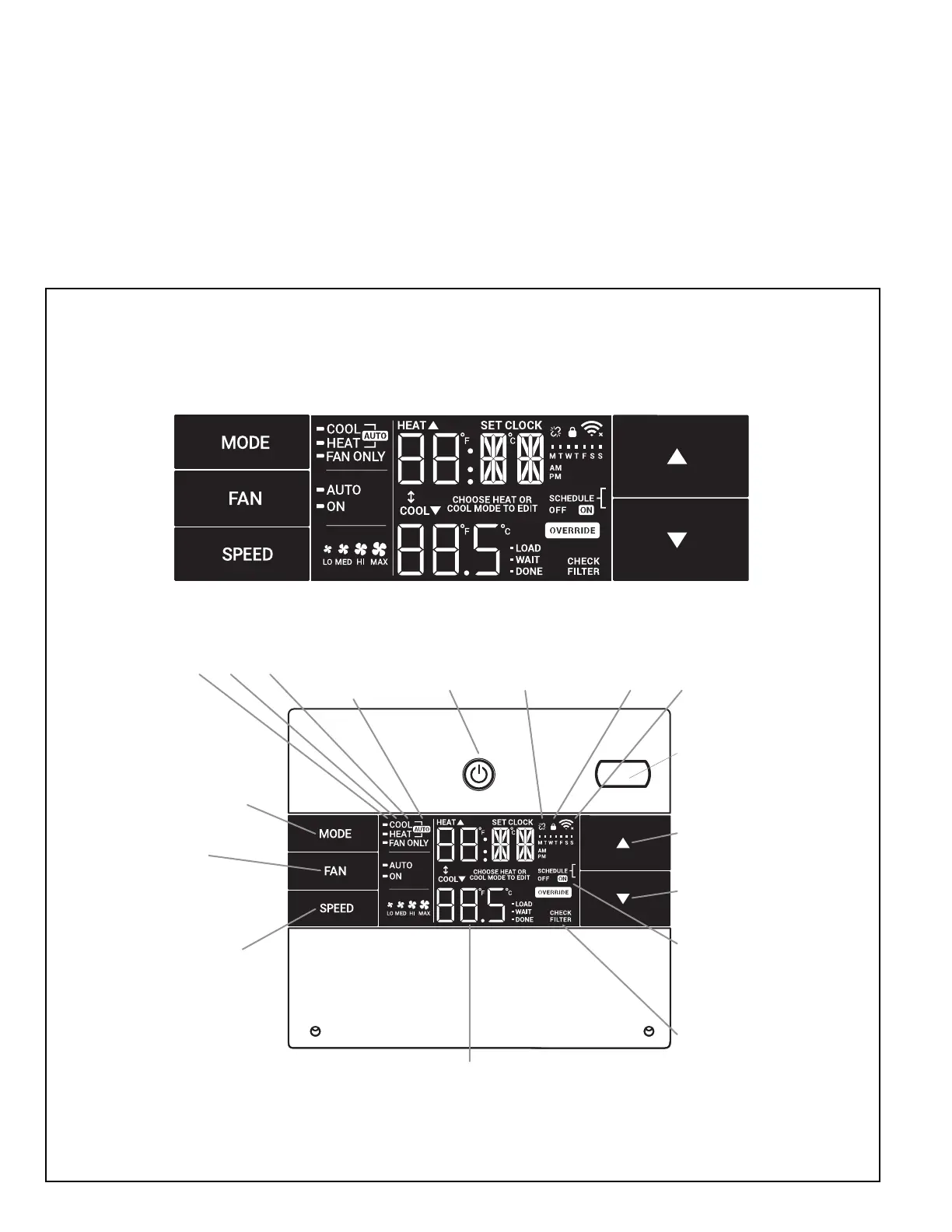
All of the control panel function buttons and mode icons can be viewed in Figure J.3.2
Power On – Press the button to turn on the air conditioner. The power button illuminates to indicate that the power is on. The backlight on the power switch will
automatically turn off after 20 seconds of inactivity.
Display – The display is a high efciency LCD with a built-in backlight. After 20 seconds of inactivity, the display switches off. Touching any button automatically changes
the display to full brightness.
There are three control push buttons on each side of the display.
SYSTEM
Cycles between
AUTO, HEAT,
COOL, or FAN
ONLY
(if equipped)
FAN MODE
Sets fan to either:
- Cycle automatically
- Run continuously
FAN SPEED
Sets fan speed:
LOW, MED,
HIGH or AUTO
(if equipped)
TEMPERATURE
Increment UP
TEMPERATURE
Increment DOWN
TIMER
Turns ON or OFF
IR WINDOW
Do not block
ON / OFF
Turns unit on/ off
Figure J.3.1
Figure J.3.2
MODE
Cycles between
COOL, HEAT, FAN
ONLY or -AUTO-
(if equipped)
ON / OFF
Turns unit on/off
Automatically switches
between cool & heat
LOCKED
2 DIGIT DISPLAY
Shows Setting for:
- Set Point (Temperature)
- Clock (AM/PM)
WI-FI OPERATING
STATE
TEMPERATURE
UP
TEMPERATURE
DOWN
TIMER
shows on or off
FILTER
Check / clean
FAN SPEED
Sets fan speed:
LOW, MED, HIGH,
OR MAX
(Actual settings are
model dependant)
FAN
Sets fan to either:
- Automatically cycle
- Continuously run
COOL HEAT FAN ONLY DISCONNECTED
FROM POWER BOARD
IR
RECEIVER



 To Next Page