27
J. STARTUP AND OPERATION
J.5 Start-up
This is a warm weather appliance
Your air conditioner is designed to cool in warm weather when the
outside temperature is above 60 °F and below 115 °F, so it won’t cool a
room if it is already cool outside.
Condensation is normal
Air conditioners actually pump the heat and humidity from your room
to the outside. Humidity becomes water, and your air conditioner
will use most of the water to keep the outside coil cool. If there is
excessive humidity, there may be excess water that will drip outside.
This is normal operation.
Frosting
This usually occurs because of insufficient airflow across the coils, a
dirty filter, cool damp weather, or all these. Set the SYSTEM mode to
FAN ONLY and the frost will disappear. Setting the thermostat a little
warmer will probably prevent the frosting from recurring.
Noises
All air conditioners make some noise. Friedrich units are designed to
operate as quietly as possible. An air conditioner mounted in a wall is
quieter than one mounted in a window. It is important to ensure that
the chassis seal gasket (Item 13) is properly installed (refer to the
Installation Instructions).
NOTICE
This unit is certified to operate in cooling mode under these maxi-
mum conditions. Any operation beyond these conditions may result
in intermittent operation.
Indoor temperature: 90 °F (45% relative humidity)
Outdoor temperature: 110 °F (25% relative humidity)
If unit is heat pump equipped, it is certified to operate in heating
mode under these maximum conditions. Any operation beyond these
conditions may result in intermittent operation.
Indoor temperature: 80 °F (humidity does not affect operation)
Outdoor temperature: 70 °F (60% relative humidity)
J.4 Remote Control Operation
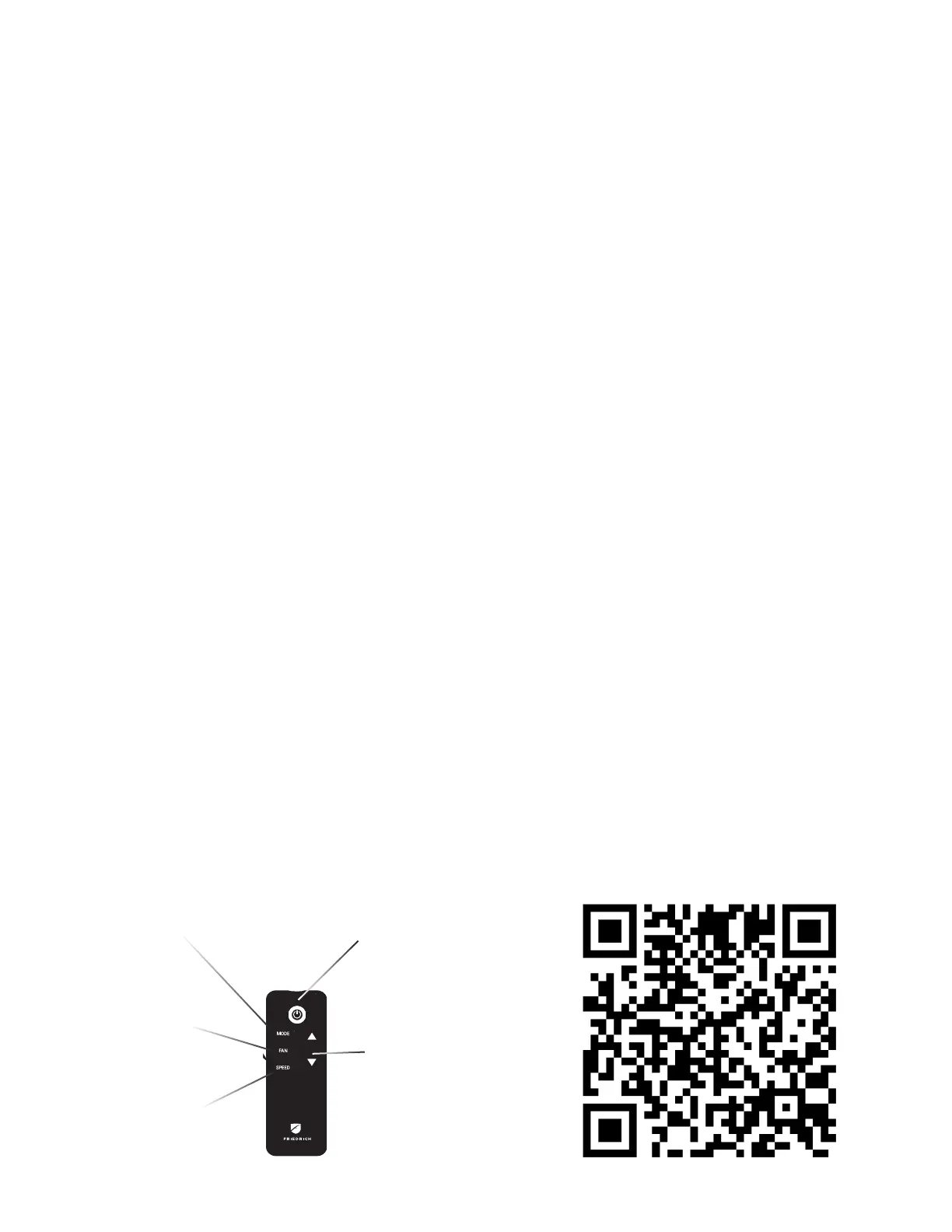
Remote Control - Refer to Figure J.4.1 during operation description.
Getting Started - Install two (2) AAA batteries in the battery
compartment located on the back of the unit.
Operation - The remote control should be within 25 feet of the air
conditioner for operation. Press the power button to turn the remote on.
The remote will automatically power off after 15 seconds if the buttons
are not being pressed. The remote must be on to control the unit.
POWER Button - Turns remote and unit on and off.
SYSTEM Button - Allows the user to sequentially select the following:
AUTO, COOL, HEAT, and FAN ONLY operations. When the button is
pressed, the display indicates which mode has been selected via a
display message. Note that when the heating function is not available,
the system will automatically skip the HEAT mode.
FAN MODE Button - Selects between automatic (AUTO FAN) or
CONTINUOUS operation. In the AUTO FAN mode, the fan only turns on
and off when the compressor operates or the heat function is enabled.
NOTE: AUTO FAN is not available in the FAN ONLY Mode, the display
indicates CONTINUOUS. In the CONTINUOUS mode, fan speed is
determined by your selection on the FAN SPEED button.
FAN SPEED Button - Used to sequentially select new fan speed,
plus AUTO operation. When the FAN SPEED button is pressed, the
fan speed icon (triangle) changes to indicate the new speed level. Fan
speed automatically varies depending on the set temperature on
the control panel and the actual room temperature. For example, if
there is a big difference between your set temperature and the actual
room temperature, the system fan speed increases to HIGH. It
remains at this speed until the room temperature matches the
set temperature.
UP and DOWN Arrows - Pressing either the UP or DOWN button
changes the desired room temperature. The factory preset lower
and upper limits are 60 °F (16 °C) and 99 °F (37 °C). These buttons are
also used to navigate between function options when using the User
Menu or Maintenance Mode.
Remote Effectiveness
Handheld Remote - Has an operating range of up to 25 ft. The infrared
remote control signal must have a clear path to transmit the command
to the air conditioning unit. The remote signal has some ability to
“bounce” off of walls and furniture similar to a television remote control.
The diagram below shows the typical operating range of the control in a
standard room with 8 ft high ceilings.
POWER
MODE
UP and
DOWN
ARROWS
FAN
SPEED
Figure J.4.1
L.
WiFi
This model is currently compatible with Friedrich Connect and
Alexa, but not Google Connect. Use a QR Reader on your phone to
scan this QR Code. It will take you to the Wifi Instructions page of
our website.



 To Next Page