Chapter 2
Page 17
2.2 Using The Manual Controller
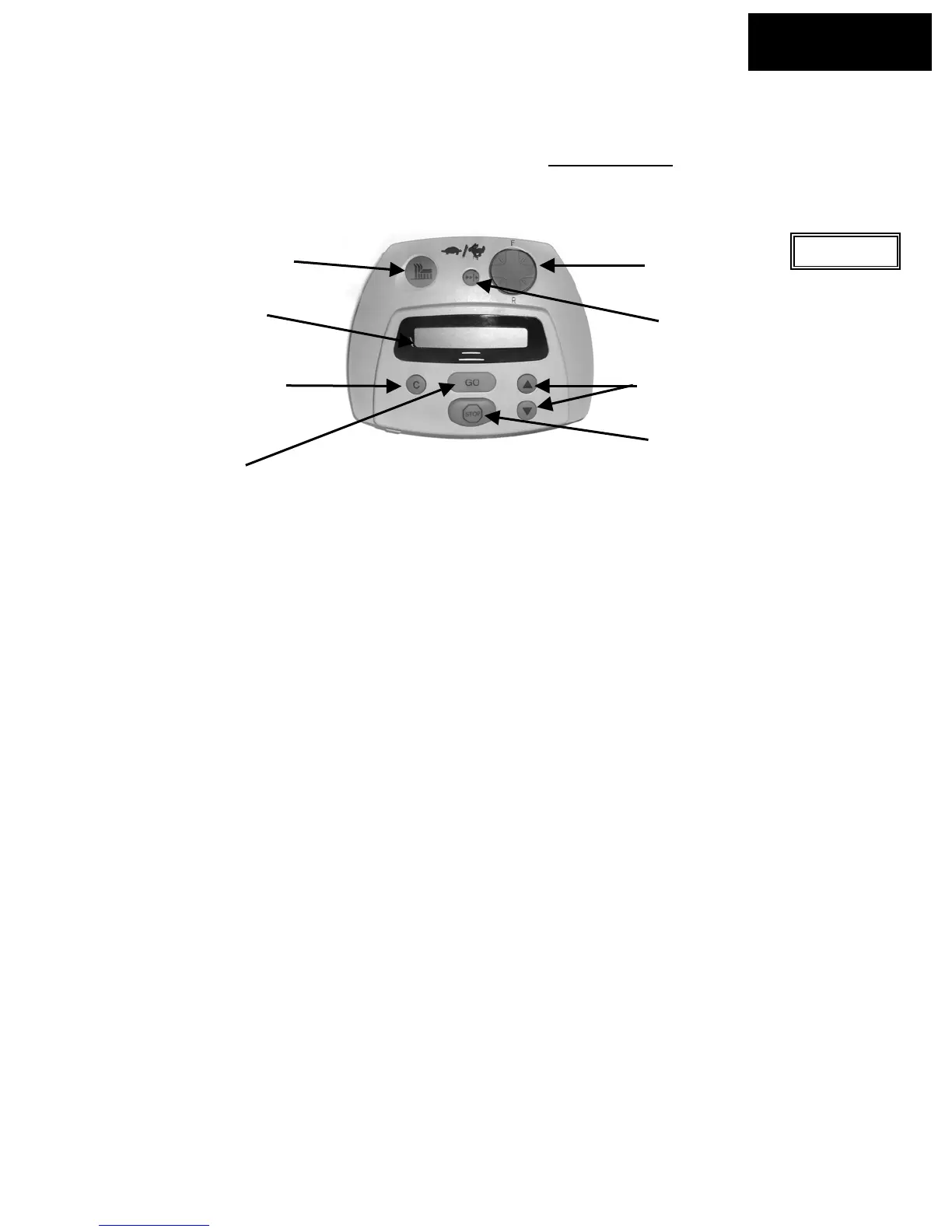
The Robomower is equipped with a Manual Controller. It allows you to manually drive and operate
the mower. To get started on using the Manual Controller, study figure 2.2 to view the various
operating controls and their functions. Refer to Chapter 5, Manual Operation
for full details regarding
use of the Manual Controller.
4. GO/Start
button
2. LCD display
window
8. Navigation
button
6. Scroll arrows for
menu selection
5. Stop
button
3. Clear/cancel
button
1. Manual blade
engagement
button
Figure 2.2
Manual
User Options
R
7. Manual drive speed
control – fast/slow
1. Manual blade engagement button – engagement of the blades in manual requires two distinct
button operations in order to operate.
2. LCD window display – displays the text messages using a Liquid Crystal Display (LCD). Also
shows current battery status.
3. Clear/cancel button –This button is used to cancel a selection shown in the LCD window when
making user selections. It is also used as a means to reverse back out of the menu options that
can be accessed in user options, returning you to the main screen.
4. GO/Start button – the main operating button for automatic operation. In addition it is used as a
button for making or confirming selections made under user options in the LCD window.
5. Stop button – pressing this button will stop all operation of the blades and wheel motors when in
the automatic operation mode. It can also be used to stop an operation in progress before it has
commenced.
6. Scroll for menu selection –The arrow button, up and down, allows you to scroll through these
different options.
7. Manual drive speed control – the manual drive function is equipped with two ground speeds,
fast and slow. In order to change the ground speed, press the button once to move to the
opposite speed of travel
8. Navigation button – pressing this button in the desired direction will allow manual driving of the
mower. Use light pressure on the navigator pad, gently rolling it to the desired direction of travel
for driving. The drive button is omni-directional in forward and reverse and constant pressure
must be maintained for continued operation.
Chapter 2
Page 22
2.3 Setting The Cutting Height And Ground Clearance
Remove the Power Pack before making any adjustments. The Robomower has two basic
adjustments, cutting height and ground clearance. The cutting height adjustment is located at the
front wheel and is controlled by rotating the front wheel hub in or out, which effectively causes the
front wheel to be raised or lowered. See Figure 2.6.








 To Next Page