SETTING OVEN CONTROLS - MODELS B & C
Control pad features
READ THE INSTRUCTIONS CAREFULLY BEFORE USING THE OVEN. For satisfactoryuse ofyour oven,become
familiarwiththe variousfeaturesand functionsofthe oven as describedbelow.Detailed instructionsforeach
feature and function follow later in this Use & Care Guide.
NOTE
The oven function will not work if the time of day clock is not set.
@ OVeN
preheat
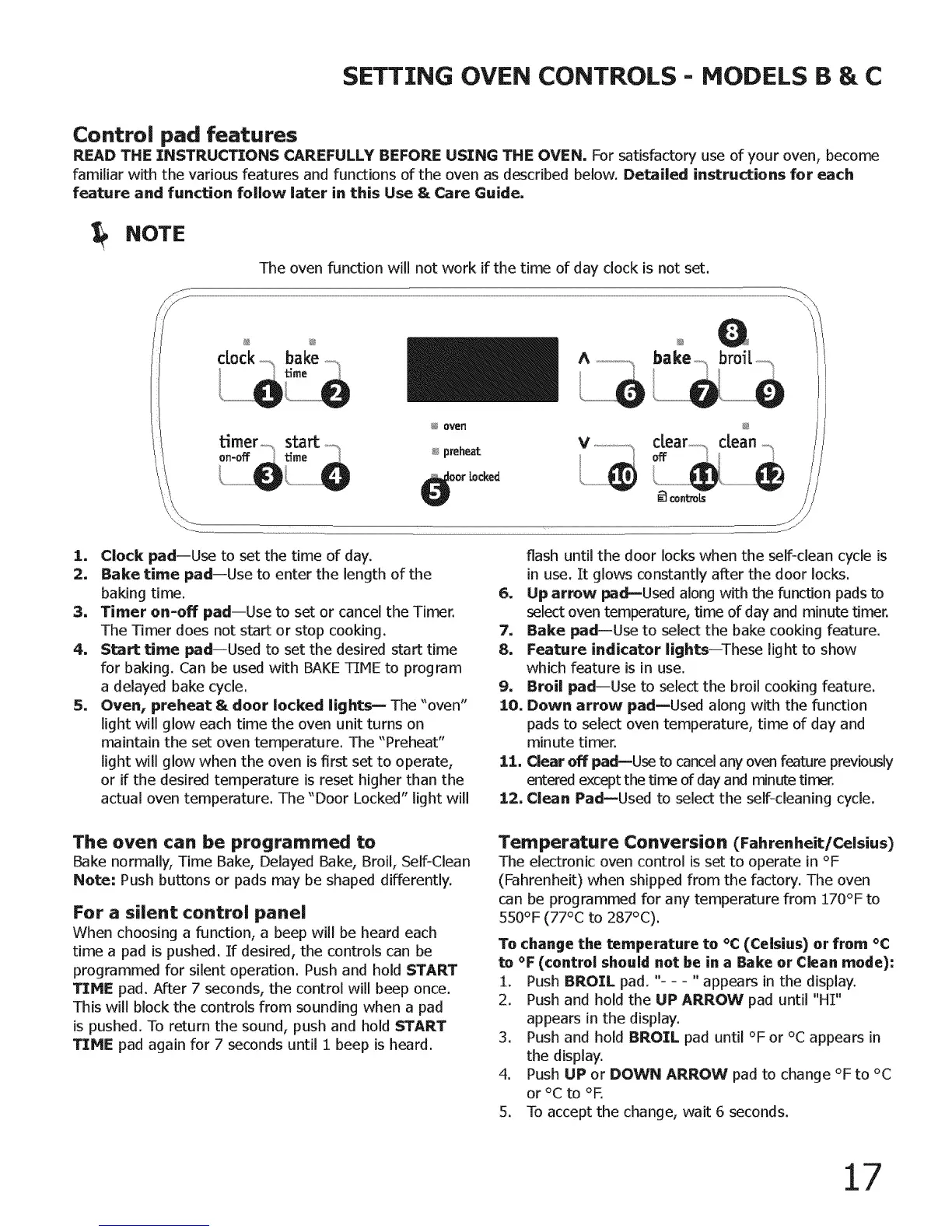
I. Clock pad--Use tosetthe time ofday.
:2. Bake time padiUse to enterthe lengthofthe
baking time.
3. Timer on-off pad--Use to set or cancel the Timer.
The Timer does not start or stop cooking.
4. Start time pad--Used to set the desired start time
for baking. Can be used with BAKE TIME to program
a delayed bake cycle.
5. Oven, preheat & door locked lights _- The "oven"
light will glow each time the oven unit turns on
maintain the set oven temperature. The "Prelleat"
light will glow when the oven is first set to operate,
or if the desired temperature is reset higher than the
actual oven temperature. The "Door Locked" light will
flash until the door locks when the self-clean cycle is
in use. It glows constantly after the door locks.
6. Up arrow pad--Used along with the function pads to
select oven temperature, time of day and minute timer.
7. Bake pad--Use to select the bake cooking feature.
8. Feature indicator lights--These light to show
which feature is in use.
9. Broil pad--Use to select the broil cooking feature.
10. Down arrow pad--Used along with the function
pads to select oven temperature, time of day and
minute timer.
11. Clear off padmUse to cancel any oven feature previously
entered except the time of day and minute titter.
12, Clean PadmUsed to select the self-cleaning cycle.
The oven can be programmed to
Bake normally, Time Bake, Delayed Bake, Broil, Self-Clean
Note: Push buttons or pads may be shaped differently.
For a silent control panel
When choosing a function, a beep will be heard each
time a pad is pushed. If desired, the controls can be
programmed for silent operation. Push and hold START
TIME pad. After 7 seconds, the control will beep once.
This will block the controls from sounding when a pad
is pushed. To return the sound, push and hold START
TIME pad again for 7 seconds until 1 beep is heard.
Temperature Conversion (Fahrenheit/Celsius)
The electronic oven control is set to operate in °F
(Fahrenheit) when shipped from the factow. The oven
can be programmed for any temperature from 270°F to
550°F (77°C to287°C).
To change the temperature to °C (Celsius) or from °C
to °F (control should not be in a Bake or Clean mode):
1. Push BROIL pad. "-- - "appears inthedisplay.
2. Push and holdthe UP ARROW pad until"HI"
appearsinthe display.
3. Push and holdBROIL pad until°F or °C appearsin
thedisplay.
4. Push UP or DOWN ARROW pad to change °F to°C
or °C to °F.
5. To accept the change, wait 6 seconds.
17



 To Next Page