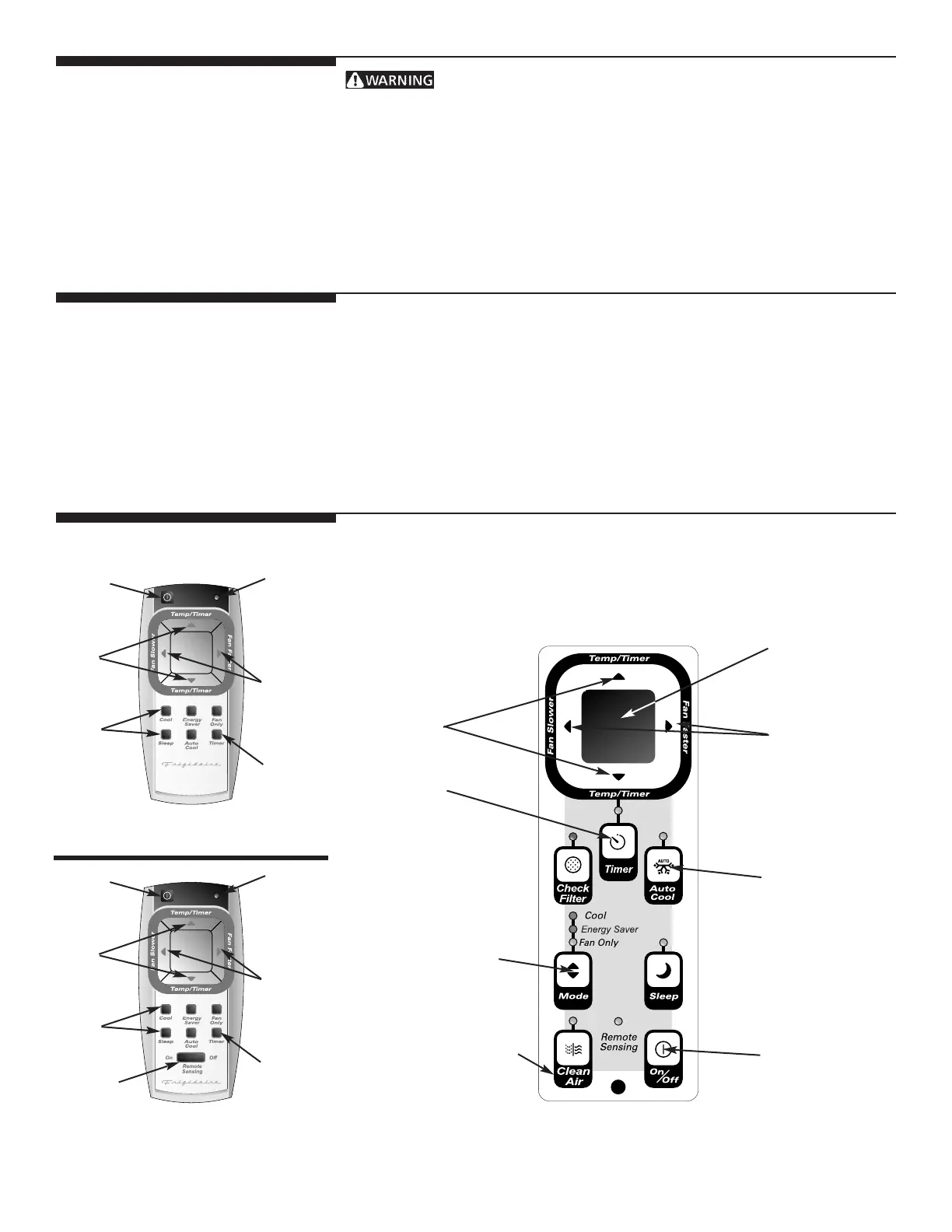
REMOTE CONTROL
ON/OFF
SETS
MODES
LIGHT
FAN
SPEEDS
Air Conditioner Features
ELECTRONIC CONTROL OPERATING INSTRUCTIONS
Before you begin, thoroughly familiarize yourself with the control panel and remote
as shown below and all its functions, then follow the symbol for the functions you
desire. The unit can be controlled by the touch pad alone or with the remote.
5
Using Air Conditioner
To reduce the risk of fire, electric shock, or injury to persons, read
the IMPORTANT SAFETY INSTRUCTIONS before operating this appliance.
To begin operating the air conditioner, follow these steps:
1. Plug in the air conditioner. (To prevent electrical hazards, do not use an extension
cord or an adapter plug.)
2. Press “On/Off” button to turn unit on.
3. Press Mode “COOL”
4. Press “TEMP/TIME” up (
^
) or down (
V
) to the desired set temperature.
Review the “Air Conditioner Features” section for other settings.
Variable Speed:
90 distinct fan settings give the ultimate in airflow and noise control.
Clean Air:
An ionic air filtration system that substantially increases the air-cleaning efficiency
over conventional air filters.
The Clean Air button on the air conditioner Touch Pad ONLY activates this feature.



 To Next Page