7
Operating Instructions
.devreser sthgir llA.cnI ,stcudorP emoH xulortcelE 9002
Operating Instructions
(continued)
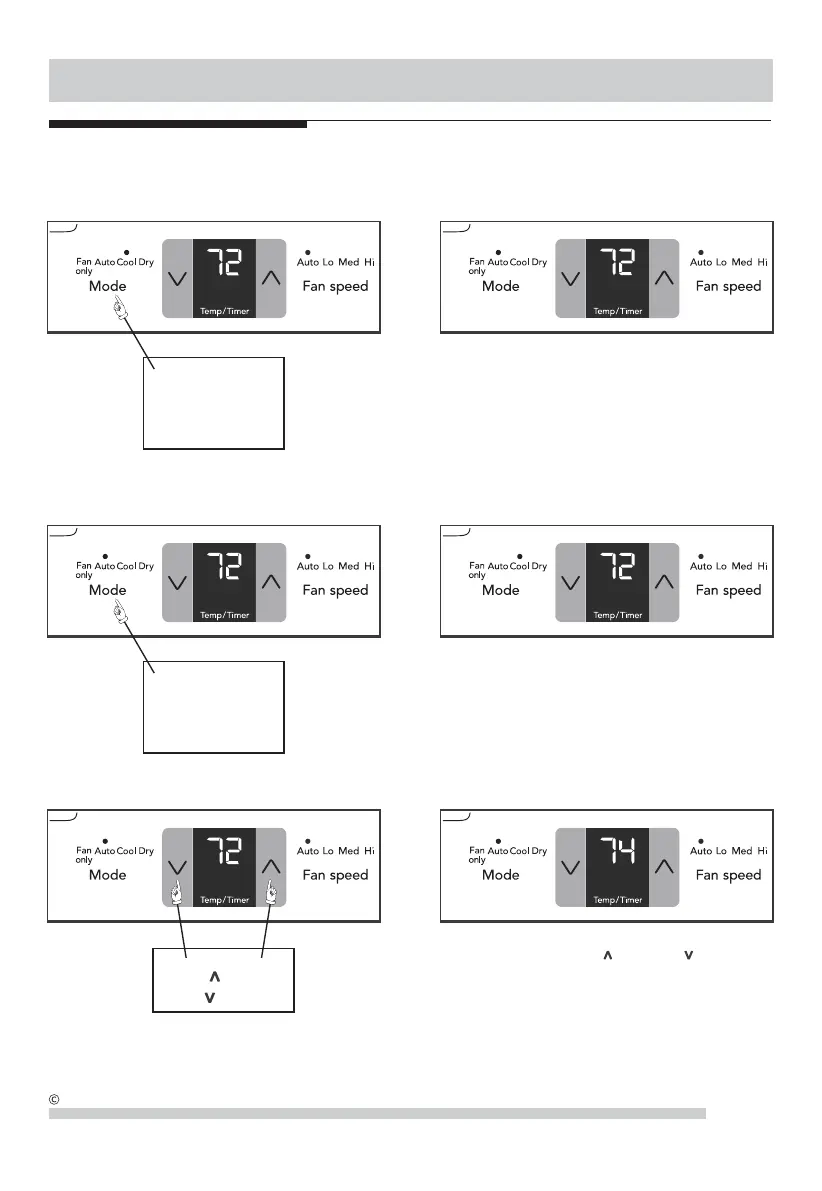
TO CHANGE TEMPERATURE SETTlNG: YOU WILL SEE:
PRESS TO RAISE
PRESS TO LOWER
DO THIS:
Note: Tap or hold either up ( ) or down ( ) button until
the desired temperature is seen on the display. This tempe-
rature will be automatically maintained anywhere between
62 °F (17 °C) and 86 °F (30 °C). If you want the display to
read the actual room temperature. See "To Operate on Fan
Only" section on Page 8.
COOL FEATURE: YOU WILL SEE:
Note: In this mode, the fan remains on all the time with the
compressor cycling on and off when room temperature is
reached.
CHOOSE COOL
DO THIS:
PRESS
MODE BUTTON
CHOOSE AUTO
DO THIS:
PRESS
MODE BUTTON
YOU WILL SEE:
AUTO FEATURE:
Note:
This mode is a fixed combination of Cool mode and
Auto fan speed setting. In this mode, the fan speed can not
be selected manually.



 To Next Page