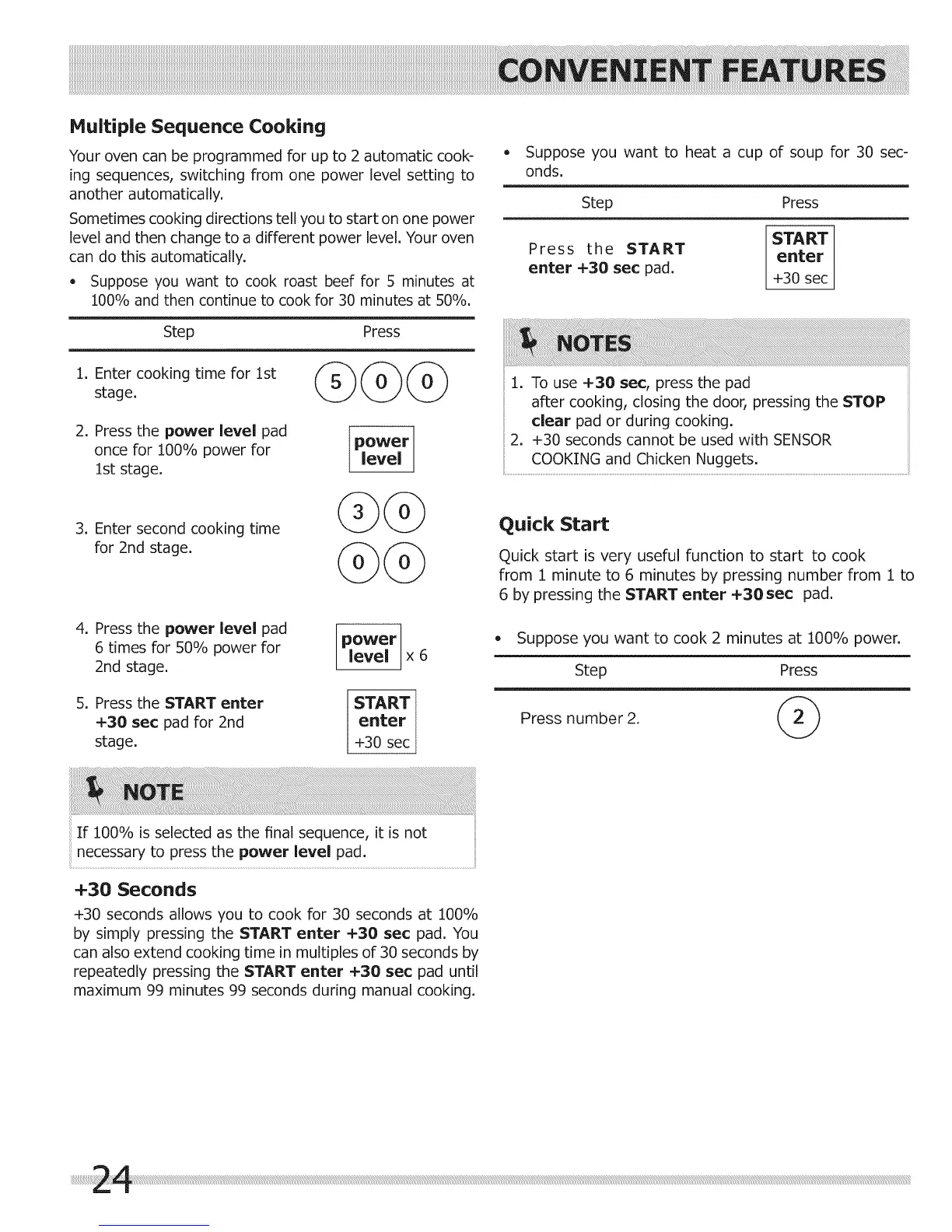
Multiple Sequence Cooking
Your oven can be programmed for up to 2 automatic cook-
ing sequences, switching from one power level setting to
another automatically.
Sometimes cooking directions tell you to start on one power
level and then change to a different power level. Your oven
can do this automatically.
• Suppose you want to cook roast beef for 5 minutes at
100% and then continue to cook for 30 minutes at 50%.
Step Press
1. Enter cooking time for 1st
stage.
2. Press the power level pad
once for 100% power for
1st stage.
power
level
Suppose you want to heat a cup of soup for 30 sec-
onds.
Step Press
Press the START
enter +30 sec pad.
START
enter
+30 sec
1. To use +30 sec, press the pad
after cooking, closing the door, pressing the STOP
clear pad or during cooking.
2. +30 seconds cannot be used with SENSOR
COOKING and Chicken Nuggets.
3. Enter second cooking time
for 2nd stage.
4. Press the power level pad
6 times for 50% power for
2nd stage.
5. Press the START enter
+30 sec pad for 2nd
stage.
@
power
level x 6
START
enter
+30 sec
Quick Start
Quick start is very useful function to start to cook
from 1 minute to 6 minutes by pressing number from 1 to
6 by pressing the START enter +30sec pad.
• Suppose you want to cook 2 minutes at 100% power.
Step Press
Press number 2.
If 100% is selected as the final sequence, it is not
necessary to press the power level pad.
+30 Seconds
+30 seconds allows you to cook for 30 seconds at 100%
by simply pressing the START enter +30 sec pad. You
can also extend cooking time in multiples of 30 seconds by
repeatedly pressing the START enter +30 sec pad until
maximum 99 minutes 99 seconds during manual cooking.



 To Next Page