Remote control description
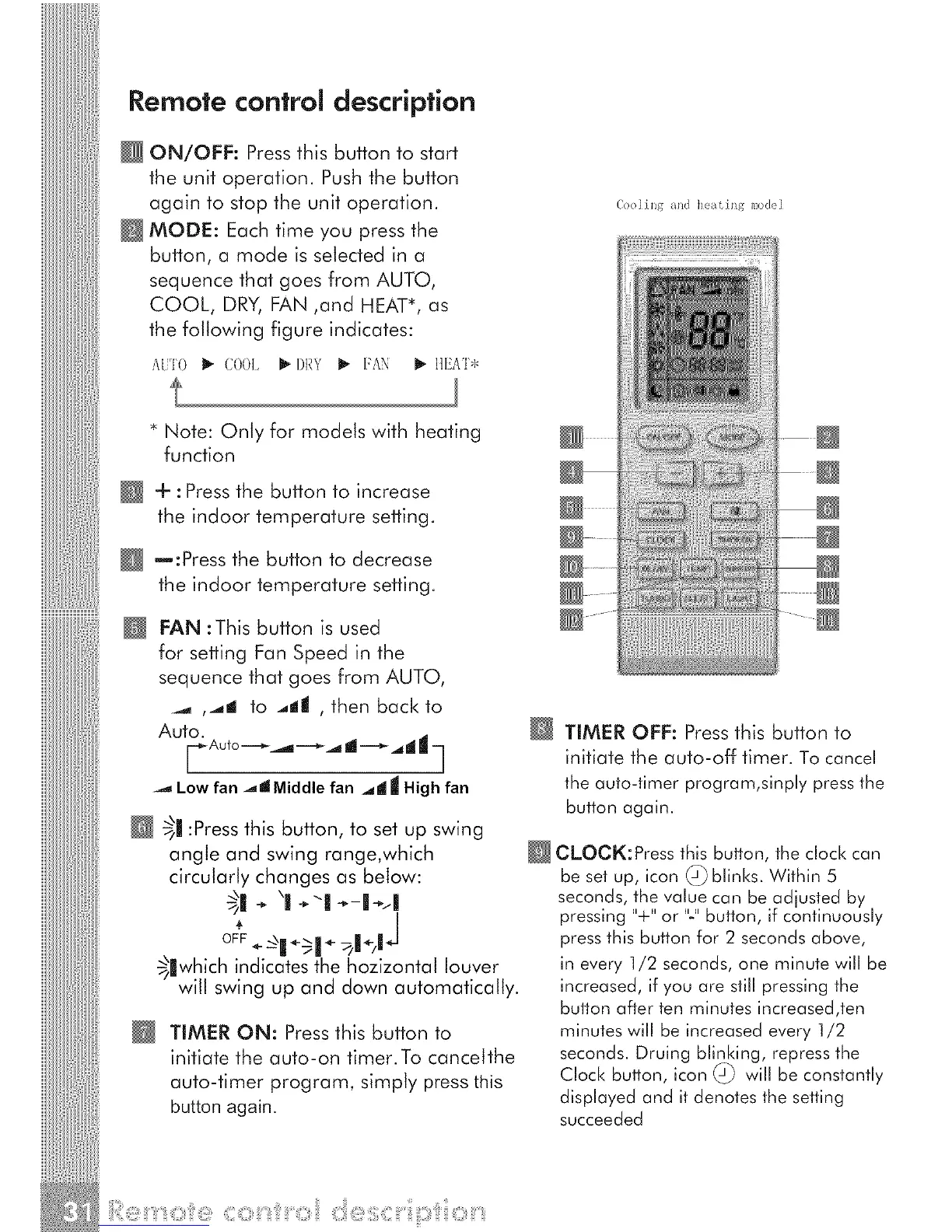
ON/OFF: Pressthis button to start
the unit operation. Pushthe button
again to stop the unit operation.
MODE: Each time you press the
button, a mode is selected in a
sequence that goes from AUTO,
COOL, DRY, FAN ,and HEAT*, as
the following figure indicates:
A[JTO _- (;()()I_ _-DRY _ FAN I_ IIEAT*
(oo l i l/g _/ll(] tl(?[/[ i llg I_/O(]( I
* Note: Only for models with heating
function
+ :Pressthe button to increase
the indoor temperature setting.
re:Press the button to decrease
the indoor temperature setting.
N
FAN :This button is used
for setting Fan Speed in the
sequence that goes from AUTO,
_,, ,.,,,I to .,ill , then back to
Auto.
F Auto -------_.,_ -------_,_ d -------__d IJ --]
-._ Low fan .._J Middle fan _ll IIIHigh fan
_11:Pressthis button, to set up swing
angle and swing range,which
circularly changes as below:
/
OF*F
_lwh_ch indicates the hozizontal louver
will swing up and down automatically.
N
TIMER ON: Pressthis button to
initiate the auto-on timer.To cancelthe
auto-timer program, simply press this
button again.
@ TIMER OFF: Press this button to
initiate the auto-off timer. To cancel
the auto-timer program,sinply press the
button again.
@CLOCK:Press this button, the clock can
be set up, icon @ blinks. Within 5
seconds, the value can be adjusted by
pressing "+" or "-" button, if continuously
press this button for 2 seconds above,
in every 1/2 seconds, one minute will be
increased, if you are still pressing the
button after ten minutes increased,ten
minutes will be increased every 1/2
seconds. Druing blir)king, repress the
Clock button, icon _.) will be constantly
displayed and it denotes the setting
succeeded



 To Next Page