13
SETTING MAIN OVEN CONTROLS
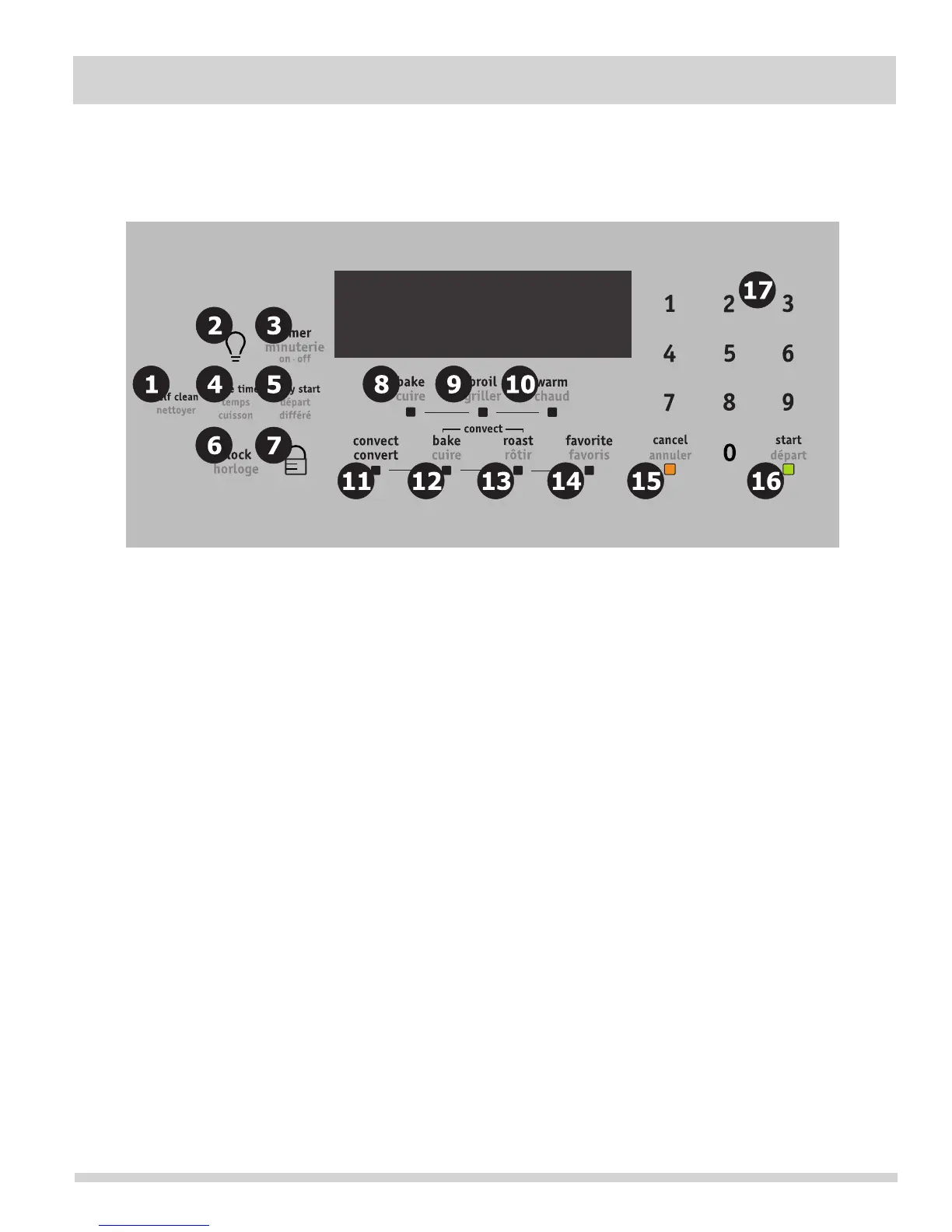
CONTROL PAD FEATURES
For satisfactory use of your oven, become
familiar with the various features and functions of the oven as described below. Detailed instructions for each
feature and function follow later in this Use & Care Guide.
—Use to select the self cleaning
feature.
—Use to turn the oven light ON and
OFF.
—Use to set or cancel the Timer.
The Timer does not start or stop cooking.
—Use to enter the length of the
baking time.
5. D—Use to program a Delayed Timed
Bake or Delay Self-Cleaning cycle start time.
—Use to set the time of day.
—Use to lock the oven door and the
control panel pads.
—Use to select the bake cooking feature.
—Use to select the broil cooking feature.
Use to keep the dishes and food warm
until served.
—Use to convert a regular
recipe temperature to a convection temperature.
—Use to select the convection
bake feature.
—Use to select the convection
roast feature.
—Use to record a temperature setting
for a cooking feature.
Use to cancel any oven feature
previously entered except the time of day and minute
timer.
Use to start all oven features (not used
with Oven Light).
Use to enter temperatures and
times.



 To Next Page