Need help?
Do you have a question about the FrSky TD R10 and is the answer not in the manual?
Details on Tandem dual-band receivers, triple antenna design, black-box function, and configurable 10 channel ports.
Technical details including frequency, dimensions, weight, operating voltage, current, and compatibility.
Highlights simultaneous dual-band operation, triple antennas, black box, built-in voltage sensor, and extended range.
Step-by-step guide for binding the TD R10 receiver to a compatible FrSky transmitter.
Explanation of LED colors and patterns for registration, binding, and normal operation status.
Instructions on how to configure the function of each channel port via the transmitter interface.
Guide on how to enter and set up the low-latency Race mode for faster response times.
Instructions on accessing and recording flight data such as RX reset, battery voltage, and RSSI.
Procedure for updating the receiver firmware wirelessly using the transmitter.
How to configure failsafe behavior for loss of signal, supporting no pulse, hold, and custom modes.
Steps for performing a pre-flight range check to ensure optimal signal strength and distance.
Details on compliance with FCC Part 15 rules, including conditions for operation and potential interference.
Guidance on how to correct harmful interference if the equipment causes issues with radio reception.
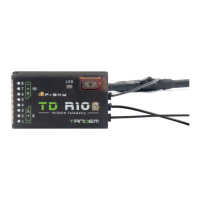
The FrSky TD R10 Receiver is a sophisticated dual-band receiver designed for remote control systems, operating simultaneously at both 900MHz and 2.4GHz frequencies. This dual-band operation ensures low latency signal control, extended control range, and enhanced reliability with strong anti-interference performance.
The TD R10 receiver is engineered to provide robust and reliable communication between a transmitter and a remote-controlled model. Its primary function is to receive control signals and translate them into commands for the model's various components. The receiver's dual-band capability means it can leverage the strengths of both frequency bands, offering redundancy and improved signal integrity, especially in challenging environments.
A key feature of the TD R10 is its triple antenna design, which provides multi-directional coverage for the remote signal. This design helps to minimize signal loss and maintain a strong connection regardless of the model's orientation. The receiver also incorporates a built-in black-box function, which records flight data such as power and signal-related information, especially when unusual statuses occur during flight. This data can be invaluable for post-flight analysis and troubleshooting.
The receiver boasts 10 configurable channel ports, offering significant flexibility for various setups. Each channel port can be assigned as PWM, SBUS, FBUS, or S.Port. The integration of the FBUS protocol is particularly noteworthy, as it enables seamless pairing with multiple telemetry devices, such as Neuron ESCs and Advanced Sensors. This not only expands the capabilities of the remote control system but also simplifies the overall build setup by reducing wiring complexity.
The TD R10 supports a "Race Mode" with telemetry, which is designed for high-performance applications where minimal latency is critical. This mode optimizes the receiver's performance for competitive use, providing rapid response times. The receiver also features a built-in voltage sensor, allowing users to monitor the power supply to the receiver directly.
Using the TD R10 receiver involves a straightforward registration and binding procedure. For example, with a TANDEM X20 transmitter, users enter the model settings, select "RF System," turn on the internal module, and choose the desired antenna and power settings before selecting "Register." The binding process involves connecting the battery to the receiver while holding its button, which activates a specific LED pattern (RED and GREEN LEDs on) indicating "Reg" status. Once the transmitter displays "Registration OK," the receiver flashes, confirming successful registration. The final step involves selecting the receiver for binding, connecting the battery, and observing the GREEN LED staying lit and the BLUE LED flashing, followed by a "Bind successful" message on the transmitter.
Configuring the channel ports is also user-friendly. Through the transmitter's "RF System" menu, users can access "RX Settings" and define the function of each of the 10 pins. For instance, pin 1 can be set as Smart Port, SBUS OUT, FBUS, SBUS IN, or PWM, while pins 2-10 can be configured as Smart Port, SBUS OUT, FBUS, or PWM. This granular control allows users to tailor the receiver's outputs precisely to their model's requirements.
The "Race Mode" can be activated by entering the Model-RF system, selecting a channel range (e.g., CH1-CH8), clicking "Switch Positions," and choosing a switch to initiate the mode. This allows for quick toggling between standard and high-performance modes.
The black-box function is accessible through the transmitter's "RF System" menu under "Set" and "Flight Data Record." This feature provides valuable insights into flight performance by recording data such as RX Reset Case, RSSI, and VFR.
The receiver supports Over-The-Air (OTA) firmware updates, simplifying maintenance and ensuring the device can always run the latest software. This is done through the transmitter's "File manager," where users select the firmware, choose "Flash RX by int. OTA," power on the receiver, and complete the flash process.
The TD R10 receiver is designed with maintenance in mind, primarily through its OTA firmware update capability. This allows users to keep the receiver's software up-to-date without needing physical connections or specialized tools, ensuring optimal performance and access to the latest features and bug fixes. It is important to note that binding operations should not be performed at close range while a firmware upgrade is in progress.
Failsafe is a critical maintenance and safety feature. It allows users to preset channel output positions in case the control signal is lost for a period. For receivers supporting ACCESS, failsafe can be configured via the transmitter interface, offering options such as no pulse, hold, and custom three modes for each channel. This ensures that the model reacts predictably and safely in the event of signal loss.
Regular pre-flight range checks are recommended to ensure safe operation. This involves placing the model at least 60cm above non-metal contaminated ground and checking the signal strength. The receiver's triple antenna design, while providing multi-directional coverage, still benefits from proper placement and orientation (vertical position) for optimal performance during range checks and actual flights. Users should be aware that reflections from metal fences, concrete buildings, or trees can affect signal strength during range checks and flight. In "Range Check Mode," the RF power is reduced, decreasing the range distance to 1/30-1/10 of the normal model range, which helps verify signal integrity at closer distances.
The TD R10 is built to comply with FCC regulations (Part 15, Class B digital device), ensuring it operates without causing harmful interference. Users are advised to avoid unauthorized modifications to the equipment, as this could void their authority to operate it. In case of interference, measures such as reorienting the receiving antenna, increasing separation between equipment, or connecting to a different circuit are recommended.
Overall, the FrSky TD R10 Receiver is a robust, feature-rich device that offers advanced communication capabilities, flexible configuration, and user-friendly maintenance options, making it suitable for a wide range of remote control applications.
 General
| Voltage Measurement Range via AIN2 (External Device) | 0-36V |
|---|---|
| Telemetry | Yes |
| S.BUS Output | Yes |
| S.Port | Yes |
| RSSI Output | Yes |
| Compatibility | ACCESS & TD |
| Operating Range | Full range |
| Ports | S.BUS, S.Port |
| Protocol | ACCESS & TD |

 To Next Page