Need help?
Do you have a question about the FrSky TD R6 and is the answer not in the manual?
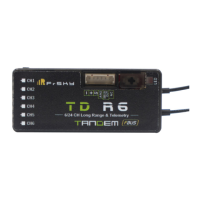
The FrSky TD R6 Receiver is a dual-band receiver designed for use with FrSky Tandem series transmitters and TD protocol-capable RF modules. It operates simultaneously on both 2.4GHz and 900MHz frequencies, offering enhanced reliability, anti-interference performance, low latency, and long-range control.
The TD R6 receiver provides 6 high-precision PWM channel outputs, making it suitable for various RC applications. It also features SBUS Out and S.Port, with the S.Port capable of being configured to the FBUS protocol. This FBUS capability allows for seamless pairing with multiple telemetry devices such as Neuron ESCs and Advance Sensors, simplifying the overall build setup. A built-in black box module records data related to power and signal status during flight, which can be useful for diagnostics and analysis. The receiver supports Over-The-Air (OTA) firmware updates, allowing users to keep their device up-to-date without physical connection.
Registration & Automatic Binding: The registration and binding process is straightforward. For Tandem X20 transmitters, users navigate to the Model's RF System settings, turn on the internal module, select TD MODE, and then choose "Register." The receiver is connected to a battery while holding its button, causing both RED and GREEN LEDs to illuminate, indicating "Reg" status. After the transmitter displays the Register ID, RX name, and UID, selecting "Register" on the transmitter will cause the receiver's RED LED to flash, and the transmitter will confirm "Registration OK." Once registered, the receiver button is no longer needed for subsequent binding. To bind, users select one of the registered receivers on the transmitter, connect the battery to the receiver, and the GREEN LED will stay lit while the BLUE LED flashes, confirming "Bind successful."
LED State Indicators: The receiver provides clear LED indicators for its status:
S.Port/F.Port/FBUS Configuration: Users can switch between S.Port, F.Port, and FBUS (F.Port2) protocols by accessing the "Set-Options" menu, selecting "Telem. Port," and choosing the desired protocol.
SBUS Channel Mode Selection: The receiver supports both SBUS-16 and SBUS-24 channel modes. This can be configured in the "RX Settings" menu by selecting "SBUS" and then choosing the preferred mode.
Race Mode (4ms) Activation: For low-latency applications, the receiver can be set to Race Mode, offering a response time down to 4ms. To activate this, users go to the "Model-RF system" menu, select a Channel Range (e.g., CH1-CH8), click "Switch Positions," and then select a switch to initiate Race Mode.
Dual-Band Operation: The TD R6 operates in a simultaneous 2.4G&900M dual-band TD mode, providing robust and reliable communication. Its dual-band antenna design ensures multi-directional coverage, enhancing signal reception and range.
Compact and Lightweight Design: With dimensions of 47.5*20.4*10.9mm and a weight of 11.5g, the receiver is compact and lightweight, making it suitable for various models where space and weight are critical.
Over-The-Air (OTA) Firmware Update: The receiver supports OTA firmware updates, which can be performed using a Tandem X20 transmitter. Users navigate to the "File manager," select the firmware file, and choose "Flash RX by int.OTA." After powering on the receiver and selecting it, the flash process can be initiated. The transmitter will display "Success" upon completion. It is important to note that binding operations should not be performed while firmware upgrading is in progress, and the firmware should be updated after the receiver has been registered (OTA).
Failsafe Configuration: Failsafe is a critical safety feature that defines the receiver's output channel positions when control signal is lost. For Tandem X20 transmitters, Failsafe can be configured via the transmitter interface, supporting "no pulse," "hold," and "custom" modes for each channel. To set Failsafe, users access the "MODEL SETUP/Internal RF/Failsafe" menu on the transmitter.
Black Box Function: The integrated black box function records data related to power and signal status during flight. This data can be invaluable for post-flight analysis, troubleshooting, and understanding the performance of the system in various conditions.
FCC Compliance: The device complies with Part 15 of the FCC Rules, ensuring it does not cause harmful interference and accepts any interference received. Users are advised that any changes or modifications not expressly approved by the manufacturer could void their authority to operate the equipment. In case of interference, troubleshooting steps include reorienting the receiving antenna, increasing separation between equipment, connecting to a different circuit, or consulting a technician.
FrSky continuously updates its products with new features and improvements. Users are encouraged to check the download section of the FrSky website (www.frsky-rc.com) for the latest firmware and manuals to ensure optimal performance and access to the newest functionalities.

 To Next Page
 General