Making a multi
Making a multi
-
-
page file printed into 2
page file printed into 2
-
-
sided booklet output, fold & centre stapled.
sided booklet output, fold & centre stapled.
P5: Making a booklet print (optional Finishing)
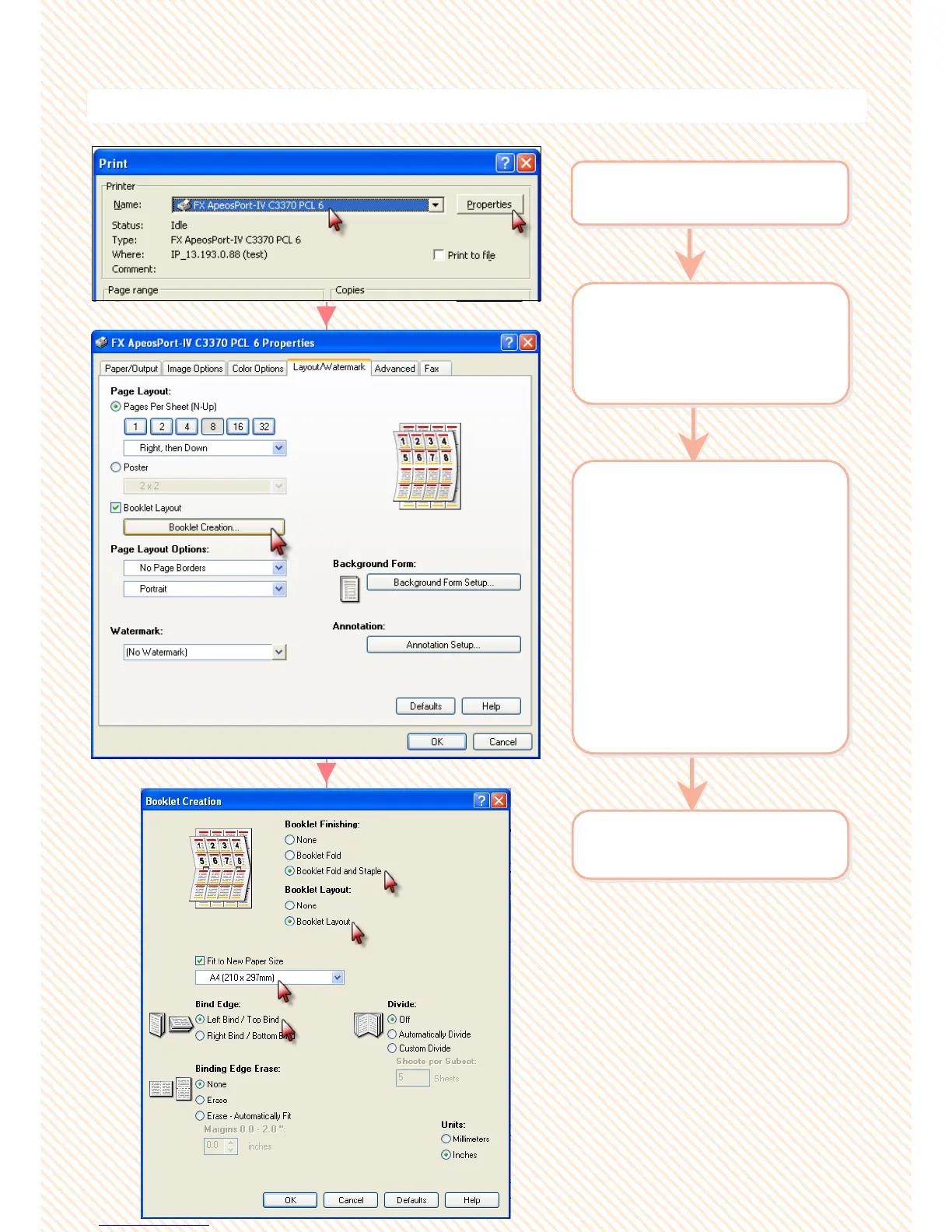
2 Select
[Layout/Watermark] >
Select [Booklet Layout] :
Booklet Creation
2 Select
[Layout/Watermark] >
Select [Booklet Layout] :
Booklet Creation
3 Select required feature:
[Booklet Finishing]
Booklet Fold
Booklet Fold & Staple
[Booklet Layout]
Booklet layout
[Fit to New Paper Size]
Booklet output size (A4 size
or A3 size)
[Bind Edge]
Left Bind / Top Bind
Right Bind / Bottom Bind
3 Select required feature:
[Booklet Finishing]
Booklet Fold
Booklet Fold & Staple
[Booklet Layout]
Booklet layout
[Fit to New Paper Size]
Booklet output size (A4 size
or A3 size)
[Bind Edge]
Left Bind / Top Bind
Right Bind / Bottom Bind
1 From application > Select
Printer > [Properties]
1 From application > Select
Printer > [Properties]
4 Click OK on all open
windows to print.
4 Click OK on all open
windows to print.
31
31


 To Next Page
 Loading...




