Checking Current/Pending Jobs
481
Job Status
11
Checking Current/Pending Jobs
This section describes how to check current or pending jobs. On the status screen, you can
cancel or preferentially execute jobs.
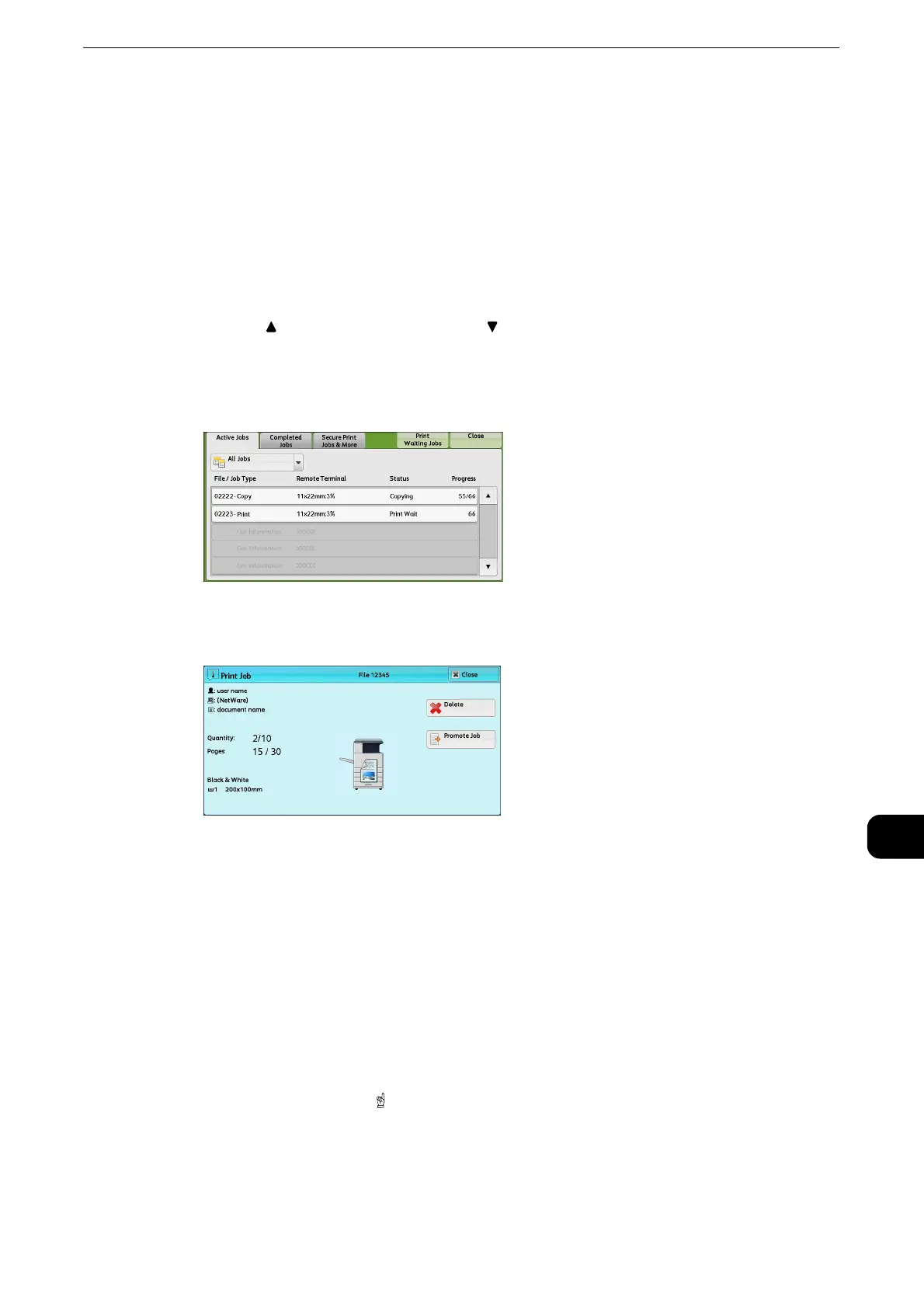
1 Press the <Job Status> button.
2 Select the job to be canceled or preferentially executed.
z
Select [ ] to return to the previous screen or [ ] to move to the next screen.
z
Scroll the list by drag or flick operation to switch the screen to be displayed. For information on how to drag or
flick, refer to "Touch Screen" (P.74).
z
From the drop-down menu, you can select and display the desired type of jobs.
3 Select [Delete] or [Promote Job].
Print Waiting Jobs
Prints the jobs that are waiting to be output or resumed.
z
For more information, refer to "Printing Pending Jobs" (P.511).
Delete
Cancels the current or pending job.
Promote Job
Preferentially executes the selected job.
If you select this button, [ ] appears under the [Status] of the selected job.
Delete
Stops processing the job.



 To Next Page
 Loading...