To scan a book onto separate sheets and transfer via preferred s
To scan a book onto separate sheets and transfer via preferred s
canning method
canning method
S8: To scan a bound document (Book) …
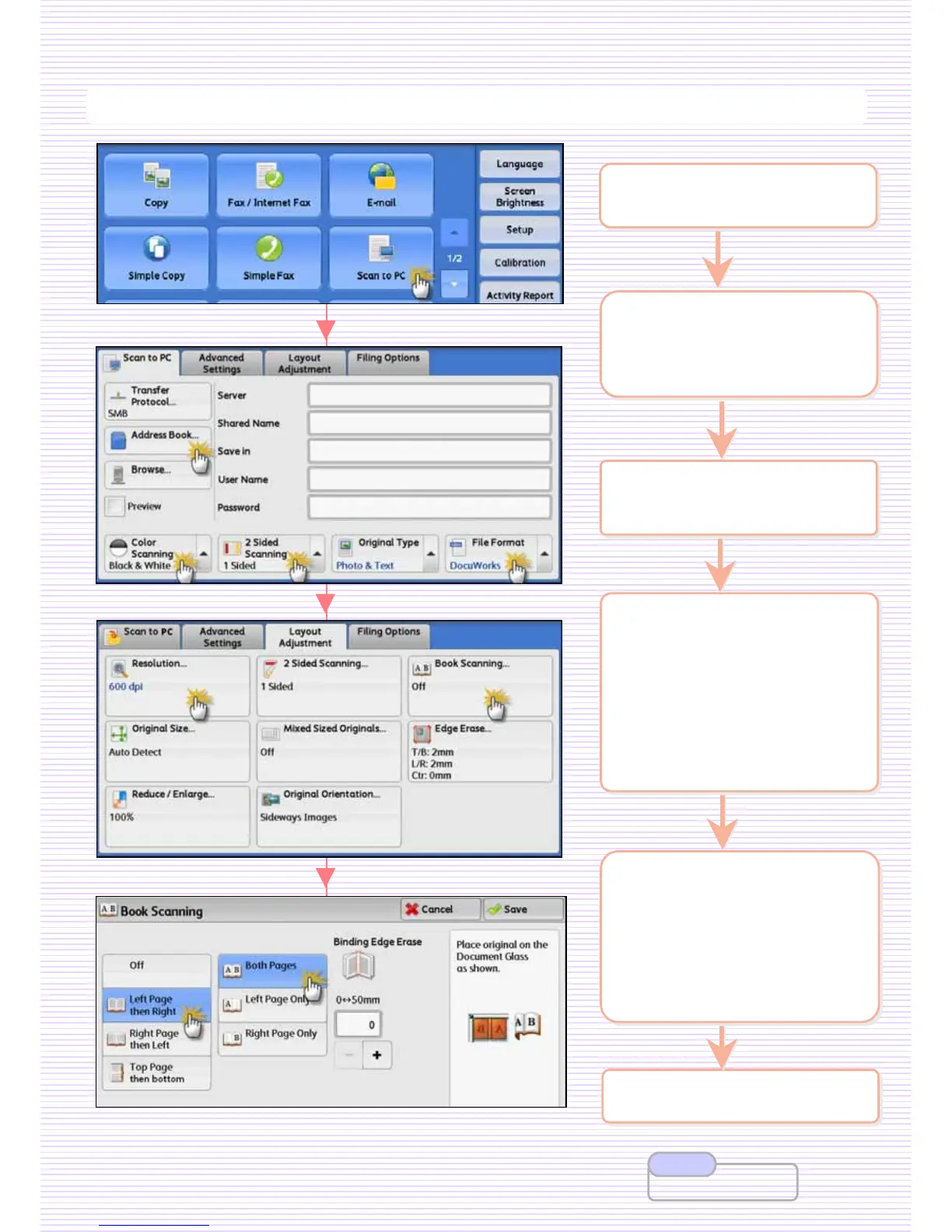
2 On the [Services Home]
select preferred scan
method Folder/PC/Email]
2 On the [Services Home]
select preferred scan
method Folder/PC/Email]
3 Select [Address Book] to
enter recipient/location
3 Select [Address Book] to
enter recipient/location
6 Press <Start> button.
6 Press <Start> button.
5 Select [Layout
Adjustment] >
[Resolution] if necessary.
[Book Scanning]
Left Page then Right
Right Page then Left
Top Page then Bottom
5 Select [Layout
Adjustment] >
[Resolution] if necessary.
[Book Scanning]
Left Page then Right
Right Page then Left
Top Page then Bottom
4 Select an option: if
necessary.
[Color Scanning]
Auto Detect / Color
Black & White / Grayscale
[File Format]
TIFF / JPEG / PDF /
DOCUWORKS / More…
4 Select an option: if
necessary.
[Color Scanning]
Auto Detect / Color
Black & White / Grayscale
[File Format]
TIFF / JPEG / PDF /
DOCUWORKS / More…
1 Load documents onto the
Document Feeder face up
1 Load documents onto the
Document Feeder face up
User Guide P.282
Note
28
28



 To Next Page
 Loading...





