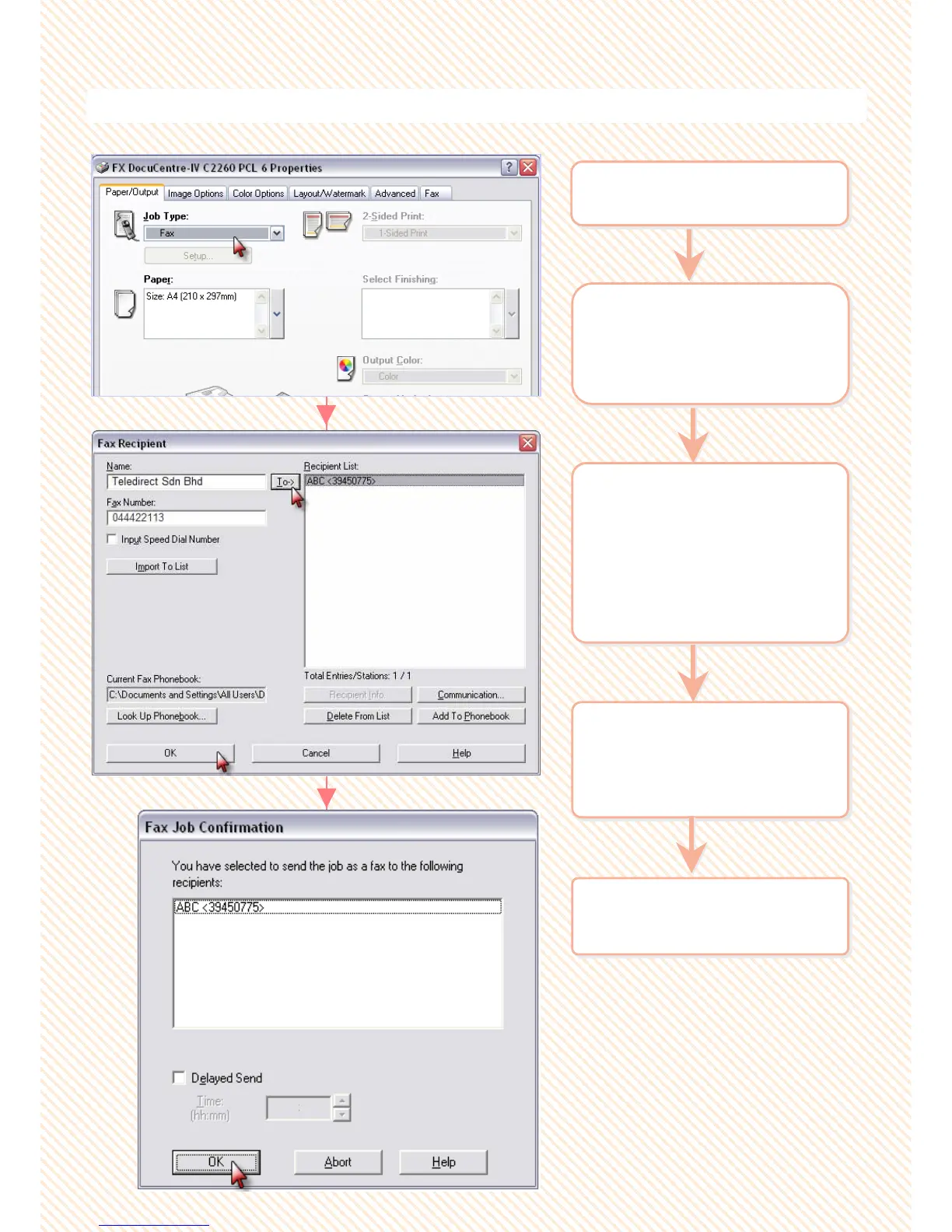
P8: Making a direct fax from computer
You can perform PC Faxing directly from your computer applicatio
You can perform PC Faxing directly from your computer applicatio
ns
ns
2 On the [Paper/Output] >
select [Job Type] : Fax
Click ‘OK’ on all open
windows.
2 On the [Paper/Output] >
select [Job Type] : Fax
Click ‘OK’ on all open
windows.
3 The ‘Fax Recipient’
window displayed. Enter
recipient name and fax
number on the text box
and click [To>>] button.
(Repeat step to add more
than one recipient)
3 The ‘Fax Recipient’
window displayed. Enter
recipient name and fax
number on the text box
and click [To>>] button.
(Repeat step to add more
than one recipient)
1 From application > Select
Printer > [Properties]
1 From application > Select
Printer > [Properties]
4 Click ‘Add to Phonebook’
button to add selected
recipient to your
computer phonebook.
4 Click ‘Add to Phonebook’
button to add selected
recipient to your
computer phonebook.
5 Select [OK] on all open
windows to proceed.
5 Select [OK] on all open
windows to proceed.
35
35



 To Next Page
 Loading...





