- 27 -
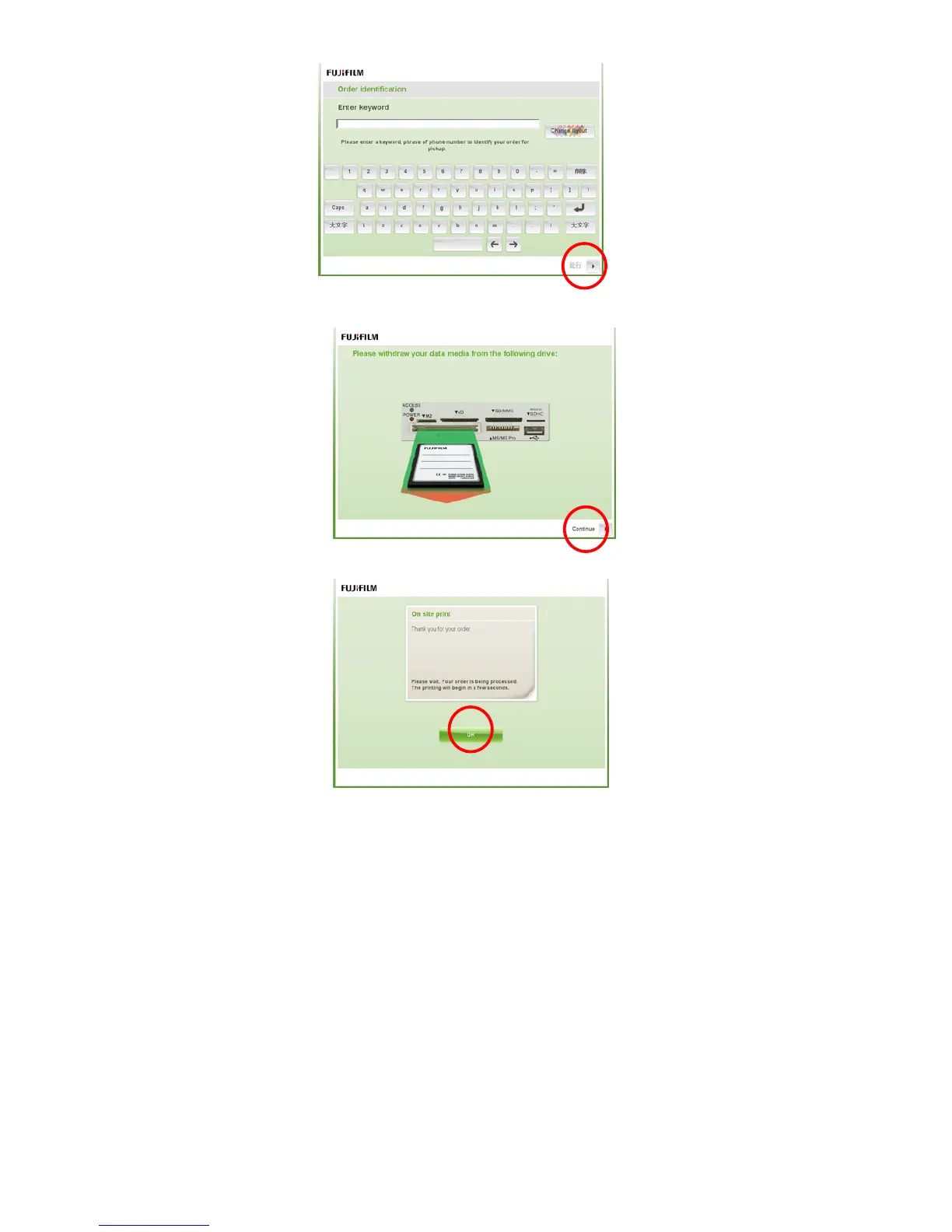
5-9. In the ninth screen, enter your name or telephone number and press [Continue].
5-10. In the tenth screen, eject the media card and press [Continue].
5-11. In the eleventh screen, to complete the order, press [OK].
6. Troubleshooting
If you found any problems, check the following countermeasures.
6-1. When you cannot write data to USB media
All USB port & media reader is read-only(default). You can write data by using the “USB Port
ReadWrite Setting Tool.exe" in the Windows desktop.
Please see User Manual of DPC Portable for details.
6-2. When you cannot accept brightness of monitor
You can adjust brightness using the “Susibrightness” tool in the Windows menu.
Please see User Manual of DPC Portable for details.
6-3. When you cannot accept position of touch panel monitor
You can adjust position using the “Calibrate Touchscreen.exe” in the Windows desktop.
Please see User Manual of DPC Portable for details.



 To Next Page