EasyManua.ls Logo

FujiFilm Finepix L50 Series - User Manual

FujiFilm Finepix L50 Series
112 pages
Print Icon
To Next Page IconTo Next Page
Loading...
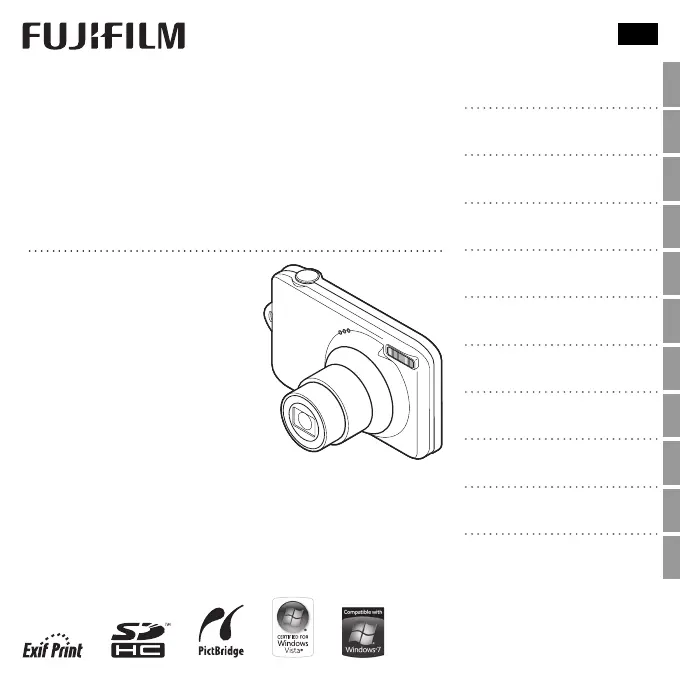
FINEPIX L50
Series
FINEPIX L30
Series
DIGITAL CAMERA
Owner’s Manual
Thank you for your purchase
of this product. This manual
describes how to use your
FUJIFILM digital camera and
the supplied software. Be sure
that you have read and un-
derstood its contents and the
warnings in “For Your Safety”
(P ii) before using the camera.
EN
Before You Begin
First Steps
Basic Photography and Playback
More on Photography
More on Playback
Movies
Connections
Menus
Technical Notes
Troubleshooting
Appendix
BL01438-200

Table of Contents

Questions and Answers

  • R
    richmatthewAug 19, 2025
    How to fix FujiFilm Finepix L50 Digital Camera that does not turn on?
    • D
      danielharrisAug 20, 2025
      If your FujiFilm Digital Camera doesn't turn on, it could be due to several reasons: * The battery might be exhausted. In this case, charge the battery. * The battery might be inserted incorrectly. Reinsert it in the correct orientation. * The battery-chamber cover might not be latched. Ensure that the battery-chamber cover is properly latched.
  • D
    Daniel SummersAug 21, 2025
    What to do if my FujiFilm Finepix L50 Digital Camera won't take pictures?
    • A
      Anthony HickmanAug 22, 2025
      If your FujiFilm Digital Camera is not taking pictures when you press the shutter button, here are a few potential reasons: * The memory might be full. Insert a new memory card or delete existing pictures. * The memory card might not be formatted. Format the memory card. * There might be dirt on the memory card contacts. Clean the contacts with a soft, dry cloth. * The memory card might be damaged. Insert a new memory card. * The battery might be exhausted. Charge the battery or insert a fully-charged spare battery. * The camera might have turned off automatically. Turn the camera back on.
  • S
    sandracampbellAug 23, 2025
    Why does my FujiFilm Digital Camera battery run down so quickly?
    • A
      Alexis ThompsonAug 25, 2025
      If your FujiFilm Digital Camera battery drains quickly, here are a few possible causes and solutions: * The battery might be cold. Warm it up by placing it in a pocket or warm place before reinserting it. * The battery terminals might be dirty. Clean them with a soft, dry cloth. * The camera might be in Q shooting mode. Switch to B mode to reduce battery drain. * The battery might be old. Consider purchasing a new battery.
  • J
    James FreyAug 26, 2025
    How to resolve blurry pictures on FujiFilm Finepix L50 Digital Camera?
    • K
      Kathryn DouglasAug 26, 2025
      If your FujiFilm Digital Camera is producing blurry pictures, consider the following: * The lens might be dirty. Clean the lens. * The lens might be blocked. Keep objects away from the lens. * Ensure you check the focus before shooting. * Try using the flash or a tripod for stability.
  • M
    Michael BurkeAug 27, 2025
    Why does my FujiFilm Finepix L50 Digital Camera turn off suddenly?
    • V
      vrobinsonAug 27, 2025
      If your FujiFilm Digital Camera suddenly turns off, charge the battery or insert a fully-charged spare battery.
  • J
    joseph56Aug 29, 2025
    What to do if my FujiFilm Digital Camera does not focus?
    • A
      Amy WhiteAug 29, 2025
      If your FujiFilm Digital Camera does not focus, it might be because: * The subject is too close. Select macro mode. * The subject is too far away. Cancel macro mode. * The subject is not suited to autofocus. Use focus lock.
  • A
    Adrian BrewerAug 31, 2025
    Why is my FujiFilm Digital Camera battery not charging?
    • V
      valeriebautistaAug 31, 2025
      If your FujiFilm Digital Camera battery isn't charging, it could be due to these reasons: * The battery terminals might be dirty. Clean them with a soft, dry cloth. * The battery might have been charged many times and reached its end of life. Purchase a new battery. * The battery might be too hot or too cold. Wait for the battery temperature to stabilize. * If the battery still fails to charge, contact your FUJIFILM dealer.
  • N
    Nicole GarciaSep 3, 2025
    Why is charging my FujiFilm Digital Camera so slow?
    • B
      Breanna JenkinsSep 3, 2025
      If charging of your FujiFilm Digital Camera is slow, try charging the battery at room temperature.
  • E
    Erin ThomasSep 4, 2025
    What to do if my FujiFilm Finepix L50 Digital Camera charging does not start?
    • A
      Alyssa TranSep 4, 2025
      If charging does not start on your FujiFilm Digital Camera, reinsert the battery in the correct orientation and make sure that the power connection is properly made.
  • E
    Ebony FrostSep 7, 2025
    Why are some flash modes unavailable on my FujiFilm Finepix L50?
    • D
      Dr. Andrew MooreSep 7, 2025
      If some flash modes are not available on your FujiFilm Digital Camera, it could be because: * The desired flash mode is not available in the current shooting mode. Choose a different shooting mode. * The camera is in silent mode. Turn silent mode off.

Summary

Before You Begin

Symbols and Conventions

Explains the meaning of symbols used in the manual for clarity and operation.

Supplied Accessories

Lists the items included with the camera for initial setup and use.

Parts of the Camera

Identifies and explains the function of each physical component of the camera.

Camera Displays

Details the indicators shown on the camera's LCD screen during shooting and playback.

First Steps

Charging the Battery

Instructions on how to charge the camera's battery for initial use.

Inserting the Battery and Memory Card

Guide on correctly inserting the battery and memory card into the camera.

Compatible Memory Cards

Information on memory card types supported by the camera for storage.

Basic Setup

Initial camera configuration, including language and date/time settings.

Basic Photography and Playback

Taking Pictures in Scene Recognition Mode

Guide to using the automatic scene recognition mode for capturing images.

Viewing Pictures

Instructions on how to view captured images on the camera's LCD monitor.

More on Photography

Shooting Modes

Explains different shooting modes available for various photographic situations.

Focus Lock

Method for locking focus and exposure for off-center subjects.

Exposure Compensation

Adjusting exposure settings to control image brightness in different lighting.

Using the Flash (Intelligent Flash)

Guide to operating the camera's intelligent flash system for optimal lighting.

More on Playback

Playback Options

Overview of features for reviewing and managing recorded images.

Deleting Pictures

Instructions on how to remove unwanted images from the memory card.

Movies

Recording Movies

Steps and guidance for capturing video clips with sound.

Connections

Viewing Pictures on TV

Connecting the camera to a television for displaying images.

Printing Pictures via USB

Connecting to a printer for direct image printing using PictBridge.

Viewing Pictures on a Computer

Installing software and transferring images to a computer.

Camera Menus

Using the Shooting Menu

How to navigate and use the shooting menu for camera settings.

The Setup Menu

Guide to accessing and configuring camera settings via the setup menu.

Maintenance and Notes

Optional Accessories

Information on compatible accessories that enhance camera functionality.

Caring for the Camera

Guidelines for maintaining and protecting the camera from damage.

Problem Solving

Problems and Solutions

Common issues and their solutions for various camera functions.

Warning Messages and Displays

Explanations of error messages and warnings shown on the camera display.

Reference

Memory Card Capacity

Table showing estimated pictures/recording time based on card size.

Specifications

Detailed technical data and features of the camera models.

FujiFilm Finepix L50 Series Specifications

General IconGeneral
BrandFujiFilm
ModelFinepix L50 Series
CategoryDigital Camera
LanguageEnglish

Related product manuals