EasyManua.ls Logo

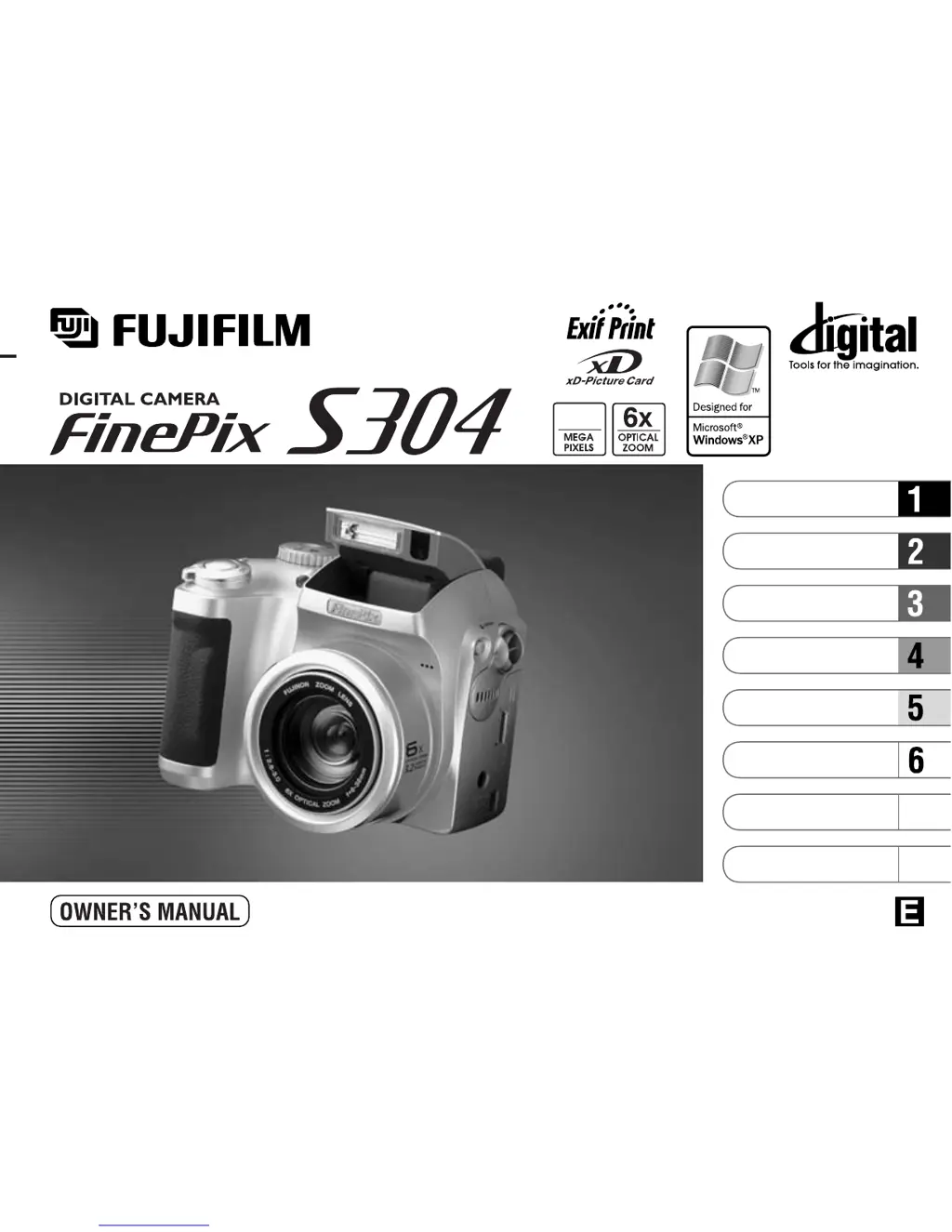
FujiFilm FinePix S304 - User Manual

FujiFilm FinePix S304
69 pages
Print Icon
To Next Page IconTo Next Page
Loading...
This manual will show you how to use your FUJIFILM DIGITAL CAMERA
FinePix S304 correctly. Please follow the instructions carefully.
BL00171-200
(
1
)
7
8
Getting Ready
Camera Connection
Using FinePixViewer
Basic Photography
Advanced Features
Photography
Advanced Features
Playback
Software Installation
Settings
3.2

Table of Contents

Other manuals for FujiFilm FinePix S304

Questions and Answers

  • A
    Angela HansenSep 3, 2025
    What to do if nothing happens when I use the Mode switch on my FujiFilm FinePix S304?
    • Q
      qandersonSep 4, 2025
      If nothing happens when you use the Mode switch on your FujiFilm Digital Camera, it may be due to: * **Camera malfunction:** Briefly remove the batteries or disconnect the AC power adapter, then reload or reconnect and try again. * **Exhausted batteries:** Replace the batteries.
  • B
    bauerannSep 18, 2025
    What to do if my FujiFilm FinePix S304 Digital Camera has a malfunction or fault?
    • R
      Robert MeadowsSep 18, 2025
      Switch the camera on again, taking care not to touch the lens. If that doesn't work, switch the camera off and on again.
  • M
    Maria BlanchardSep 16, 2025
    What to do if prints were specified for more than 1000 frames in the DPOF frame settings of my FujiFilm FinePix S304 Digital Camera?
    • A
      Anthony HuntSep 16, 2025
      The maximum number of frames for which prints can be specified on the same xD-Picture Card is 999. Copy the images for which you want to order prints onto another xD-Picture Card and then specify the DPOF settings.
  • R
    Rachel FrySep 14, 2025
    Why is there speckling on the image taken with my FujiFilm FinePix S304 Digital Camera?
    • L
      Laura WilsonSep 15, 2025
      If there is speckling on the image taken with your FujiFilm Digital Camera, this is a characteristic of CCDs when a shot is taken with a slow shutter speed (long exposure) in a high-temperature environment, and does not indicate a camera fault.
  • K
    Kathleen DelgadoSep 12, 2025
    Why does the shot image appear on the camera's LCD when my FujiFilm Digital Camera is connected to a PC?
    • J
      Jesse AndersonSep 12, 2025
      If the shot image appears on the camera’s LCD monitor when connected to a PC: * **Incorrect USB cable connection:** Ensure the special FinePix S304 USB cable is correctly connected to both the computer and camera. * **PC not switched on:** Switch the PC on.
  • J
    Jason HaydenSep 12, 2025
    Why won't the Frame function erase the frame on my FujiFilm FinePix S304 Digital Camera?
    • R
      Randy StoneSep 12, 2025
      If the Frame function on your FujiFilm Digital Camera doesn't erase the frame: * **DPOF settings:** Cancel the DPOF settings and try again. * **Protected frames:** Remove the protection from the frames.
  • E
    Erika WilsonSep 9, 2025
    Why is the playback image faded when I use the flash on my FujiFilm FinePix S304?
    • M
      Matthew PhillipsSep 9, 2025
      If the playback image is faded after using the flash on your FujiFilm Digital Camera, there may be dust on the flash control sensor. Use an applicator such as a cotton swab to clean the flash control sensor.
  • K
    Keith BrownSep 7, 2025
    Why can I only select “Suppressed Flash” mode on my FujiFilm Digital Camera?
    • J
      Joanna TurnerSep 7, 2025
      If you can only select the 'Suppressed Flash' mode on your FujiFilm Digital Camera, it's likely because continuous shooting is selected. Set continuous shooting to OFF.
  • J
    Jacob LinSep 5, 2025
    Why doesn't my FujiFilm FinePix S304 Digital Camera make any sound?
    • R
      ryan24Sep 6, 2025
      If your FujiFilm Digital Camera isn't emitting any sound, check the following: * **Volume level:** Adjust the volume to a higher level. * **Microphone obstruction:** Ensure the microphone isn't blocked during shooting or recording. * **Speaker obstruction:** Make sure nothing is covering the speaker during playback.
  • L
    Laurie GrahamAug 20, 2025
    What to do if my FujiFilm Digital Camera doesn't take pictures when pressing the shutter button?
    • E
      Elizabeth CoxAug 21, 2025
      If your FujiFilm Digital Camera isn't taking pictures when you press the shutter button, here are some possible causes and solutions: * **No xD-Picture Card loaded:** Insert an xD-Picture Card. * **xD-Picture Card is full:** Insert a new card or erase unwanted images. * **xD-Picture Card is write-protected:** Remove the write-protection. * **xD-Picture Card is not formatted:** Format the card. * **xD-Picture Card contact area is soiled:** Wipe the gold-colored area with a clean, dry cloth. * **xD-Picture Card is damaged:** Load a new card. * **Power Save function is active:** Switch the camera on. * **Batteries are exhausted:** Load new, fully charged batteries.

Summary

Safety and Compliance Information

General Safety Warnings

Contains CAUTION, WARNING icons and general safety advice.

Camera Components Overview

Power Switch and Mode Dial

Identifies the main control buttons for camera operation.

Powering and Storage Media

Loading Batteries and Handling

Details compatible batteries and handling precautions.

Loading xD-Picture Card and Handling

Explains card insertion and handling precautions.

Basic Camera Operations

Switching the Camera On and Off

Control of the camera's power state.

Initial Camera Configuration

Setting the Date and Time

Step-by-step guide for setting date and time.

Basic Photography

Taking Pictures in Auto Mode

Core process for shooting photos in automatic mode.

Auto Mode Shooting Techniques

Using Zoom and Framing

Explains optical and digital zoom usage.

Shooting Aids and Indicators

Autofocus Operation and Warnings

AF frame, focus issues, and warnings.

Shooting Features

Using AF;AE Lock

Locking focus and exposure settings.

Advanced Shooting Control

Applying AF;AE Lock

Detailed procedures for using AF/AE lock.

Camera Functions

Digital and Optical Zoom Explained

Explanation of zoom capabilities.

Flash Operation and Range

Using the built-in flash and its effective range.

Flash Modes

Auto and Red-Eye Reduction Flash

Details on automatic and red-eye reduction flash modes.

Forced Flash and Slow Synchro

Advanced flash modes for specific scenarios.

Special Shooting Modes

Macro Photography (Close-up)

Capturing small subjects at close range.

Playback Operations

Viewing Images (Playback)

Basic procedures for browsing photos.

Image Management

Playback Zoom Function

Magnifying images during playback.

Erasing a Single Image Frame

Deleting one photo at a time.

Advanced Photography Features

Erasing Selected Frames

Repeatedly deleting specific frames.

Still Image Shooting Modes

Auto and Manual Modes

Explanation of automatic and manual control levels.

Scene Position Mode Details

Movie (Video) Recording Introduction

Introduction to video capture functionality.

Video Recording

Movie Recording Operations

How to shoot video clips.

Photography Menu Operations

Navigating the Photography Menu

How to access and use menu options.

Shooting Control Features

Creative Shooting and Playback

Movie Playback and Image Deletion

Data Management

Image Protection Options

System Setup Menu

Software Installation Guide

Installing on a Windows PC

Step-by-step instructions for Windows installation.

Software Installation for Macintosh

Installing FinePixViewer on Mac OS 8.6-9.2

Step-by-step for older Mac OS versions.

Software Installation for Mac OS X

Installing FinePixViewer on Mac OS X

Step-by-step instructions for Mac OS X.

Connecting the Camera to a Computer

DSC (Mass Storage) Mode Connection

Connecting the camera as a drive.

Using DSC (Mass Storage) Mode

PC Camera Mode

Using PC-CAM Mode

Setting up the camera for video calls.

PC Camera Mode Operation

Disconnecting the Camera

Safe Disconnection Procedures

Instructions for safely unplugging the camera.

Using FinePixViewer Software

Saving Images to Your Computer

Transferring photos from camera to PC.

Optional Accessories

Troubleshooting and Warnings

Screen Warning Displays

Interpreting error messages shown on the screen.

Troubleshooting Common Issues

More Screen Warning Displays

Additional error messages and their remedies.

Troubleshooting No Power Issues

Resolving problems related to the camera having no power.

Troubleshooting Solutions

Troubleshooting Flash and Focus Problems

Solutions for common shooting issues.

Camera Specifications

System Specifications

Core technical details of the camera system.

Safety Precautions

General Safety Warnings and Prohibitions

Crucial safety advice and prohibited actions.

FujiFilm FinePix S304 Specifications

General IconGeneral
Max resolution2048 x 1536
Image ratio w:h4:3
Sensor size1/2.7"
Sensor typeCCD
LensFujinon 6x optical zoom
Optical Zoom6x
Manual focusYes
Aperture RangeF2.8 - F8
Custom white balanceYes
Image stabilizationNo
Uncompressed formatNo
Screen size1.8"
Screen dots110, 000
Built-in flashYes
External flashNo
Drive modeSingle, Continuous, Self-timer
Video recordingYes
Max video resolution320 x 240
Video frame rate10 fps
Battery4 x AA
Camera typeDigital Camera
Effective pixels3.2 million
ISO100, 200, 400
Macro focusing range10 cm - 80 cm
Metering modesMulti, Spot
Exposure compensation+/- 2EV in 1/3 steps
Viewfinder typeOptical
Flash modesAuto, Forced, Suppressed, Slow sync
Self-timer10 sec
Storage typesxD-Picture Card
Storage included16 MB

Related product manuals