System expansions
A26361-K680-Z122-1-7619, Edition 1 37
Installing and removing drives
The PC casing can accommodate a total of eight drives:
● four accessible drives
(three 5¼" drives and one 3½" drive)
● four non-accessible drives
(3½" drives)
"Accessible drives" are e.g. DVD or CD ROM drives, into which a data carrier can be inserted from
outside. Non-accessible drives are e.g. hard disk drives.
IDE drives
Four IDE drives are supported as standard equipment. Ideally, hard disks are connected to IDE
interface 1 and other drives to IDE interface 2 (see also the technical manual for the mainboard).
SCSI drives
If you want to install a SCSI drive, you require a SCSI controller and a SCSI cable. Details are
provided in the manuals on the SCSI controller.
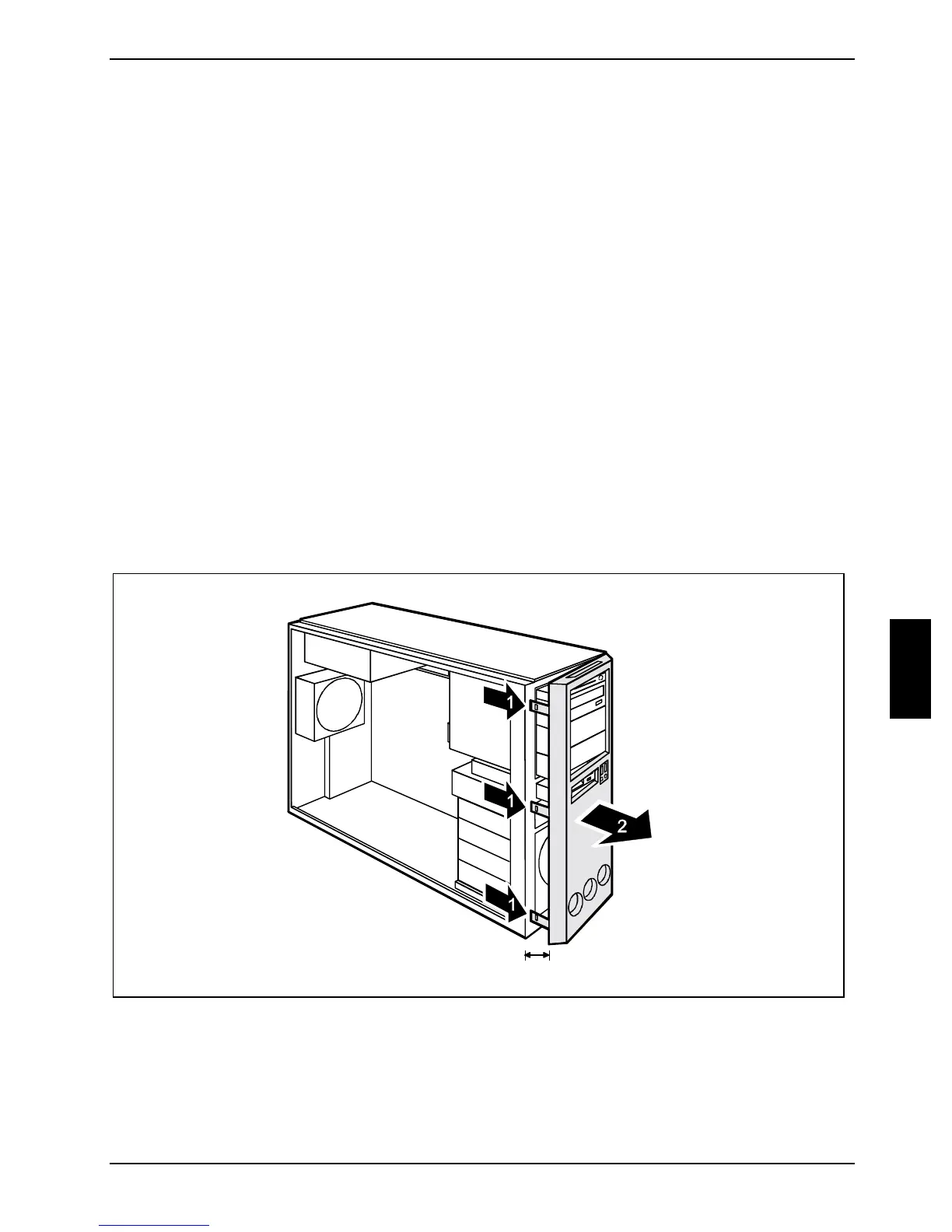
Removing the front panel
► Open the casing (see "Opening the casing" chapter).
a
► Detach the three locking tabs on the left side of the front panel (1).
► Open the left side of the front panel approximately 2-3 cm (a).


 To Next Page