Upgrading main memory
A26361-D1555-Z120-1-6319 English - 15
Upgrading main memory
Technical data
Technology: DDR 266 or DDR 333 unbuffered DIMM modules
184-Pin; 2.5 V; 64 Bit, no ECC
Size: 32 Mbytes to 3 Gbyte DDR 266 SDRAM
32 Mbytes to 2 Gbyte DDR 333 SDRAM
Granularity: 32, 64, 128, 256, 512 or 1024 Mbyte for one socket
A current list of the memory modules recommended for this mainboard is available on the Internet
at: www.fujitsu-siemens.de/mainboards.
At least one memory module must be installed. You may only use three double-sided memory
modules for DDR 266 modules. You may only use up to two double-sided, three single-sided
memory modules or one double-sided with two single-sided memory modules for DDR 333.
Memory modules with different memory capacities can be combined.
!
You may only use unbuffered 2,5 V memory modules. Buffered memory modules are not
supported.
DDR-DIMM memory modules must meet the PC2100 or PC2700 specification.
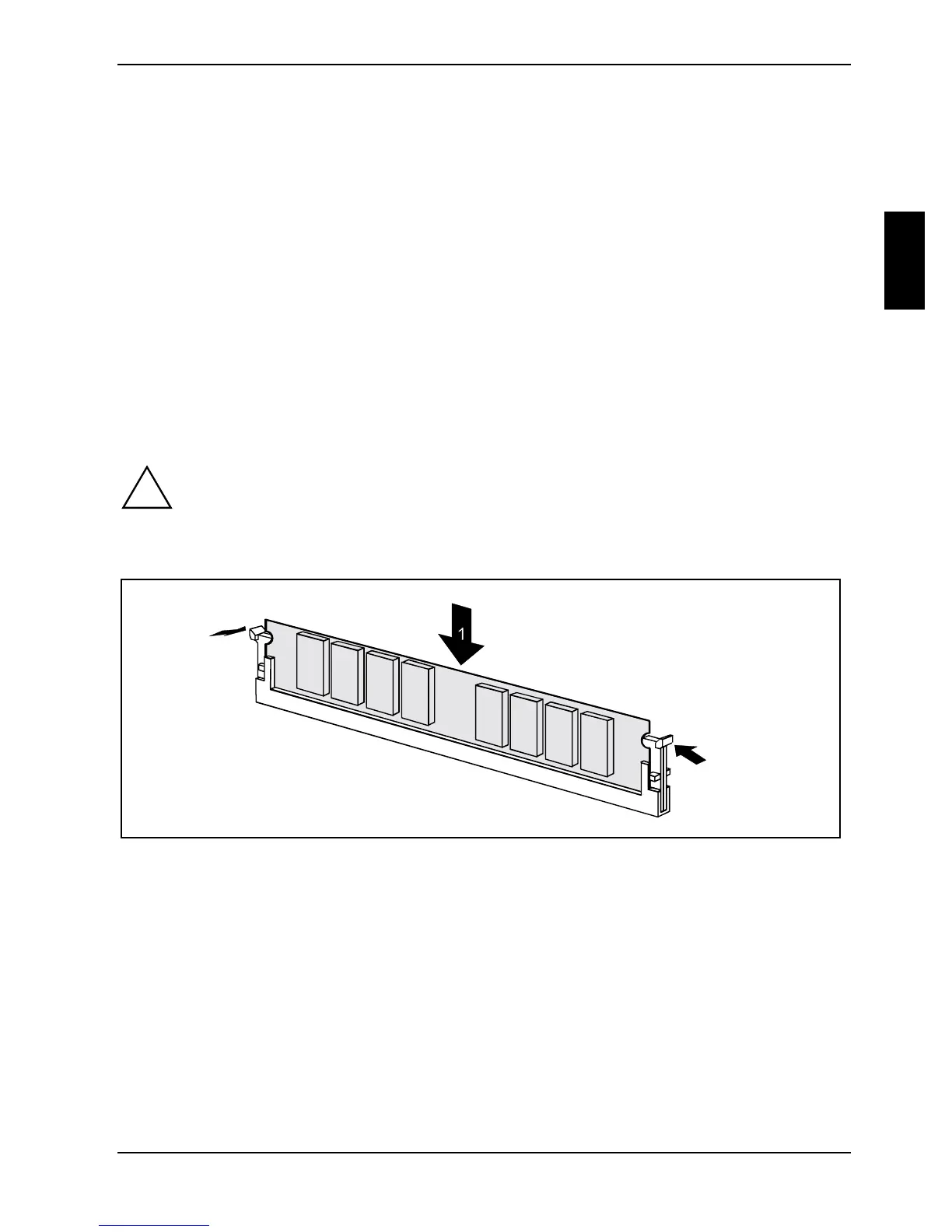
Installing a memory module
2
2
Ê Push the holders on each side of the memory compartment outwards.
Ê Insert the memory module into the location (1).
Ê At the same time flip the lateral holders upwards until the memory module snaps in place (2).



 To Next Page