Brief description of mainbo ard
Procedure
3
2
1
A
4
5
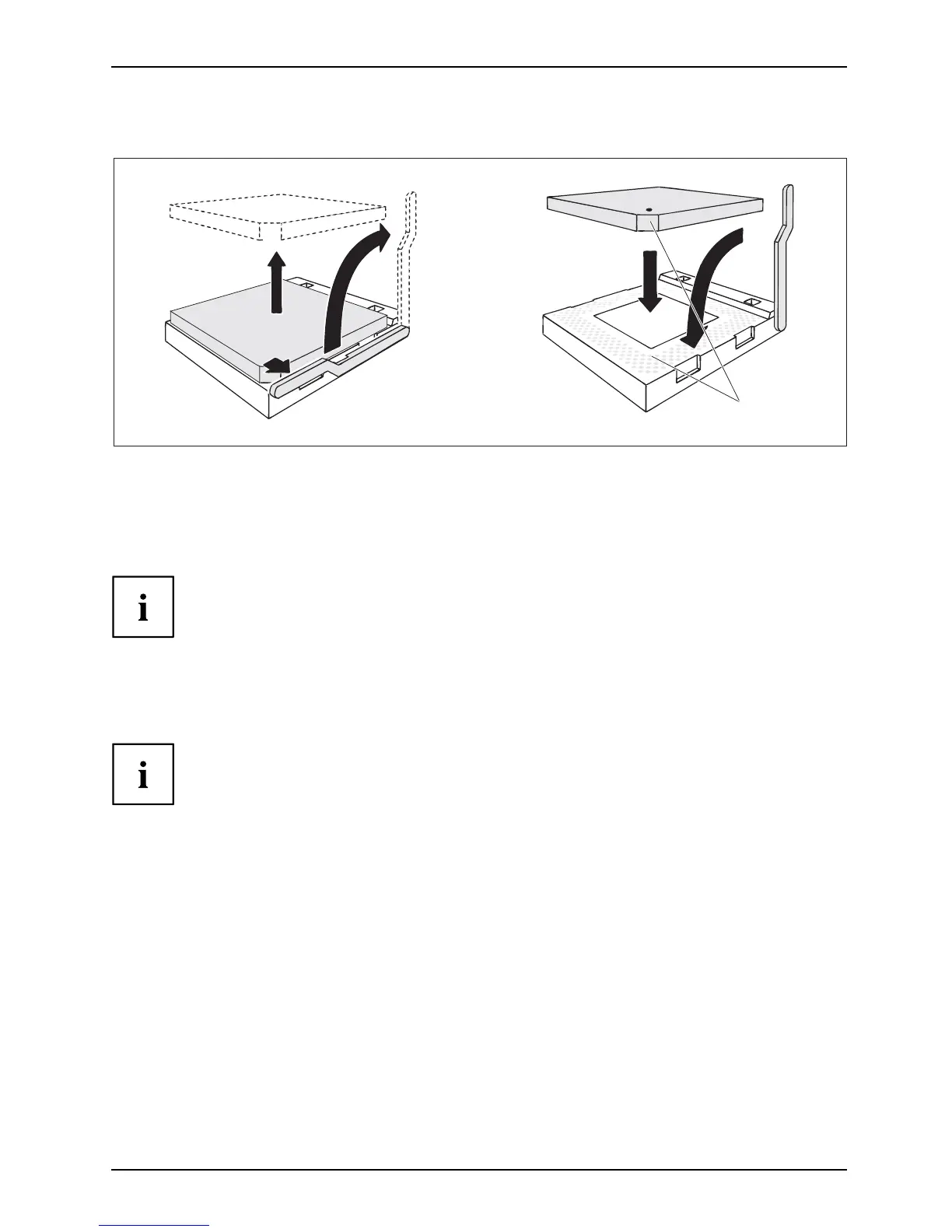
► Remove any fan and the heat sink.
► Pull the lever in the direction of the arrow (1) and lift it as far as it will go (2).
► Fold up the frame.
► Remove the old processor from the so cket (3).
The bevelled corner of the processor may be in a d ifferent position
from that shown in the illustration.
► Insert the ne w processor in the socket so that the bevelled c orner of the processor
matches the coding on th e socket (A) with regard to the position (4).
► Push the lever back do wn until it clicks into place (5).
Please note that, depending on the heat sink used, different heat sink
mounts are required on the mainboard.
► Depend ing on the configuration variant, you must pull a protective f oil off the h eat sink
or coat the heat sink with heat conducting paste before fitting it.
► Depend ing on the processor v ariant, clips may also be supplied for mounting
the heat sink that fixitinplace.
A26361-D2721-Z110-1-7419, edition 3 English - 3




 To Next Page