- (01-173) -
MULTI TYPE
2, 3, 4 ROOMS TYPE
MULTI TYPE
2, 3, 4 ROOMS TYPE
FUNCTION SETTING
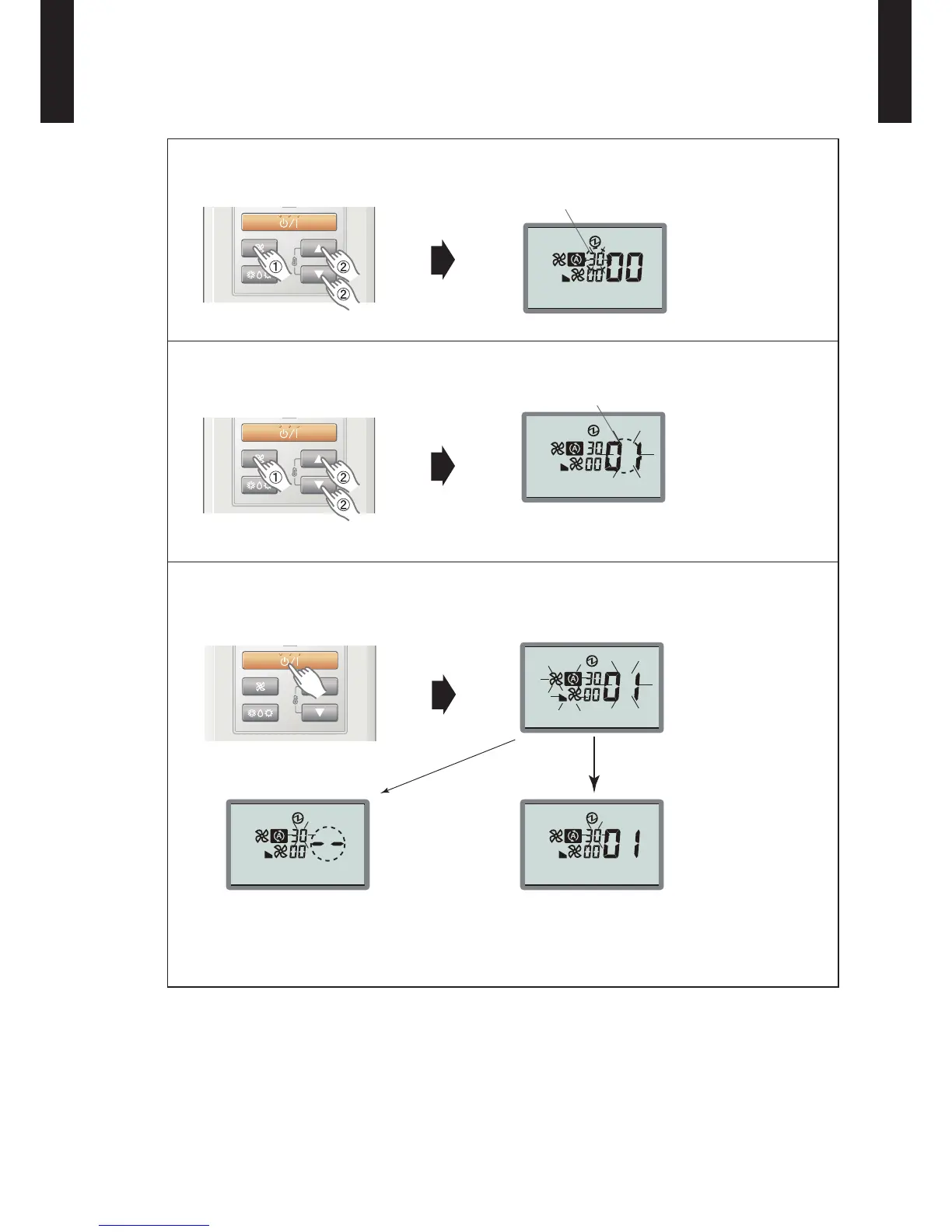
3) Press the "Fan" button so that the “Function number” display ashes. Then, press either
the "Set Temp.
p
" button or the "Set Temp.
q
" button to set up the function number.
Function number
4) Press the Fan button so that the “Setting number” display ashes. Then, press either the
Set Temp.
p
button or the Set Temp.
q
button to set up the setting number.
Ex.) Function number : 30, Setting number : 01
Setting number
5) Pressing the Start/Stop button, conrm the setting.
(The data will be transferred to the indoor unit.)
ERROR
When the data was correctly set up on the indoor
unit.
When the data was not set up on the indoor ●
unit "--" is displayed.
Set up the data again according to the ●
procedure in step 3), 4) above.
GOOD
FUNCTION DETAILS
Refer to 13-5. FUNCTION DETAILS


 To Next Page
 Loading...