22 - English Mainboard D3128
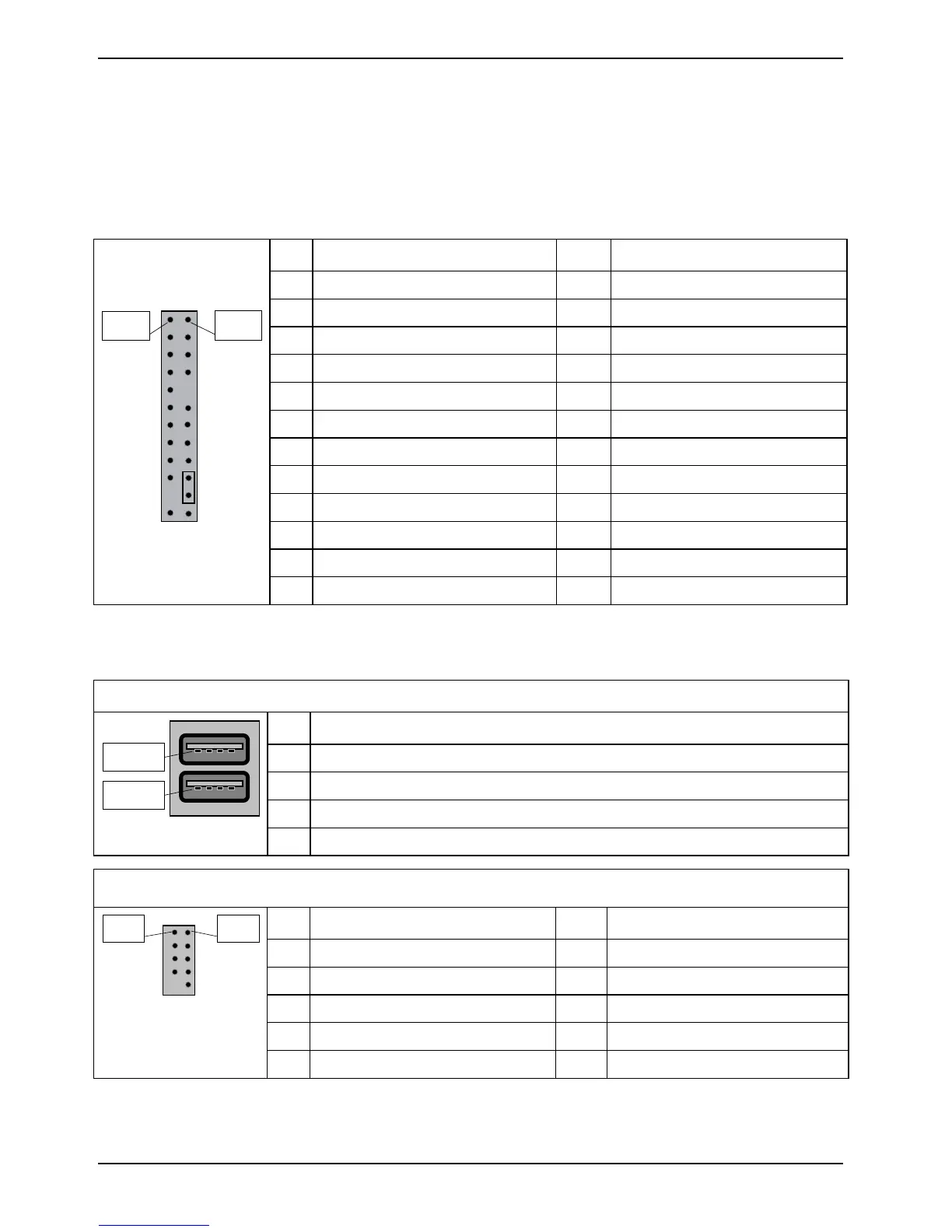
Frontpanel Connector (internal)
Normally, a chassis has some control or signal wires can be connected onto a motherboard for hard
drive LED, Power LED, power button, and reset button;
The front panel connector has been implemented on D3128 for such purposes.
PIN Signal PIN Signal
1 HD-LED + 2 Power LED +
3 HD-LED - 4 Power LED -
5 GND 6 Power Button
7 RST L 8 GND
9 Chassis Detect WS L 10 Key
11 Chassis Detect Baku L 12 GND
13 LED1 + 14 LED1 -
15 LED2 + 16 LED2 -
17 Speaker + 18 Password Skip
19 GND 20 GND (0,1K)
21 Key 22 GND (0,1K)
Pin 2
Pin 1
23 Speaker - 24 Recover BIOS
Communication connectors
USB 2.0 port (external)
PIN Signal
1 VCC AUX (safe mode)
2 Data negative
3 Data positive
Pin 1
Pin 1
4 GND
USB 2.0 port (internal) – Internal/Front
PIN Signal PIN Signal
1 VCC AUX 2 VCC AUX
3 Data negative Port X 4 Data negative Port Y
5 Data positive Port X 6 Data positive Port Y
7 GND 8 GND
Pin 1 Pin 2
9 Key 10 NC
60 Fujitsu Technology Solutions


 To Next Page