44
APPENDIX
❍ Checking the memory map
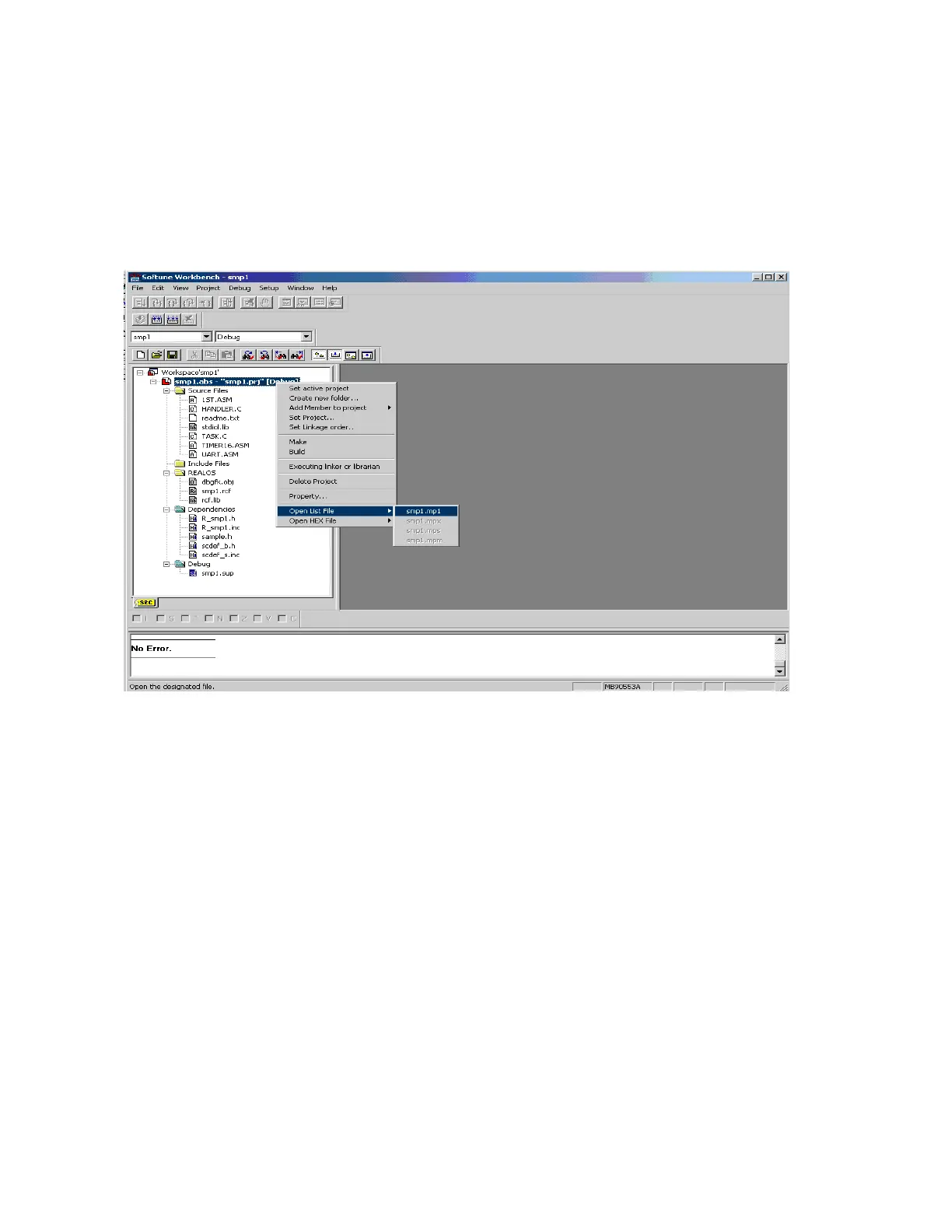
To check the memory map, select smp1.abs, then right-click to select, from the context
menu, [Open List File] -- [smp1.mp1].
Figure Bh shows the [Open List File] dialog.
Figure Bh [Open List File]
❍ Debugger activation
Activate the debugger and load the load module.
Select [Start Debug] from the [Debug] menu to switching to debugging mode. The
debugger setup wizard starts. Using the debugger manual, set up the debugger.
Note:
• The setup wizard appears only the first time debugging is started.
• An example of debugging with the emulator debugger is described here.
• Debugging with the emulator debugger requires the 16LX evaluation board,
a daughterboard, and an ICE (MB2140 series).
• A memory map must have been specified for the emulator debugger.
Select [Load target file] from the [Debug] menu to load the sample program if it has not
already been loaded.
Then, select [Reset of MCU] from the [Debug] menu. Preparations for sample system
activation are complete.
An example of breaking at the beginning of task 1 (a_tsk) is described below.
Double-click task.c in the project window to open the source window. Then, click m on the
first line of a_tsk as shown in Figure Bi to set the breakpoint.



 To Next Page