Instruction manual “1353-EN” 9
Heat pump, split, single service
3.4 Programming examples
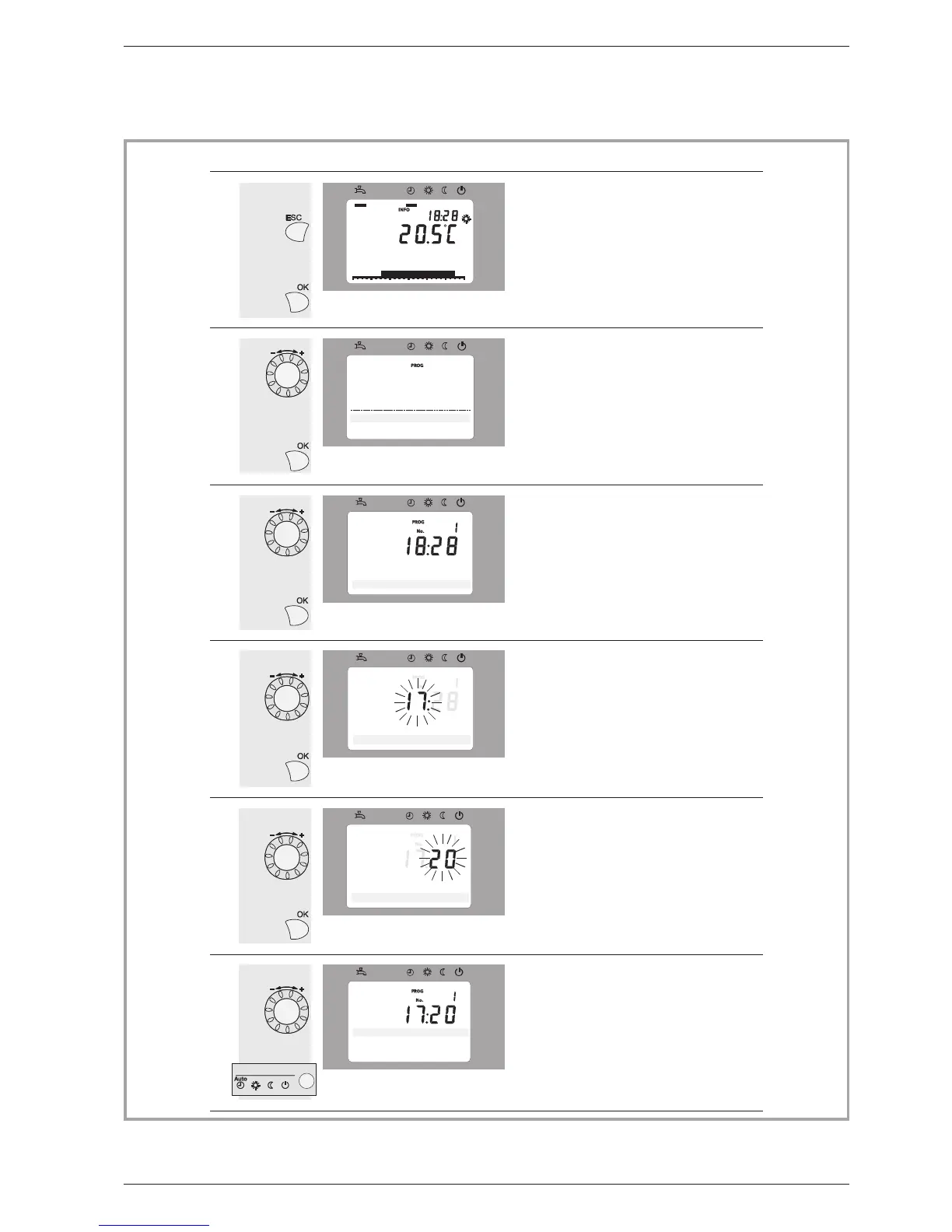
Setting the time
0
4 8 12 16 20 24
AUTO
2
Text3
0
4 8 12 16 20 24
AUTO
3
0
4 8 12 16 20 24
AUTO
4
0
4 8 12 16 20 24
AUTO
1
5
0
4 8 12 16 20 24
AUTO
6
0 4 8 12 16 20 24
AUTO
Basicdisplay
Ifthebasicdisplayisnotshown,
pressESCtoreturntoit.
Pressthekey OK.
Turntheknob,choosemenu:
Timeanddate,
PressOKtoconfirm.
PressOKtoconfirm.
Turntheknob,selectline1:
Hours/minutes,
Thehourdisplayflashes
Pressthekey OK.
Turntheknob
tosetthetime,
Theminutesdisplayflashes
Pressthekey OK.
Turntheknob
tosettheminutes,
Thesettingarerecorded
Pressaregimekey
toreturntothestandarddisplay.
Turntheknob
tomakeothersettings
or
Keys
DescriptionDisplayexample
Room setpoint 1
Operator section
T
ime of day and date
Time of day and date
Hours / minutes
Time of day and date
Hours / minutes
Time of day and date
Hours / minutes
Time of day and date
Hours / minutes


 To Next Page