3LOCALTELEPHONEDIRECTORY
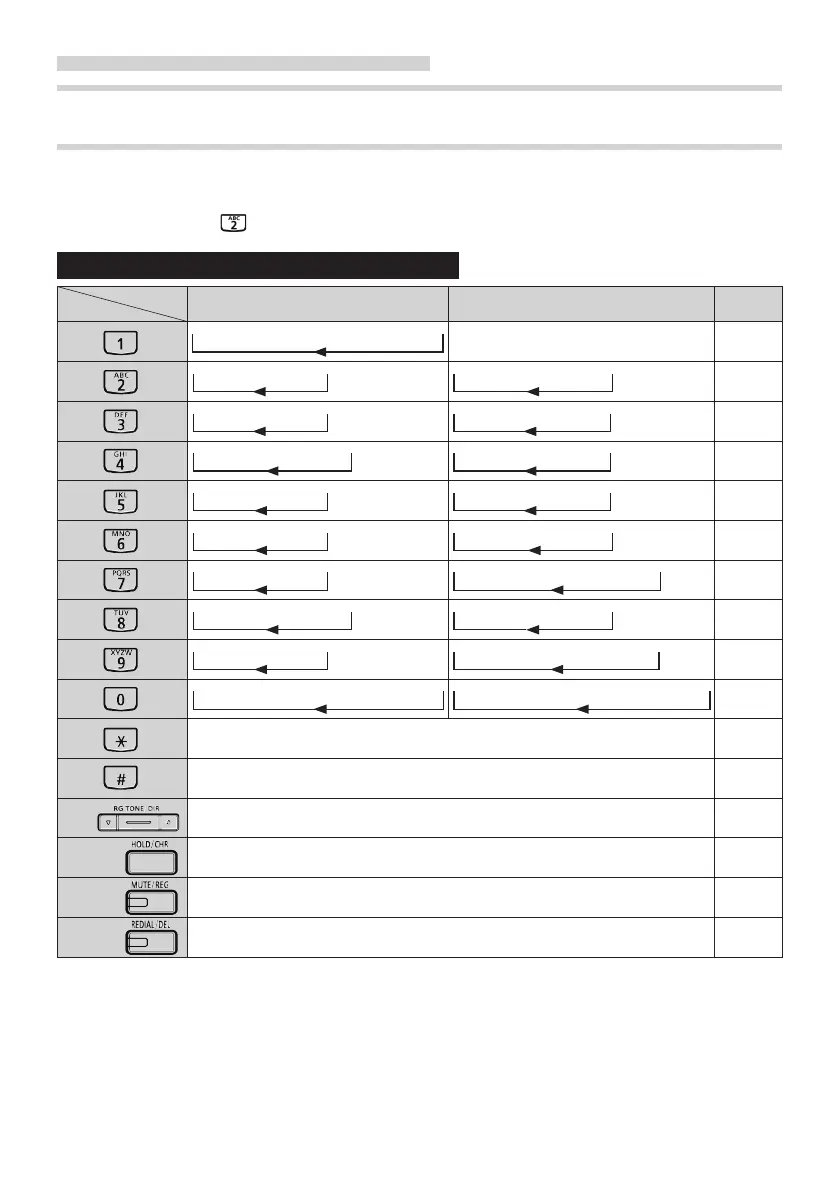
METHOD OF INPUTTING THE CHARACTERS
Pressing the same dial button repeatedly changes the character assigned to the
dial button cyclically in the character mode.
Ex: If you want to input " B ", press the REG button to display "AL ナマエ ?" and
press
button twice.
Charactersusedinthelocaltelephonedirectory.
Mode
Button
Japanese syllabary Alphabet Digit
-ア -イ-ウ-エ-オ-ァ-ィ- ゥ-ェ-ォ-
1
-カ - キ- ク -ケ - コ-
-A - B- C -a - b- c -
2
-サ - シ- ス -セ - ソ-
-D - E- F -d - e- f -
3
-タ - チ- ツ -テ - ト- ッ -
-G - H- I -g - h- i -
4
-ナ - ニ- ヌ -ネ - ノ-
-J - K- L -j - k- l -
5
-ハ - ヒ- フ -ヘ - ホ-
-M - N- O -m - n- o -
6
-マ - ミ- ム -メ - モ-
-P - Q- R -S - p- q -r - s-
7
-ヤ - ユ- ヨ -ャ - ュ- ョ -
-T - U- V -t - u- v -
8
-ラ - リ- ル -レ - ロ-
-W - X- Y -Z - w- x -y - z-
9
-ワ -ヲ-ン-゛-゜-ー-・- ?-!-□-
-. -`---: -& -/ -( -) -¥ -# -* -□-
0
←( Move the cursor to the left.)
→( Move the cursor to the right.)
DIR
The local telephone directory mode "ON" or "OFF".
CHR
Select the character mode( Japanese syllabary / Alphabet / Digit) .
REG
Executes a directory data registration.
DEL
Delete characters of a directory data.
□:Blank
23



 To Next Page