1BEFOREUSES
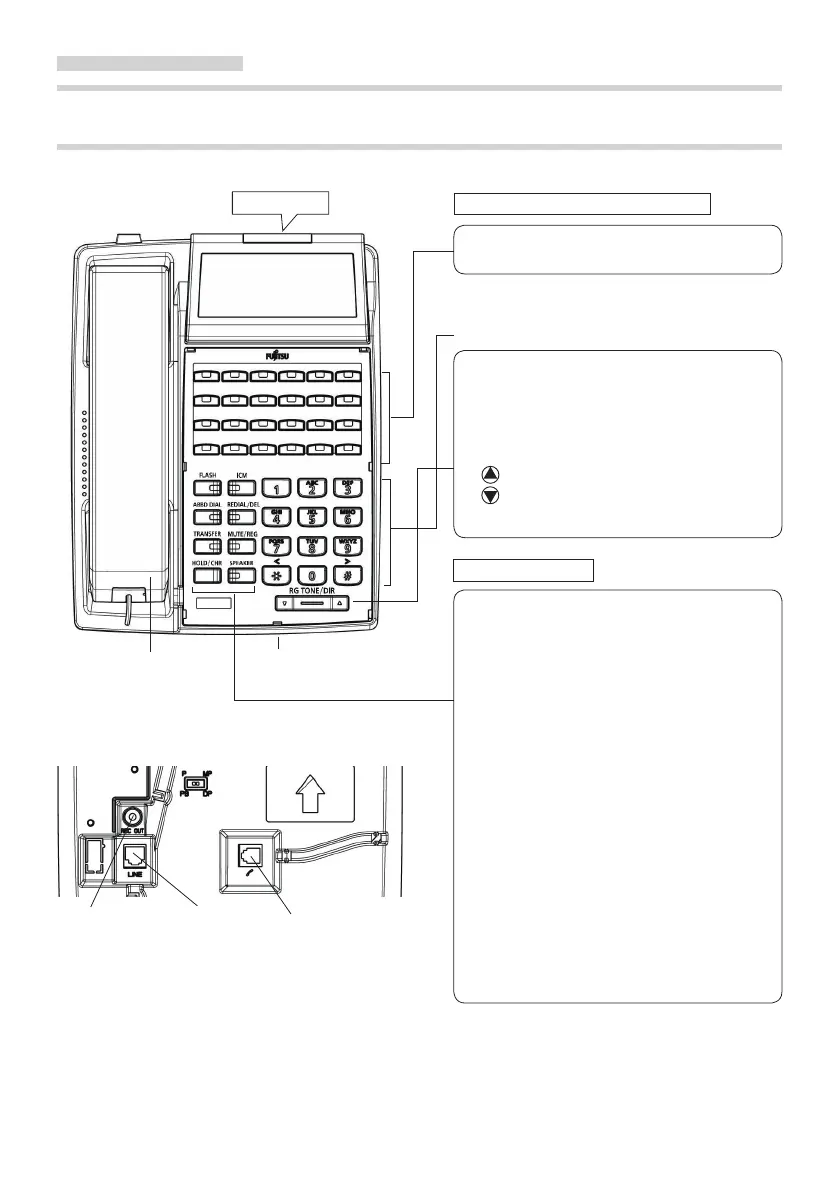
DIGITAL TELEPHONE CONTROLS AND INDICATORS
<FC782D >
■ Face
Ringer LED
Programmable Line / Feature Buttons
All buttons can be used to automatically dial
either an extension or others.
Dial Buttons
RG TONE
DIR
Press this key to change the ringing
tone.
Local telephone directory can be
operated.
Use these keys to change the ringing
tone volume, speaker volume, handset
volume, display c o ntrast, an d
retrieval of telephone book.
Function Buttons
FLASH
ICM
ABBD Dial
REDIAL
DEL
TRANSFER
MUTE
REG
HOLD
CHR
SPEAKER
Press this key to terminate a call
without replacing the handset.
Press this key for extension call
and answering.
Press this key for abbreviated
dialing.
Press this key to redial number.
Press this key to clear the local
telephone directory's data.
Press this key to transfer a call to
another telephone.
Press this key to turn off the
microphone.
Press this key to register the local
telephone directory's data.
Press this key to hold an outside or
extension call. Press the ICM or the
LINE button to resume call.
Press th is k ey to sw i t c h the
character input mode.
Press this key to dial without
lifting handset. Only FC782D can
use the handsfree by pressing this
button.
Handset
Microphone(only FC782D)
■ Bottom
Recording jack
Line code Handset code
※The insert sheet is option (the available accessory).
【The insert sheet of the available accessory】
・FC780TC41 : For FC781A, Ten pieces
・FC780TC42 : For FC781B, Ten pieces
・FC780TC43 : For FC782B/D/PA/PB, Ten pieces
9



 To Next Page