Operation
Operation
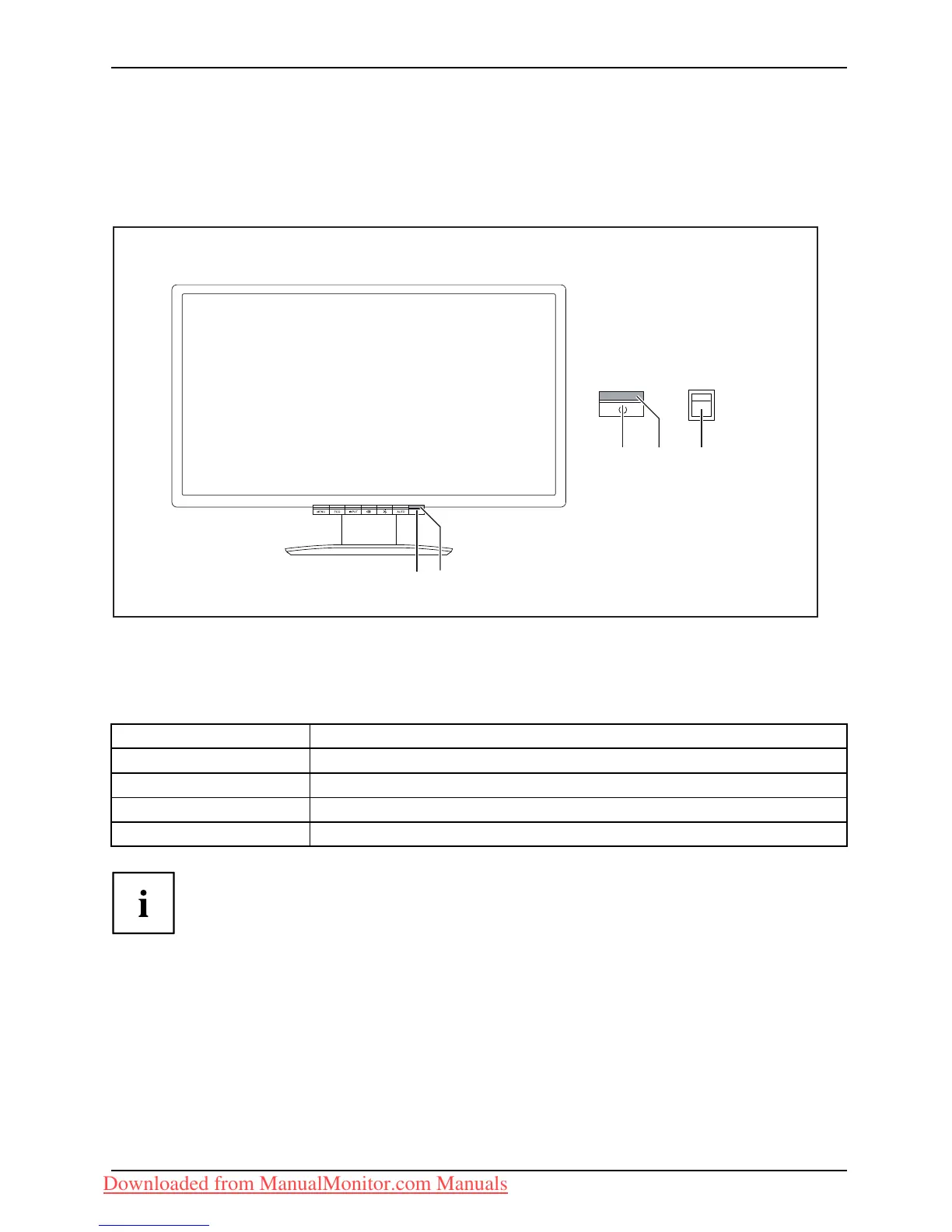
Switching the device on and off
1 23
12
1=SwitchOn/Off
2 = Power suppl
y indicator
3 = 0 W switch
The colour of the LED indicator changes as follows:
LED indicator Status
blue
Monitor and compu ter are switched on (normal mode).
green
Monitor and computer are switched on (ECO mode ).
orange
Monitor is not receiving a video signal or is in power saving mode.
does not light up
Monitor is switched off (or is in 0W power-saving mode).
Theswitchsetting"0"ofthe0Wswitch(3)onthereversesideactivatesthe
ECO power- saving mode (0 W operating mode) and the switch setting "I"
switches to the BASIC power saving mode <1 W. This setting is required for t he
DP data cable. In some PCs, it c an, however, also be necessary for VGA or
DVI if the screen remains unlit in the 0 W operating mode.
► Switch the de vice on again with the ON/OF F switch (1).
Fujitsu Technology Solutions 17
Downloaded from ManualMonitor.com Manuals



 To Next Page
 Loading...