Chapter1 Preliminary Steps before Installing the Sensor Driver
1.1 Overview of the Sensor Driver
The Sensor driver enables the Sensor’s operations.
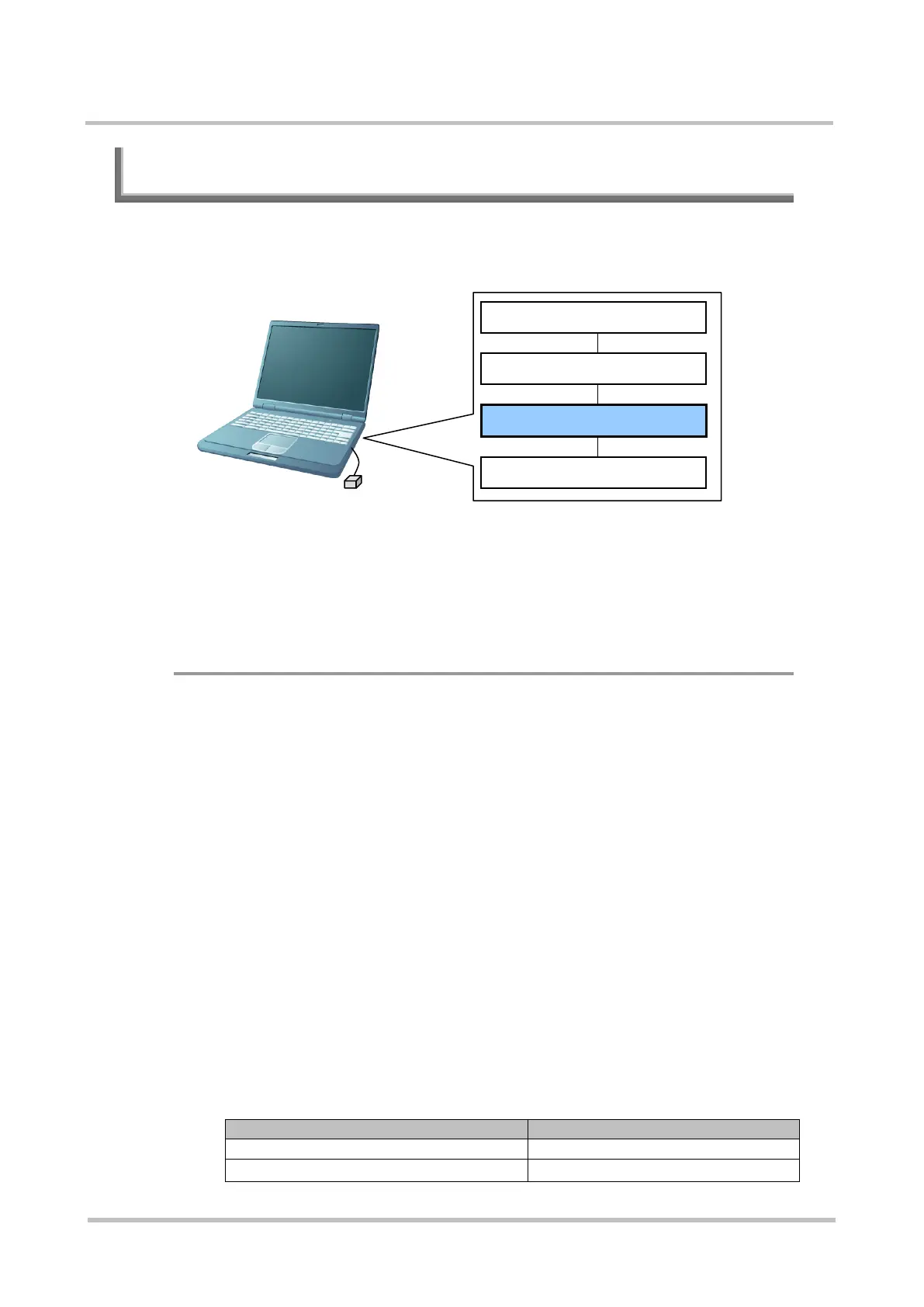
The figure shown below indicates the position of the Sensor driver.
Application
Authentication library
Sensor driver
USB driver
There are three types of Sensor drivers as follows.
• Conventional Sensor driver for Windows
• Sensor driver for extended function for Windows
• Sensor driver for extended function for Linux
◆ Conventional Sensor Driver (Windows Version)
This is the previous Sensor driver that was supplied with PalmSecure™ SDK
since V01.
This Sensor driver does not have a WHQL (Windows Hardware Quality Lab)
signature.
The conventional Sensor driver for Windows can be used for both PalmSecure
Sensor and PalmSecure Sensor V2; however, extended functions of the Sensor
are not available if you use this Sensor driver.
>See> For information on extended functions of the Sensor, refer to the
"System Development Guide".
There are two types of conventional Sensor driver for Windows as follows.
Select one which is more suitable for your requirements.
• Installer version (Execution file form)
Use this in case installing the Sensor driver first.
The following table indicates installers included in the installer version and
their names.
Sensor



 To Next Page