EasyManua.ls Logo

Fujitsu SP-1130 - Operator Panel Names and Functions

Fujitsu SP-1130
117 pages
Print Icon
To Next Page IconTo Next Page
To Previous Page IconTo Previous Page
Loading...
Chapter 3 How to Use the Operator Panel
39
Appendix
Glossary
Contents
TOP
How to Load
Documents
How to Use the
Operator Panel
Various Ways to
Scan
Daily Care
Troubleshooting
Operational
Settings
Replacing the
Consumables
Scanner
Overview
Index
Introduction
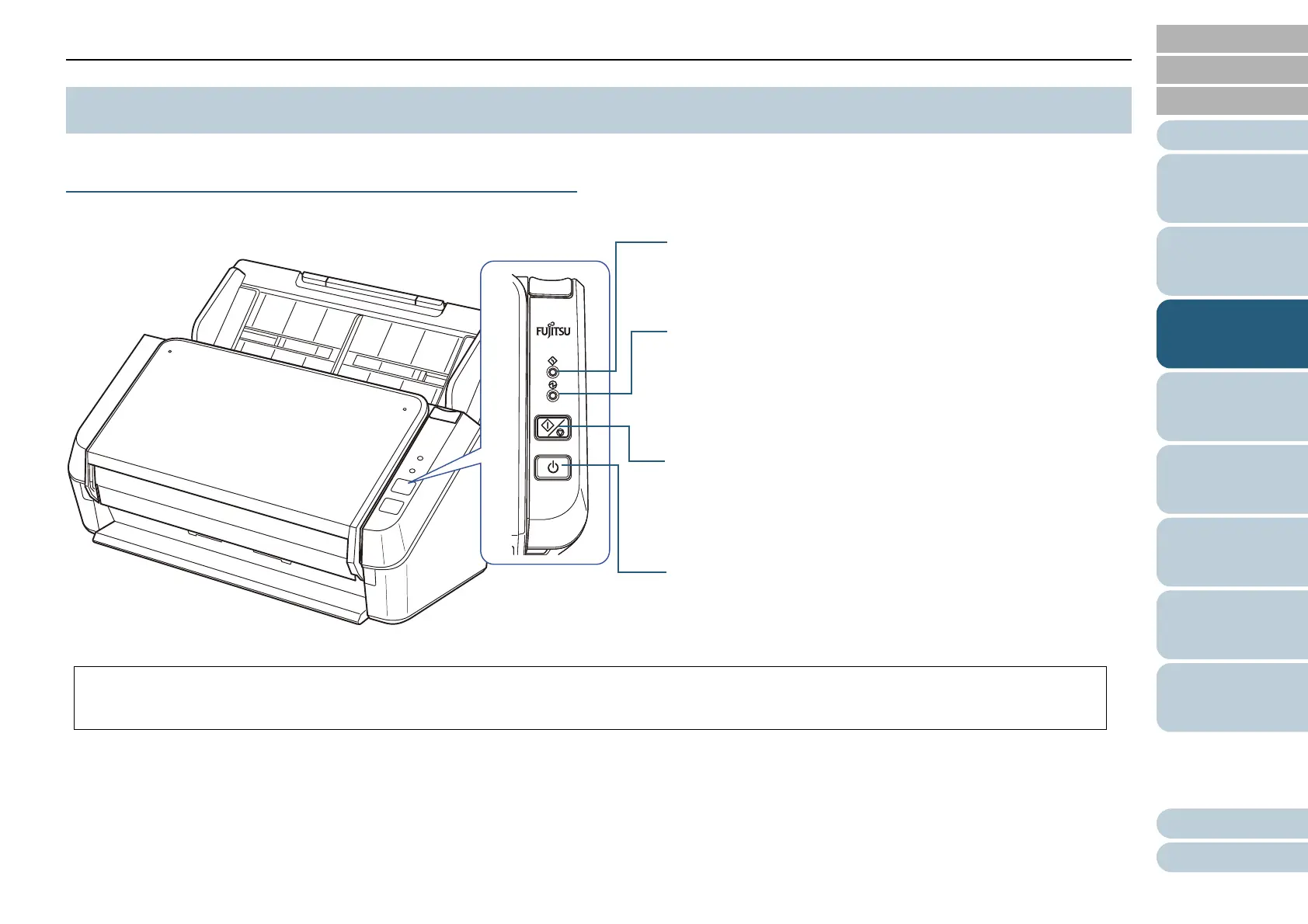
The operator panel consists of buttons and indicators.
Names and Functions
3.1 Operator Panel
Check indicator
Lights or flashes in orange when an error occurs.
Scan/stop button (*1)
Starts up the linked application.
Cancels the scan.
Power button
Turns the power on/off.
*1: For details about how to scan by pressing the scan/stop button, refer to the scanner driver's Help (included in the Setup DVD-ROM) or "Using a
Button on the Scanner to Start Scanning" (page 46).
Power indicator
Lights in green when the scanner is on.
This indicator flashes immediately after the scanner is turned on, or
when resuming from power saving mode.


Table of Contents

Related product manuals