Chapter 6 Replacing the Consumables
59
Appendix
Glossary
Contents
TOP
How to Load
Documents
How to Use the
Operator Panel
Various Ways to
Scan
Daily Care
Troubleshooting
Operational
Settings
Replacing the
Consumables
Scanner
Overview
Index
Introduction
The roller set consists of a brake roller and a pick roller.
Replace each roller in the following procedure.
1 Remove all documents from the ADF paper chute
(feeder).
2 Open the ADF.
For details, refer to "1.4 Opening/Closing the ADF" (page 17).
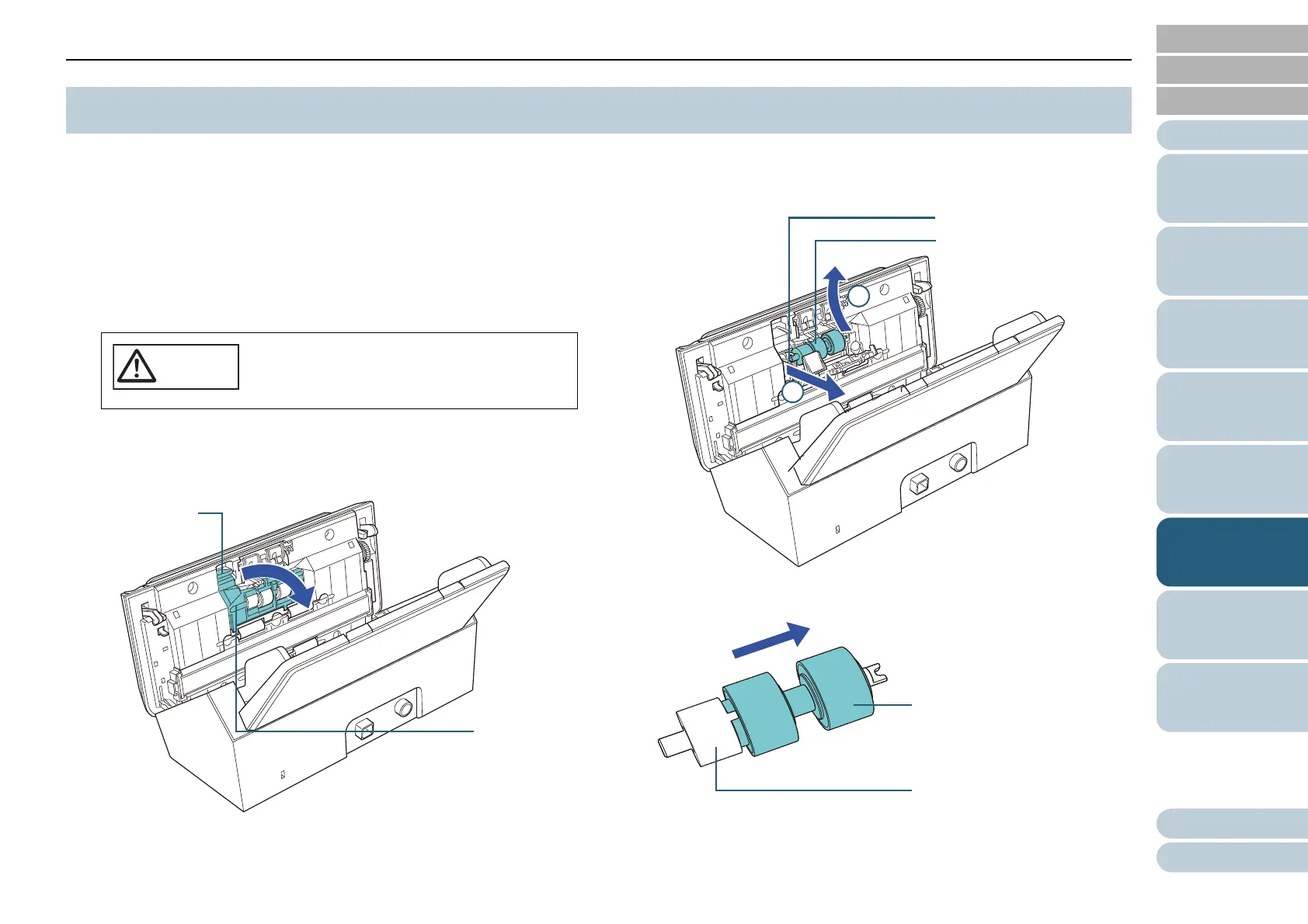
3 Remove the brake roller.
1 Press the cover bushing of the brake roller to open the cover in the
direction of the arrow.
2 Pull out the left side of the brake roller shaft, and then pull out the
right side of the shaft from the hole.
4 Remove the brake roller from its shaft.
6.2 Replacing the Roller Set
Be careful not to have your fingers caught
when the ADF closes.
1
2
Brake roller shaft
Brake roller
Brake roller
Brake roller shaft












 To Next Page