Getting started English - 15
Connecting the device
Please observe the safety information in "Important notes", Page 7 - English.
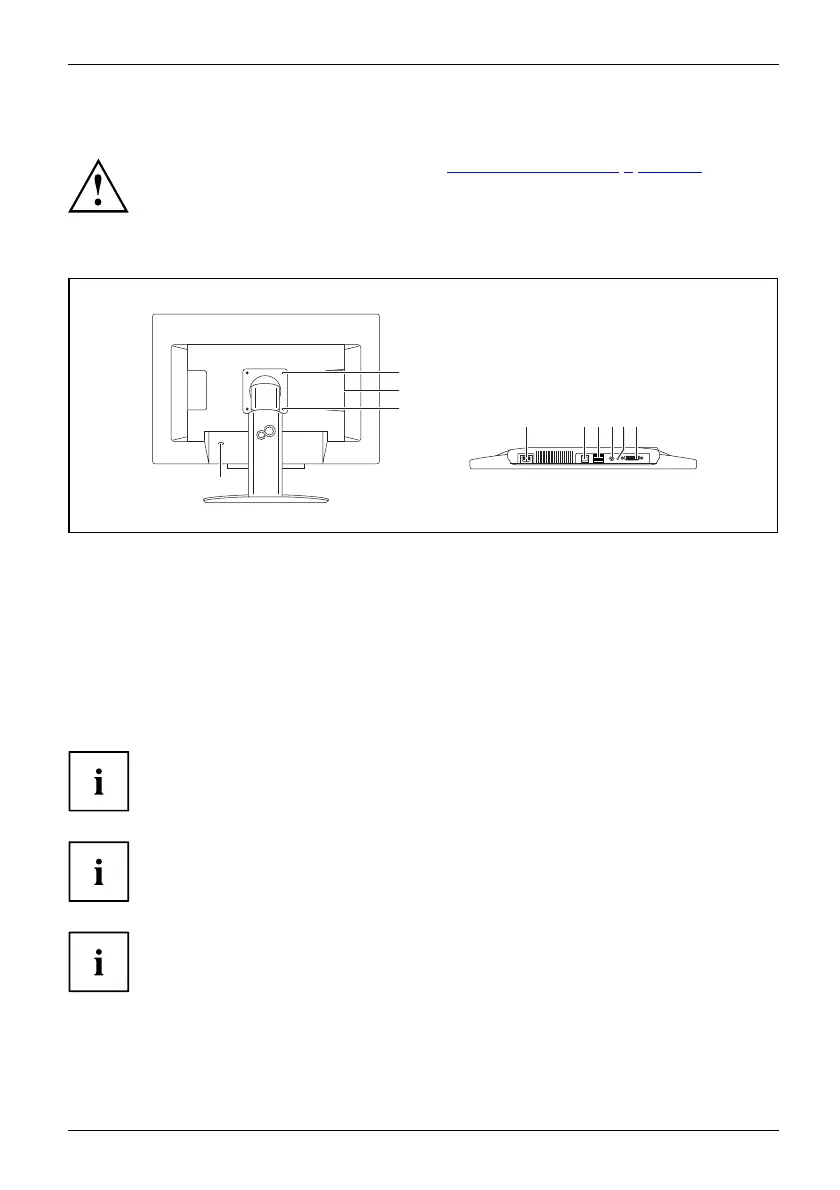
Connect the cables to the Zero Client
1
1
4
567 9
8
2
3
1 = Threads for s ec
uring the swivel arm
or w all mounti
ng
2 = Security slot for th e "Kensington Lock"
3=USBports
4 = Power connection
5 = LAN port
6 = USB ports
7 = Headphone output
8 = Microphone in
put
9 = DVI-D output
► Insert the plug of the shielded Ethernet data cable in the LAN port of the Zero Client,
making sure tha t it the connector is correctly connected.
If you connect your Zero Client DZ22-2 to a Power over E thernet network, no
mains ca ble is ne eded to supply power. This does not apply to the Zero Client
DZ19-2, which always needs a mains cable to supply power.
For power supply through Power over Etherne t (only for Zero Client DZ22-2):
Only use the Pow er over Ethernet M idspans provided by Fujitsu, as only
these can supply t he required output of up to 60 W.
The Zero Client DZ22-2 m ust be s witched off before the power supply source can
be changed from mains power to Power over Ethernet (or vice versa).
► Plug the other end of the Ethernet cable into a LAN w all s ocket.
► Insert the USB plugs of your keyboard and mouse into U SB ports on your Zero Client.
Fujitsu Technology Solutions 17


 To Next Page
 Loading...