-19- -20-
Int hird leve l menu , if the para m eter h a s no f lash b it, i t m eans t h e fun ct ionc ode ca nnot be changed a n d
the possib le reas onsare:
1) This parameter ofthis function c odecannot be changed, suchas the act ually d etected parameter and
runningrecordparameter.
2) This f u nction code ca nnot be changed in op er ating st atus andcan only b e ch a ngedw hen the
is s toppe d.
4.3
Wh en DZB Series i nverter is in the st o por runnin g statu s,seve ral stat us pa rameter of th e inver ter ca n be
disp layed on the LED nixie tube. Pr essing the ke yDATA ca n display the st op or running statu s para meter s.
Thereare nine s top s ta tus pa r ameter s to b e displ ayed i n the s top s ta tus,
.
DZBSe ries inverter has f ifteen runnin g sta tu s par a meters to be displa y ed in the ru nning st at us,
.
If the i nverter is powered on ag ainafterpow er-off, the pa ramet ers dis played are d efaul tedas those
sele cted b efore thepower-off.
in verter
Setting frequen cy,DC bus v oltage ,
Inp ut t erm inal status,Output termin al stat us,PID setpo int,PI Dfee d back, valu e, v alue ,Cu rr ent s egment
of m ult i-speed c ont rol
Setting
freq uency,Running fre quenc y,Output curr ent,O utput voltage , Running speed,A ctual value of delay t ime,
Set ting of delay time,DCbus volta g e,P ID setpo i nt,PID feedb ack, Input terminal stat u s , Output t erminal status,
value, valu e ,Curr en t se gment of multi-speed con trol
How to View Status Parameters
VI CI
VI CI
Note: W hen o perating 3- level menu, pressing PR Gor DATA can r eturn tosecondl ev elm enu. Th e
differenceis: pressi ngD ATAw illsave the parameters a ndreturnto second le velmenuand then s hift
to thenext fu nction code, whil e pressingPRGwil l returnto second leve l menu with outsa ving the
pa ramet ers.
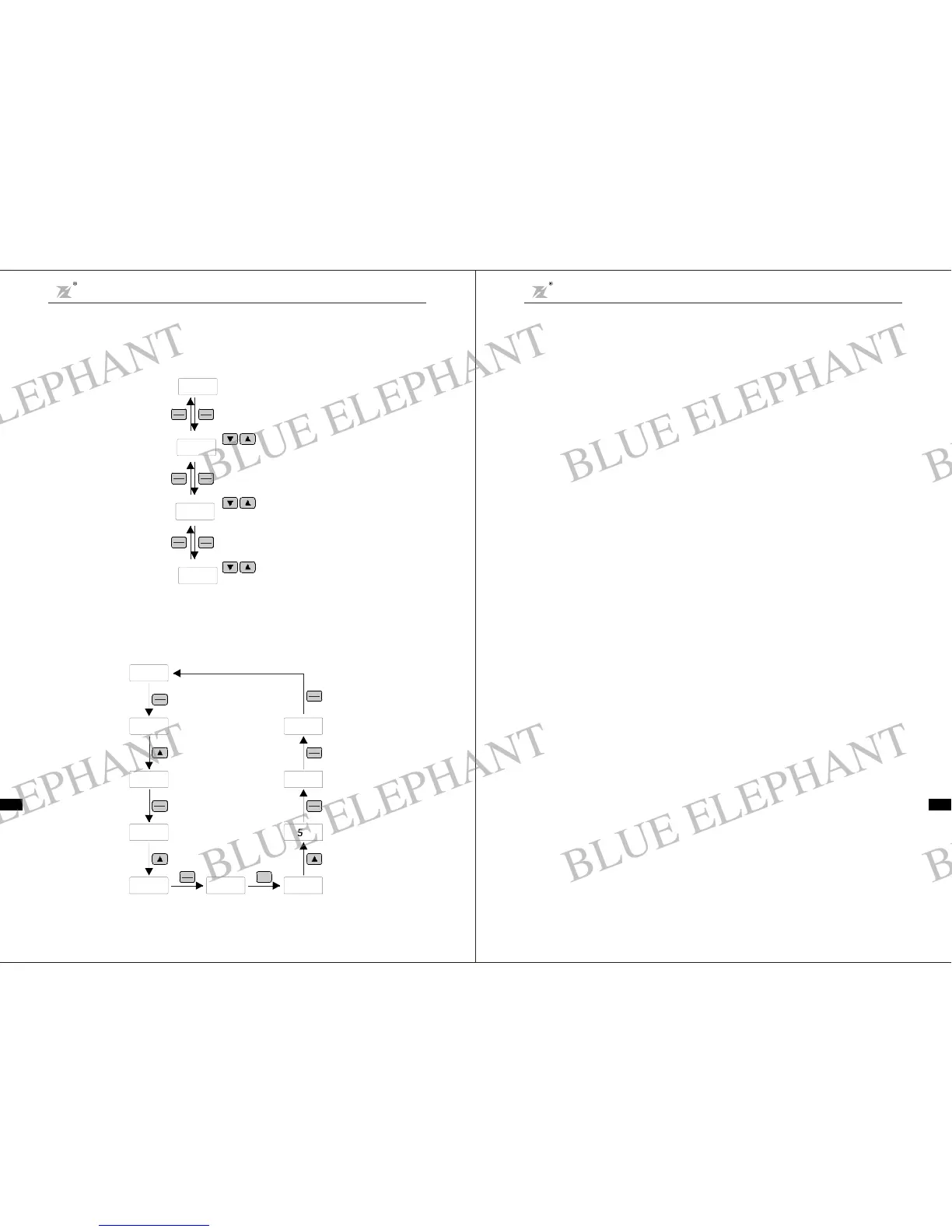
E xample: Change the set tingof F1. 02 fro m 10.0 0Hzt o 15.00Hz.(Bold means f lash bit.)
4. 2
DZB200
→→
Modify a ndCheck t he Function Codes
series i nvert er's operati on pan el uses 3- levelm enuto conduct pa ramet erset tings .
3-level me nu: functio n para meter gr oup (fi rs t level) f u nction code (seco nd level) settin g of
fu nction code (th ir d level). Operation proc edure is sho wn in Fig. 4-2 .
Fi g.4-2 Operation Procedures for3 -level Menu
D i gi t al d is pla y
50. 00
PRGM
RESET
PRGM
RESET
QU ICK
JOG
FUNC
DATA
PRGM
RESET
1stlevelmenu
Modify paramete r g ro up
F0
2nd level menu
Modify function code
F0.0 7
QU ICK
JOG
FUNC
DATA
PRGM
RESET
3rdlevelmenu
Modi fy value of functioncode
050.00
Fig. 4-3 Exampl e forParameterChanging
RUN
F1
F0 F1
50 .00
PRGM
RESET
QUICK
JOG
FUNC
DATA
F1. 00
QUICK
JOG
FU NC
DATA
10.00F1. 02 1.000
1.005
QUICK
JOG
FUNC
DATA
F1.03
PRGM
RESET
PRGM
RESET
0
Chapter 4 Operat ion and Display
DZB Series
Chapter 4 Opera tion and Display
DZB Series
4.4
DZB200 inve rte r provides password protection for use rs.Whe n F3.00 is not zero, t hat is the user password,
and the passwor d protectio n func tion is val id o nce exiti n g the funct ion c ode ed iting status . If t he u se r
pre sses PRG a gain, the i nverter shall di splay ------ , and the us er can on lye nter the menu after
inputting the user password. Otherwise,the user ca nno t enter.
Ift he user wantsto c ancelthe password protection f unc tion,F3.00 should bes et 0.
Passwo rdSetting
“”
BLUE ELEPHANT
BLUE ELEPHANT
BLUE ELEPHANT
BLUE ELEPHANT
BLUE ELEPHANT
BLUE ELEPHANT
BLUE ELEPHANT
BLUE ELEPHANT
BLUE ELEPHANT
BLUE ELEPHANT
BLUE ELEPHANT
BLUE ELEPHANT
BLUE ELEPHANT
BLUE ELEPHANT
BLUE ELEPHANT
BLUE ELEPHANT
BLUE ELEPHANT
BLUE ELEPHANT
BLUE ELEPHANT
BLUE ELEPHANT
BLUE ELEPHANT
BLUE ELEPHANT
BLUE ELEPHANT
BLUE ELEPHANT



 To Next Page